

The 559 release is working fine on my F4-425 Plus and the F6-424. I saw no new issues so far on those two devices.
The F4-424 is pretty much down for me, any application that needs to list directories is not working since Filemanager service will not start. It seems to not want to connect to the database.
I can access the shares from my Windows computer.
TOS 7.0.0559 Beta (X86) is Released for Update
Re: TOS 7.0.0559 Beta (X86) is Released for Update
F6-424 & F4-425 Plus at 7.0.1341
F4-424 Pro (x2) at 7.0.1341
D4-320 (Offline until I can afford more HDDs)
F4-424 Pro (x2) at 7.0.1341
D4-320 (Offline until I can afford more HDDs)

Re: TOS 7.0.0559 Beta (X86) is Released for Update
This issue seems to have a significant impact Is it the only one among the three devices experiencing problems?rfbjr wrote: ↑29 Apr 2026, 03:18 Another reboot caused the webgui not to come up.
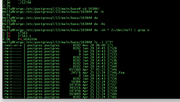
Root file system did fill up (/) turns out under the postgresql was a dup of a module
I deleted the 17563.1 module, the root vol is back to 88%
Bottom line filemanager.service still will not start.
My system disk is on M.2 SSD so if I really have to, I can re-install
Oh yeah, the other storage pool for the HDD's is resyncing. Figures....
I'm going to let the resync finish, so I'll stop trying to fix or at least see what's wrong.
===
If I need to rebuild: power off, pop out the HDs, then what, bring up system and select factory reset?

We will investigate based on the information you provide.
If the problem only occurs in the/etc/directory, you can try resetting the system configuration without resetting the entire system
To contact our team, please send email to following addresses, remember to replace (at) with @:
Technical team: support(at)terra-master.com (for technical support)
Service team: service(at)terra-master.com (for purchasing, return, replacement, RMA service)
Technical team: support(at)terra-master.com (for technical support)
Service team: service(at)terra-master.com (for purchasing, return, replacement, RMA service)
Re: TOS 7.0.0559 Beta (X86) is Released for Update
Oh cool, I'll try that.
Yes the 424 Pro is the only device here having that issue.
Leave all the HDD's in, just do the reset of system configuration?
I'm still going to wait until the resync is done on the HDD storage pool.
Yes the 424 Pro is the only device here having that issue.
Leave all the HDD's in, just do the reset of system configuration?
I'm still going to wait until the resync is done on the HDD storage pool.
F6-424 & F4-425 Plus at 7.0.1341
F4-424 Pro (x2) at 7.0.1341
D4-320 (Offline until I can afford more HDDs)
F4-424 Pro (x2) at 7.0.1341
D4-320 (Offline until I can afford more HDDs)


Re: TOS 7.0.0559 Beta (X86) is Released for Update
Sorry, yours is not the latest. Open the App Center, then tap the refresh button in the top-left corner to check again for the latest version 2.1.184.
To contact our team, please send email to following addresses, remember to replace (at) with @
Technical team: support(at)terra-master.com (for technical support)
Service team: service(at)terra-master.com (for purchasing, return, replacement)
Technical team: support(at)terra-master.com (for technical support)
Service team: service(at)terra-master.com (for purchasing, return, replacement)

Re: TOS 7.0.0559 Beta (X86) is Released for Update
To help our engineers resolve this issue, please follow these steps:rfbjr wrote: ↑29 Apr 2026, 03:18 Another reboot caused the webgui not to come up.
Root file system did fill up (/) turns out under the postgresql was a dup of a module
I deleted the 17563.1 module, the root vol is back to 88%
Bottom line filemanager.service still will not start.
My system disk is on M.2 SSD so if I really have to, I can re-install
Oh yeah, the other storage pool for the HDD's is resyncing. Figures....
I'm going to let the resync finish, so I'll stop trying to fix or at least see what's wrong.
===
If I need to rebuild: power off, pop out the HDs, then what, bring up system and select factory reset?
1.Go to TOS > Support & Help > Report issues to generate and download the system report.
2.Send the report to [email protected]. (If the file is too large to attach, upload it to a cloud drive and send us the sharing link.)
3.Crucially, please include the link to this post in your email so we can track your case.
We will analyze the log and provide a solution as soon as we receive it.
To contact our team, please send email to following addresses, remember to replace (at) with @:
Support team: support(at)terra-master.com (for technical support only)
Support team: support(at)terra-master.com (for technical support only)


Re: TOS 7.0.0559 Beta (X86) is Released for Update
Hello
I’d like to understand why the storage pool resynchronises completely with every update?
I’d like to understand why the storage pool resynchronises completely with every update?
Re: TOS 7.0.0559 Beta (X86) is Released for Update
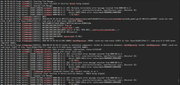
For syslog, since is constantly screaming about correctable errors, here is the scenario
try to start filemanager service
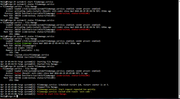
here is a piece of syslog showing why postg is freaking out
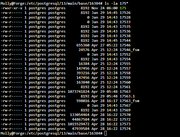
Here is the postg modules, no clue why .1 or even it wants .2
It will still be probably another day before the resync finishes on the 54tb (HDD) storage pool.
try to start filemanager service
here is a piece of syslog showing why postg is freaking out
Here is the postg modules, no clue why .1 or even it wants .2
It will still be probably another day before the resync finishes on the 54tb (HDD) storage pool.
F6-424 & F4-425 Plus at 7.0.1341
F4-424 Pro (x2) at 7.0.1341
D4-320 (Offline until I can afford more HDDs)
F4-424 Pro (x2) at 7.0.1341
D4-320 (Offline until I can afford more HDDs)
Re: TOS 7.0.0559 Beta (X86) is Released for Update
Under normal circumstances, system updates should not cause storage pool synchronization issues. We suggest you perform an S.M.A.R.T. test on your hard drive, check the official compatibility list for any compatibility problems, and try restarting your NAS to see if the storage pool synchronization problem persists. If you still cannot locate the problem, please navigate to TOS > Technical Support > Issue Reports to generate and download the system report, then send it to our technical support email ([email protected]). Upon receipt, our engineers will analyze it and provide a solution. If the system report cannot be sent normally, please upload it to a cloud storage service first and then send us the sharing link in your email.
To contact our team, please send email to following addresses, remember to replace (at) with @:
Support team: support(at)terra-master.com (for technical support only)
Support team: support(at)terra-master.com (for technical support only)
Re: TOS 7.0.0559 Beta (X86) is Released for Update
The sync was triggered because the system won't fully come up during one of the reboots, I couldn't putty in and had no choice to force power off the unit.
As requested: TOS_SystemReport_20260429_064241.zip
(My Onedrive link)
https://1drv.ms/f/s!AgP4K-RskQ9MjLwJvJG ... Q?e=2GWq4N
As requested: TOS_SystemReport_20260429_064241.zip
(My Onedrive link)
https://1drv.ms/f/s!AgP4K-RskQ9MjLwJvJG ... Q?e=2GWq4N
F6-424 & F4-425 Plus at 7.0.1341
F4-424 Pro (x2) at 7.0.1341
D4-320 (Offline until I can afford more HDDs)
F4-424 Pro (x2) at 7.0.1341
D4-320 (Offline until I can afford more HDDs)
Re: TOS 7.0.0559 Beta (X86) is Released for Update
It happened again before, I was on the F4-425 Plus running a Duple pointing to the F6-424/D4-320. When the job finished I switched to the F6 and found it logged out again. I signed on and ran the system report, you never know.

The link to it: https://1drv.ms/f/s!AgP4K-RskQ9MjLwJvJG ... Q?e=2GWq4N (TOS_SystemReport_20260429_083850.zip)
F6-424 & F4-425 Plus at 7.0.1341
F4-424 Pro (x2) at 7.0.1341
D4-320 (Offline until I can afford more HDDs)
F4-424 Pro (x2) at 7.0.1341
D4-320 (Offline until I can afford more HDDs)