

Based on the information you provided, the fact that the device can be detected after removing the hard drive indicates that your TNAS is currently in a normal boot state and has entered the initialization process. For your situation, we recommend following these steps:
1.Try rebooting with the drives
First, press and hold the power button to turn off the device, then reinsert all hard drives and power on. If the device can be detected and logged into after rebooting, please follow the File System Repair Instructions that appear on the page to perform the repair.
2.System reinstallation
If the device still cannot be detected or accessed after inserting the hard drives, it means the file system error could not be automatically repaired. In this case, you can refer to Method B in the System Reinstallation Guide to reinstall the system.
Note: Reinstalling the system typically only resets system configurations and permissions, and will not delete existing data on the hard drives.
If you have any questions during the reinstallation process, please visit the TerraMaster official website to contact online customer service. We will provide you with real-time answers and operational guidance.
[Help] New IP address after change in networking - 'checking file system'?
Re: [Help] New IP address after change in networking - 'checking file system'?
To contact our team, please send email to following addresses, remember to replace (at) with @
Technical team: support(at)terra-master.com(for technical support)
Service team: service(at)terra-master.com(for purchasing, return, replacement, RMA service)
Technical team: support(at)terra-master.com(for technical support)
Service team: service(at)terra-master.com(for purchasing, return, replacement, RMA service)

Re: [Help] New IP address after change in networking - 'checking file system'?
I think I've managed to make some progress (i) got a new IP; (ii) initiallised and some HDD checks happened; (iii) it goes into 'loading' for a long time.
However, I get the following error:
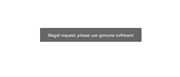
However, I get the following error:
Re: [Help] New IP address after change in networking - 'checking file system'?
Thanks for your update.
To help resolve your issue as soon as possible, please visit our official website to contact online technical support for guidance.
Additionally, for a quick response, please include the forum link and your ID.
To help resolve your issue as soon as possible, please visit our official website to contact online technical support for guidance.
Additionally, for a quick response, please include the forum link and your ID.
To contact our team, please send email to following addresses, remember to replace (at) with @
Technical team: support(at)terra-master.com(for technical support)
Service team: service(at)terra-master.com(for purchasing, return, replacement, RMA service)
Technical team: support(at)terra-master.com(for technical support)
Service team: service(at)terra-master.com(for purchasing, return, replacement, RMA service)