[Help] Disable/mute boot buzzer  [SOLVED]

Language, region, time zone, power, navigation, notification and more.
User avatar
nenominal
Posts: 8
Joined: 20 Mar 2026, 15:37
Romania

[Help] Disable/mute boot buzzer  [SOLVED]

Post by nenominal »

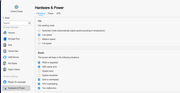
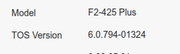
I have an F2-425 Plus running the latest TOS 6.x branch (6.0.794-01324) and I'm unable to disable/mute the boot buzzer.

Initially, disabling it worked fine. Then out of the blue it stopped working, the buzzer started going off on boot again and I haven't been able to silence it since.

I've tried the enable - shutdown - disable cycle with no luck.

The shutdown buzzer disable does work correctly, so the issue seems specific to the boot buzzer.


Image

Image
User avatar
EriChan
TM Support
Posts: 196
Joined: 06 Jan 2026, 12:27
United States of America

Re: [Help] Disable/mute boot buzzer

Post by EriChan »

Thank you for the detailed description and the screenshot. Regarding the buzzer behavior you're experiencing:

The initial short beep you hear immediately after pressing the power button is the POST (Power-On Self-Test) signal. This is a hardware-level notification from the BIOS/motherboard to confirm that the CPU, memory, and core components are functioning correctly before the operating system (TOS) even begins to load.

Why it can't be disabled: Because this happens at the hardware/firmware level before the software starts, the settings you see in TOS Control Panel > Hardware & Power only affect "system-level" beeps (like shutdown, RAID errors, or fan failures) that occur after the OS is up and running.
User avatar
nenominal
Posts: 8
Joined: 20 Mar 2026, 15:37
Romania

Re: [Help] Disable/mute boot buzzer

Post by nenominal »

Hi,

Are you sure? I haven't heard the POST signal for a few weeks. I have the NAS set up with auto-startup at a specified hour in the morning.
Also, there are plenty of NASes out there where you can disable the buzzer on boot (Synology, UGreen).
User avatar
Gremlin
Gold Member
Posts: 1625
Joined: 02 Dec 2022, 22:31
Great Britain

Re: [Help] Disable/mute boot buzzer

Post by Gremlin »

"System Boot" can be enabled/disabled under Control Panel > Hardware & Power
F5-221 TOS7.0.0777 - 4x4TB (Ironwolf) Traid
F2-424 TOS7.0.0777 - 2x500GB nvme (P3) Traid, 2x6TB HDD (HGST) Traid
F2-221 TOS7.0.0777 - 1x3TB Ext4, 1x4TB Btrfs
F2-425+ TOS7.0.0777 - 2x500GB nvme (P3) Traid, 2x6TB HDD (EXOS) Traid
User avatar
TMnight
TM Support
Posts: 181
Joined: 30 Sep 2022, 16:40

Re: [Help] Disable/mute boot buzzer

Post by TMnight »

nenominal wrote: 30 Mar 2026, 20:35
Regarding the buzzer issue you mentioned, the device buzzer can be categorized into two types, each controlled differently depending on the scenario:

1. System Notification Beep (Controlled within TOS)

This type of buzzer is mainly used for system alerts or status notifications (e.g., disk errors, temperature warnings) and can be configured within the system.

Path:
Control Panel > General Settings > Hardware > Buzzer Notification

You can enable or disable the corresponding alert options based on your needs.

2. Power-On Self-Test (POST) Beep (BIOS Level Control)

This type of buzzer sound is generated during the system’s POST (Power-On Self-Test) process. It is not controlled by TOS and must be configured in the BIOS.

Steps:

Connect a keyboard and monitor to the NAS, then press Del during startup to enter the BIOS
1、Use the arrow keys to navigate to "Chipset"
2、Press Ctrl + , to reveal the hidden options. Then locate PCH-IO Configuration and press Enter to access it.
Within this menu, find Legacy IO Low Latency and set it to Disabled.
3、Press F4 to save and exit

After completing the above steps, the POST beep during startup and shutdown will be disabled.

Note

Not all NAS models support this BIOS option. Currently available for the following models:
F2-425 Plus, F4-425 Plus, F4 SSD, F8 SSD, F8 SSD Plus
To contact our team, please send email to following addresses, remember to replace (at) with @:
Technical team: support(at)terra-master.com(for technical support)
Service team: service(at)terra-master.com(for purchasing, return, replacement, RMA service)
User avatar
nenominal
Posts: 8
Joined: 20 Mar 2026, 15:37
Romania

Re: [Help] Disable/mute boot buzzer

Post by nenominal »

Hi,

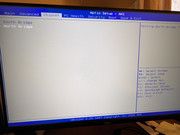
Thanks for the tip but unfortunatly it didn't work as I was unable to enter hidden menu.
I've tried all sorts of key combinatinations, including the one you have provided but I was not been able to activate it.


Image

Image
User avatar
EriChan
TM Support
Posts: 196
Joined: 06 Jan 2026, 12:27
United States of America

Re: [Help] Disable/mute boot buzzer

Post by EriChan »

I understand the frustration when the hidden menu doesn't appear as expected. I have personally verified these steps on a local machine to ensure they work.

To ensure the hidden options are triggered, please try these specific steps:

Enter the "Chipset" tab using the arrow keys.

Press and hold the [Ctrl] key first, and while keeping it held down, tap the comma key [,] once.

Note: Make sure you are using the main keyboard's comma key, and ensure [Ctrl] is held firmly before pressing [,].

The "PCH-IO Configuration" option should appear immediately after this sequence.

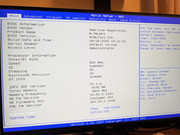
If you still don't see the menu after several attempts, please let us know your specific BIOS version (you can find this on the main 'Information' page of the BIOS), as this will help us verify if there's a specific firmware variation for your unit.
User avatar
nenominal
Posts: 8
Joined: 20 Mar 2026, 15:37
Romania

Re: [Help] Disable/mute boot buzzer

Post by nenominal »

Hi,

I was finally able to access the menu. It seems the issue was related to my keyboard, after switching to a different one, everything worked correctly.

I’ve now disabled the entry, and the buzzer is no longer active during boot. Instead, there’s a faint double “tick” sound (either newly introduced or previously unnoticed). Bellow you find the recorded sound

https://recorder.google.com/0f3cf1ca-bf ... d4b25cbea0

It’s definitely better with the buzzer turned off.

Are there any downsides except turning sound off for the buzzer for this BIOS settings?

Thanks.
User avatar
EriChan
TM Support
Posts: 196
Joined: 06 Jan 2026, 12:27
United States of America

Re: [Help] Disable/mute boot buzzer

Post by EriChan »

Regarding your follow-up questions:
  • The "tick" sound: I listened to the recording, and that faint double "tick" is perfectly normal. It is the sound of the Hard Drives (HDDs) initializing and the heads starting to read/write during the boot process. Since the loud buzzer is now silent, these mechanical sounds from the disks have simply become more noticeable.
  • Downsides of this BIOS setting: Our BIOS is specifically tuned and optimized for the device's stability. The only practical "downside" is that you will lose the audible feedback for the system's status. The POST beep is a quick way to know the system has passed its self-test; without it, you'll need to rely on the LED indicators or the TOS interface to monitor the boot progress or any potential hardware alerts.
In short, if you prefer the silence and are comfortable checking the TOS for status, you are all set!
User avatar
nenominal
Posts: 8
Joined: 20 Mar 2026, 15:37
Romania

Re: [Help] Disable/mute boot buzzer

Post by nenominal »

Hi,

Thanks for the answer.

I don't have mechanical disks, only SSD and nvme.

It's possible to be the PSU or a mechanical relay switch, I don't know.
Post Reply

Return to “System Configuration”