Is it normal?


Is it normal?
Good day. Is it normal that system partition "/" occupies 94%? TOS 6 on F2-221 model. Thanks in advance.
Model F2-221 TOS Version 6.0.794


Re: Is it normal?
94% of what, would be the question. If your os partition is not 8GB (7.6GB approx actual) you should not really be running TOS6.
F5-221 TOS7.0.1278 - 4x4TB (Ironwolf) Traid
F2-424 TOS7.0.1278 - 2x500GB nvme (P3) Traid, 2x6TB HDD (HGST) Traid
F2-221 TOS7.0.1278 - 1x3TB Ext4, 1x4TB Btrfs
F2-425+ TOS7.0.1278 - 2x500GB nvme (P3) Traid, 2x6TB HDD (EXOS) Traid
F2-424 TOS7.0.1278 - 2x500GB nvme (P3) Traid, 2x6TB HDD (HGST) Traid
F2-221 TOS7.0.1278 - 1x3TB Ext4, 1x4TB Btrfs
F2-425+ TOS7.0.1278 - 2x500GB nvme (P3) Traid, 2x6TB HDD (EXOS) Traid


Re: Is it normal?
On the F2-221 model running TOS 6, a 94% system partition ("/") usage is abnormal, indicating the system may crash due to running out of space or enter read-only mode.
You need to log in to the TOS web interface, go to Storage Management > Snapshots, and delete all unnecessary old snapshots. If Docker is installed, clean up unused images and containers. Please clean up the occupied space as soon as possible (especially logs and snapshots).
Re: Is it normal?
I don't use system snapshots. Only 2 containers are used (transmission and jackett). What can i clean up more and how? Thanks.Phil wrote: ↑23 Mar 2026, 18:57You need to log in to the TOS web interface, go to Storage Management > Snapshots, and delete all unnecessary old snapshots. If Docker is installed, clean up unused images and containers. Please clean up the occupied space as soon as possible (especially logs and snapshots).
Model F2-221 TOS Version 6.0.794

Re: Is it normal?
You can open the Terminal from the TOS desktop and run the following commands to check the disk usage of directories under the root path, in order to identify any abnormal space consumption:
Code: Select all
cd /
du -sh ./*If you confirm that this directory contains abnormal or unintended data, you can first copy its contents to a valid volume for backup:
Code: Select all
cp -r ./volume1 /Volume1/publicTo contact our team, please send email to following addresses, remember to replace (at) with @:
Technical team: support(at)terra-master.com(for technical support)
Service team: service(at)terra-master.com(for purchasing, return, replacement, RMA service)
Technical team: support(at)terra-master.com(for technical support)
Service team: service(at)terra-master.com(for purchasing, return, replacement, RMA service)
Re: Is it normal?
As I can see, only 2 directories have a huge size - path (5.1G) and usr (1.7G)TMnight wrote: ↑24 Mar 2026, 08:55You can open the Terminal from the TOS desktop and run the following commands to check the disk usage of directories under the root path, in order to identify any abnormal space consumption:
Code: Select all
cd /
du -sh ./*
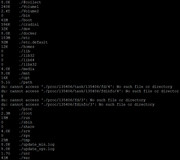
Should I delete them completely? What commands should I use for this? Thanks.
Model F2-221 TOS Version 6.0.794
Re: Is it normal?
Based on the screenshot you provided, the /usr directory must be retained, and its size is normal.akaserge wrote: ↑24 Mar 2026, 14:24As I can see, only 2 directories have a huge size - path (5.1G) and usr (1.7G)TMnight wrote: ↑24 Mar 2026, 08:55You can open the Terminal from the TOS desktop and run the following commands to check the disk usage of directories under the root path, in order to identify any abnormal space consumption:
Code: Select all
cd /
du -sh ./*
Should I delete them completely? What commands should I use for this? Thanks.
You should review the /path directory yourself and confirm that its contents are unnecessary before deleting it. If you are unsure of its origin, the safest approach is to keep it temporarily or move it to another location for observation, rather than deleting it directly.
If you still have questions about the directory’s contents, we recommend backing them up first.
Deletion command (for the /path directory; use with caution)
If, after verification, you decide to delete all contents within the /path directory (please ensure there is no important data in /path beforehand), you can use the following command:
Code: Select all
rm -rf /path/*Re: Is it normal?
Thanks all for the help. This was a directory with folders from transmission. When installing in docker, I incorrectly specified the paths for saving data. The "/" partition is now only 26% full.
Model F2-221 TOS Version 6.0.794