TOS 7.0.0448 Beta (X86) is Released for Update


Re: TOS 7.0.0448 Beta (X86) is Released for Update
For me Virtualbox functionality is essential. None of my virtual machines work in VMs app. They are Turnkey appliances and do not finish the booting process no matter what settings I choose in VMs app. I am not a linux fan and don't care for constantly fighting against a product I payd for. This was the reason for which I bought a NAS: it is supposed to just work, no derranged config files/logs/nights spent on forums. Removing Virtualbox functionality for me is a dealbreaker, half of the reason for investment in Terramaster just dissapear, half of the value of the product lost just like that. Without apps that I can rely on, NAS is just a dumb external drive for a PC. Very unfortunate decision. NAS is an OS meaning it is supposed to be a platform but this is not how a platform works, by constantly breaking things that yesterday worked and user came to depend on. Every new iteration of TOS breaks most of the apps. A PC with a bunch of HDDs looks like a better alternative at this point.


Re: TOS 7.0.0448 Beta (X86) is Released for Update
We have included a method for migrating VirtualBox virtual machines to VMs in the update notification. You can refer to the instructions in the Help Center: https://toshelp.terra-master.com/faq/TN ... Box-to-VMsusersky wrote: ↑22 Mar 2026, 15:50 For me Virtualbox functionality is essential. None of my virtual machines work in VMs app. They are Turnkey appliances and do not finish the booting process no matter what settings I choose in VMs app. I am not a linux fan and don't care for constantly fighting against a product I payd for. This was the reason for which I bought a NAS: it is supposed to just work, no derranged config files/logs/nights spent on forums. Removing Virtualbox functionality for me is a dealbreaker, half of the reason for investment in Terramaster just dissapear, half of the value of the product lost just like that. Without apps that I can rely on, NAS is just a dumb external drive for a PC. Very unfortunate decision. NAS is an OS meaning it is supposed to be a platform but this is not how a platform works, by constantly breaking things that yesterday worked and user came to depend on. Every new iteration of TOS breaks most of the apps. A PC with a bunch of HDDs looks like a better alternative at this point.
To contact our team, please send email to following addresses, remember to replace (at) with @
Technical team: support(at)terra-master.com(for technical support)
Service team: service(at)terra-master.com(for purchasing, return, replacement, RMA service)
Technical team: support(at)terra-master.com(for technical support)
Service team: service(at)terra-master.com(for purchasing, return, replacement, RMA service)

Re: TOS 7.0.0448 Beta (X86) is Released for Update
F4-423 hangs two times - one on the .427 and the second time on .428
Have to switch power off/on to reboot.
How can I discover the hanging reason?
Have to switch power off/on to reboot.
How can I discover the hanging reason?
F4-423


Re: TOS 7.0.0448 Beta (X86) is Released for Update
I followed your procedure to export my VM from VirtualBox to VMs, but it doesn’t work. VMs does not import the OVA image.CursaYang wrote: ↑22 Mar 2026, 22:00We have included a method for migrating VirtualBox virtual machines to VMs in the update notification. You can refer to the instructions in the Help Center: https://toshelp.terra-master.com/faq/TN ... Box-to-VMsusersky wrote: ↑22 Mar 2026, 15:50 For me Virtualbox functionality is essential. None of my virtual machines work in VMs app. They are Turnkey appliances and do not finish the booting process no matter what settings I choose in VMs app. I am not a linux fan and don't care for constantly fighting against a product I payd for. This was the reason for which I bought a NAS: it is supposed to just work, no derranged config files/logs/nights spent on forums. Removing Virtualbox functionality for me is a dealbreaker, half of the reason for investment in Terramaster just dissapear, half of the value of the product lost just like that. Without apps that I can rely on, NAS is just a dumb external drive for a PC. Very unfortunate decision. NAS is an OS meaning it is supposed to be a platform but this is not how a platform works, by constantly breaking things that yesterday worked and user came to depend on. Every new iteration of TOS breaks most of the apps. A PC with a bunch of HDDs looks like a better alternative at this point.

Re: TOS 7.0.0448 Beta (X86) is Released for Update
Which step in the link did you encounter an error with? Could you please provide a specific screenshot of the error? This will help us locate the problem quickly.BFG wrote: ↑23 Mar 2026, 17:30I followed your procedure to export my VM from VirtualBox to VMs, but it doesn’t work. VMs does not import the OVA image.CursaYang wrote: ↑22 Mar 2026, 22:00We have included a method for migrating VirtualBox virtual machines to VMs in the update notification. You can refer to the instructions in the Help Center: https://toshelp.terra-master.com/faq/TN ... Box-to-VMsusersky wrote: ↑22 Mar 2026, 15:50 For me Virtualbox functionality is essential. None of my virtual machines work in VMs app. They are Turnkey appliances and do not finish the booting process no matter what settings I choose in VMs app. I am not a linux fan and don't care for constantly fighting against a product I payd for. This was the reason for which I bought a NAS: it is supposed to just work, no derranged config files/logs/nights spent on forums. Removing Virtualbox functionality for me is a dealbreaker, half of the reason for investment in Terramaster just dissapear, half of the value of the product lost just like that. Without apps that I can rely on, NAS is just a dumb external drive for a PC. Very unfortunate decision. NAS is an OS meaning it is supposed to be a platform but this is not how a platform works, by constantly breaking things that yesterday worked and user came to depend on. Every new iteration of TOS breaks most of the apps. A PC with a bunch of HDDs looks like a better alternative at this point.
Re: TOS 7.0.0448 Beta (X86) is Released for Update
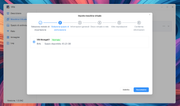
After converting the VM to OVA format, when importing the VM into VMs it gets stuck after selecting the OVA file.Phil wrote: ↑23 Mar 2026, 19:55Which step in the link did you encounter an error with? Could you please provide a specific screenshot of the error? This will help us locate the problem quickly.BFG wrote: ↑23 Mar 2026, 17:30I followed your procedure to export my VM from VirtualBox to VMs, but it doesn’t work. VMs does not import the OVA image.CursaYang wrote: ↑22 Mar 2026, 22:00
We have included a method for migrating VirtualBox virtual machines to VMs in the update notification. You can refer to the instructions in the Help Center: https://toshelp.terra-master.com/faq/TN ... Box-to-VMs
Re: TOS 7.0.0448 Beta (X86) is Released for Update
I need to confirm with you whether there are any virtual machines with the same name in your virtual machine list. During our testing of your situation, we found that the system will get stuck and fail to access the storage configuration interface only when there are duplicate-named VMs in the list; this issue does not occur in other cases.BFG wrote: ↑24 Mar 2026, 02:43After converting the VM to OVA format, when importing the VM into VMs it gets stuck after selecting the OVA file.
Re: TOS 7.0.0448 Beta (X86) is Released for Update
I could import virtual machines but all of them fail to boot in VMS app, they all hang at boot with screens full of logs that I really am not inclined to parse to find fixez (cursory search to fix it lead nowhere). So zero luck running my virtual machines (linux/turnkey appliances) under VMs app, instrunctions in your link offer no help. If they would boot and work I would be pleased. Still breaking most apps at every new TOS version is very very bad experience, why I should trust that at the next TOS iteration VMs app would still work?CursaYang wrote: ↑22 Mar 2026, 22:00We have included a method for migrating VirtualBox virtual machines to VMs in the update notification. You can refer to the instructions in the Help Center: https://toshelp.terra-master.com/faq/TN ... Box-to-VMsusersky wrote: ↑22 Mar 2026, 15:50 For me Virtualbox functionality is essential. None of my virtual machines work in VMs app. They are Turnkey appliances and do not finish the booting process no matter what settings I choose in VMs app. I am not a linux fan and don't care for constantly fighting against a product I payd for. This was the reason for which I bought a NAS: it is supposed to just work, no derranged config files/logs/nights spent on forums. Removing Virtualbox functionality for me is a dealbreaker, half of the reason for investment in Terramaster just dissapear, half of the value of the product lost just like that. Without apps that I can rely on, NAS is just a dumb external drive for a PC. Very unfortunate decision. NAS is an OS meaning it is supposed to be a platform but this is not how a platform works, by constantly breaking things that yesterday worked and user came to depend on. Every new iteration of TOS breaks most of the apps. A PC with a bunch of HDDs looks like a better alternative at this point.
Re: TOS 7.0.0448 Beta (X86) is Released for Update
Thank you very much for your detailed feedback regarding the issue. We sincerely apologize for the inconvenience caused by the Virtual Machine Service (VMS) failing to start and for the poor user experience this has resulted in. We fully understand your concerns about long-term compatibility. We need to collect some key information to help us work with you to identify and resolve this issue:usersky wrote: ↑24 Mar 2026, 15:17I could import virtual machines but all of them fail to boot in VMS app, they all hang at boot with screens full of logs that I really am not inclined to parse to find fixez (cursory search to fix it lead nowhere). So zero luck running my virtual machines (linux/turnkey appliances) under VMs app, instrunctions in your link offer no help. If they would boot and work I would be pleased. Still breaking most apps at every new TOS version is very very bad experience, why I should trust that at the next TOS iteration VMs app would still work?CursaYang wrote: ↑22 Mar 2026, 22:00We have included a method for migrating VirtualBox virtual machines to VMs in the update notification. You can refer to the instructions in the Help Center: https://toshelp.terra-master.com/faq/TN ... Box-to-VMsusersky wrote: ↑22 Mar 2026, 15:50 For me Virtualbox functionality is essential. None of my virtual machines work in VMs app. They are Turnkey appliances and do not finish the booting process no matter what settings I choose in VMs app. I am not a linux fan and don't care for constantly fighting against a product I payd for. This was the reason for which I bought a NAS: it is supposed to just work, no derranged config files/logs/nights spent on forums. Removing Virtualbox functionality for me is a dealbreaker, half of the reason for investment in Terramaster just dissapear, half of the value of the product lost just like that. Without apps that I can rely on, NAS is just a dumb external drive for a PC. Very unfortunate decision. NAS is an OS meaning it is supposed to be a platform but this is not how a platform works, by constantly breaking things that yesterday worked and user came to depend on. Every new iteration of TOS breaks most of the apps. A PC with a bunch of HDDs looks like a better alternative at this point.
1. What is the specific configuration of your virtual machine?
2. Could you please export the logs from after the system freezes and send them to our email address ([email protected])? We will analyze your logs to help identify and resolve the issue.


Re: TOS 7.0.0448 Beta (X86) is Released for Update
F2-424 updated to .0448.
F5-221 TOS7.0.1278 - 4x4TB (Ironwolf) Traid
F2-424 TOS7.0.1278 - 2x500GB nvme (P3) Traid, 2x6TB HDD (HGST) Traid
F2-221 TOS7.0.1278 - 1x3TB Ext4, 1x4TB Btrfs
F2-425+ TOS7.0.1278 - 2x500GB nvme (P3) Traid, 2x6TB HDD (EXOS) Traid
F2-424 TOS7.0.1278 - 2x500GB nvme (P3) Traid, 2x6TB HDD (HGST) Traid
F2-221 TOS7.0.1278 - 1x3TB Ext4, 1x4TB Btrfs
F2-425+ TOS7.0.1278 - 2x500GB nvme (P3) Traid, 2x6TB HDD (EXOS) Traid