[Help]Nas Not shutting down after Preset time

Discuss, seek assistance, and report issues related to hardware components, such as hardware platforms, memory, network ports, power supplies, UPS systems, and so on.
Post Reply
User avatar
IDG
Posts: 12
Joined: 20 Dec 2024, 02:32
Canada

[Help]Nas Not shutting down after Preset time

Post by IDG »

I had a long power outage the other day 2+ hours which was a good test for my nas. I did not gracefully shut down. It's a APC Smart-UPS 1000 XL with a UPS Network Management Card 2 (model 9631) I have it set to shut the NAS (f4-424) (TOS_X642.0_6.0.794) off after 30 mins. It did not shut down.It ran the full 2 hours until the ups shut down the output power at low battery and crashed the NAS.I received notifications from the nas that states

( UPS has entered battery mode. Your TNAS will automatically shut down after the preset waiting time.)

Then after power was back I received

( TNAS was shut down abnormally! Abnormal shutdown can result in data loss, file system errors, or array corruption. Please check your data and array for anomalies and back up your data in a timely manner.)

I also have a very old QNAP connected the same way and it shut down after the 30 min as expected. I do realize there is a lot of configuration variables on the APC but was looking for some input on what I may have missed. Currently I have it set to shut down in 1 min to do more testing when I figure out what settings to change. Thank you in advance for any help.
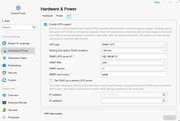
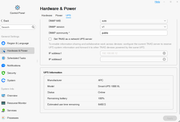
Image

Image
User avatar
TMzethar
TM Support
Posts: 2818
Joined: 27 Oct 2020, 16:43

Re: [Help]Nas Not shutting down after Preset time

Post by TMzethar »

Looking forward to hearing good news from you. If it does not work as expected, you may try replacing the NUT tool within the system to optimize compatibility.
viewtopic.php?t=8878
To contact our team, please send email to following addresses, remember to replace (at) with @:
Technical team: support(at)terra-master.com (for technical support)
Service team: service(at)terra-master.com (for purchasing, return, replacement, RMA service)
Post Reply

Return to “Hardware, Power and Accessories”