

 Call for Sharing: UPS + TNAS User Experiences
Dear TNAS Users,
We all know how important data protection is. To avoid unexpected power outages, many users connect their TNAS to a UPS (Uninterruptible Power Supply).
But one common question we receive is:
 “Which UPS works best with TNAS?”
Currently, the TNAS compatibility list includes several tested UPS models (such as APC | Back-UPS BK650M2-CH and Tripp Lite | UNP-1KBSHTF24SC), as well as other models with good compatibility performance (see details at: https://www.terra-master.com/global/compatibility/).
Given the wide variety of UPS brands and models available on the market, it is not feasible to test each one individually. Therefore, we recommend users refer to the list when selecting compatible devices.
That’s why we’re inviting you, our community, to join a UPS + TNAS Experience Sharing initiative. Your feedback will help other TNAS users choose the right UPS and avoid unnecessary pitfalls.
 Why Share?
- Save others from buying incompatible or underperforming UPS models.
- Provide real-world insights (backup duration, response speed, stability).
- Help us build a stronger TNAS community knowledge base.
 What to Share (the more details, the better):
- UPS brand + model (e.g., APC BK650M2-CH, Santak TG-E1000).
- Your TNAS model (e.g., F4-424, F8-SSD).
- Your experience (e.g., “40 min backup, smooth auto-shutdown”).
- Problems or shortcomings (e.g., noise, reduced backup in winter, delayed communication).
- Tips & tricks (e.g., recommended shutdown settings, maintenance habits, remote monitoring).
- Where you bought it (e.g., Amazon, official website, local distributor), plus price/warranty if possible.
 Notes:
- Please do not share personal addresses or sensitive information。
- Be objective and honest — real experiences only, no ads
Your feedback will be compiled into a “UPS Practical Reference Guide” for the whole TNAS community.Every post you share could be another user’s pitfall-avoidance guide or buying reference.
We’re looking forward to your contributions!
 Sharing Template (copy & fill in):
[My UPS + TNAS Experience]
- UPS brand + model:
- TNAS model:
- Experience:
- Problems / shortcomings:
- Useful tips:
- Purchase channel:
APC Back-UPS BE850G2-GR
CyberPower VP1000EILCD
CyberPower LE1000DG
EATON Ellipse ECO 650 USB
EATON Ellipse PRO 650
Prolink PRO851SFCU 850VA
PowerWalker VI 2200 SHL IEC
Tecnoware UPS 1200VA
Notes:Regarding the issues of abnormal shutdown caused by insufficient UPS power and the inability to automatically power on after power is restored, we have prepared a temporary solution.
For the convenience of other users who may encounter the same issue, we are also providing the download link and usage guide below.
https://download2.terra-master.com/upsctl
【Usage Guide】
Applicable Model: TNAS on x86 architecture
TOS Version: TOS 6
Issue: After the UPS power is depleted and mains power is restored, the device fails to power on—either via power-on from AC or by pressing the power button—resulting in boot failure.
Root Cause: When the UPS is in low-battery state, the nut service may send a low-battery signal during startup, which triggers an unintended shutdown.
Solution: After receiving a low-battery signal, check whether mains power is present. If so, the shutdown command will not be executed.
Patch Procedure:
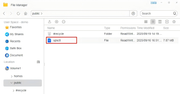
1.Upload the upsctl file to the public shared folder.
2.Open the terminal and run the following commands:
mv /usr/bin/upsctl /usr/bin/upsctl.bak
mv /Volume1/public/upsctl /usr/bin/upsctl
chmod 755 /usr/bin/upsctl
setfacl -b /usr/bin/upsctl
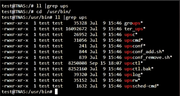
Patch update completed.


