TOS 7.0.0403 Beta (X86) is Released for Update


Re: TOS 7.0.0403 Beta (X86) is Released for Update
Hello, I bought a TerraMaster F4-425 Plus and installed TOS6. It works as expected: the HDD turns off after 10 minutes and then turns back on again—everything works as expected. But when I installed TOS 7.0.0403, the drives stopped turning off after 10 minutes and have been making a staticky noise all day long. After digging around, I discovered that TOSdaemon was running at 10%. I tried everything, but nothing helped. The TOSdaemon process was running at 10%, and it was causing the drives to crackle and keep me awake. I reset it to factory settings and installed TOS6—everything worked as expected: the drives started turning off after 10 minutes, so I can sleep soundly. What's wrong with TOS 7?

Re: TOS 7.0.0403 Beta (X86) is Released for Update
Does “the hard drive shuts down after 10 minutes and then restarts” mean that it enters sleep mode and is then woken up again? Currently, in TOS 7, the issue where the system drive cannot enter sleep mode properly is a known problem. We are actively working on a fix, and we kindly ask for your patience while waiting for future updates.
Thank you again for your understanding and support.
Thank you again for your understanding and support.
To contact our team, please send email to following addresses, remember to replace (at) with @:
Technical team: support(at)terra-master.com(for technical support)
Service team: service(at)terra-master.com(for purchasing, return, replacement, RMA service)
Technical team: support(at)terra-master.com(for technical support)
Service team: service(at)terra-master.com(for purchasing, return, replacement, RMA service)


Re: TOS 7.0.0403 Beta (X86) is Released for Update
Hi I’ve installed the beta on my TerraMaster F4-424.
I’m currently on the version 7.0.0403
So far I’ve only face the permissions issues that was corrected on a new update. But No matter what version (I alsa faced that on the version 6), sometimes when I launch “too many” containers my NAS stop responding and I have to force to shut it down or wait for a long time before the NAS is working again (more Than 3 hours !!!).
I feel like it’s a RAM issue since I’m the “default 8GO” but with the current prices I’m waiting a little bit to buy a more capable DDR5 so I think it should have have some “prevention” because the NAS should not be unstable in that scenario and should not launch or block something.
After a long wait the NAS seems to be responding a little bit and I can see this error when I reload a page as you can see on this picture and then later after that message appears the NAS seems to work again:
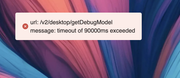
I think the time for the NAS to be responding should be way shorter than what I’m facing.
Except that painfull trouble I don’t have any other problem and like the product.
I’m currently on the version 7.0.0403
So far I’ve only face the permissions issues that was corrected on a new update. But No matter what version (I alsa faced that on the version 6), sometimes when I launch “too many” containers my NAS stop responding and I have to force to shut it down or wait for a long time before the NAS is working again (more Than 3 hours !!!).
I feel like it’s a RAM issue since I’m the “default 8GO” but with the current prices I’m waiting a little bit to buy a more capable DDR5 so I think it should have have some “prevention” because the NAS should not be unstable in that scenario and should not launch or block something.
After a long wait the NAS seems to be responding a little bit and I can see this error when I reload a page as you can see on this picture and then later after that message appears the NAS seems to work again:
I think the time for the NAS to be responding should be way shorter than what I’m facing.
Except that painfull trouble I don’t have any other problem and like the product.
own a F2-424 | TRAID 4+4TB | 1 NVMe disk 1TB


Re: TOS 7.0.0403 Beta (X86) is Released for Update
1. Based on your usage scenario, it's highly likely that excessive container usage is causing the memory crash. You can try adding more memory. We suggest closing some infrequently used containers and limiting the memory usage of each container.
2. Regarding your second question, we are currently working with the lab to determine the cause. We will provide you with further updates once the determination is complete. Thank you for your understanding and support.
To contact our team, please send email to following addresses. "(at)" = "@"
Technical team: support(at)terra-master.com
Service team: service(at)terra-master.com
Technical team: support(at)terra-master.com
Service team: service(at)terra-master.com

Re: TOS 7.0.0403 Beta (X86) is Released for Update
Hi!
Something wrong with docker volumes.
Can't setup this app https://hub.docker.com/r/wieweet/twonkyserver though at TOS6 it was ok.
Can't link directory with my media lib. Container is configured as usual.
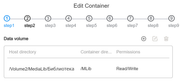
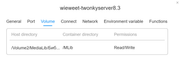
Can see mounted volume in terminal.
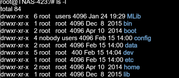
But in twonky I see only list of "/diif" volume not linked Volume from NAS
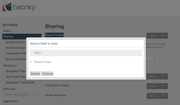
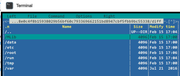
Something wrong with docker volumes.
Can't setup this app https://hub.docker.com/r/wieweet/twonkyserver though at TOS6 it was ok.
Can't link directory with my media lib. Container is configured as usual.
Can see mounted volume in terminal.
But in twonky I see only list of "/diif" volume not linked Volume from NAS
F4-423

Re: TOS 7.0.0403 Beta (X86) is Released for Update
Добрый день!
F2-424, TOS 7.0.0403
Обновление прошло штатно, без ошибок.
Конфигурация 2хNVMe (system + HyperCache), 2x4Tb HDD
Проблема -- после, примерно, одного часа после загрузки NAS исчезают все Shared Folders.
При этом в настройках я их вижу, но из файлового менеджера -- они исчезают.
Помогает перезагрузка только. В чем может быть проблема? Как лечить?
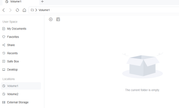
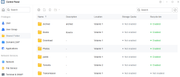
F2-424, TOS 7.0.0403
Обновление прошло штатно, без ошибок.
Конфигурация 2хNVMe (system + HyperCache), 2x4Tb HDD
Проблема -- после, примерно, одного часа после загрузки NAS исчезают все Shared Folders.
При этом в настройках я их вижу, но из файлового менеджера -- они исчезают.
Помогает перезагрузка только. В чем может быть проблема? Как лечить?

Re: TOS 7.0.0403 Beta (X86) is Released for Update
После обновление ClamAV и очередной проверки полной запущеной по расписанию, процесс заглючил и после окончания по полной проверке начинался заново и так себя система вела 3 дня подряд, пока не перезагрузил NAS. При этоп процесс проверки на вирусы висел в фоне, на постоянку, а приложении ClamAV система писала, что процесс был закончен через 2 часа после запуска по расписанию, а по факту все еще продолжал работать
Re: TOS 7.0.0403 Beta (X86) is Released for Update
Так же выявил еще пару ошибок:
1. если настроить в резервном копировании автоматическое создание моментальных снимков и поставить режим удаления самой старой версии, при достижении лимита моментальных снимков установленный, самый старый не удаляется и вся система ломается добавления новых и удаления старых.
2. В файловом менеджере при подключении через tnas.onine в левой колонке быстрого доступа всегда не прогружаются названия в блоке пространство пользователя и Местоположения, кроме открытого раздела поумолчанию, если нажать обновить в файловом менеджере, то названия в блоке местоположения прогрузятся
1. если настроить в резервном копировании автоматическое создание моментальных снимков и поставить режим удаления самой старой версии, при достижении лимита моментальных снимков установленный, самый старый не удаляется и вся система ломается добавления новых и удаления старых.
2. В файловом менеджере при подключении через tnas.onine в левой колонке быстрого доступа всегда не прогружаются названия в блоке пространство пользователя и Местоположения, кроме открытого раздела поумолчанию, если нажать обновить в файловом менеджере, то названия в блоке местоположения прогрузятся

Re: TOS 7.0.0403 Beta (X86) is Released for Update
Hello everyone!
I have two NAS:
F6-424 Max
FW: 7.0.0403
BIOS: 5.26
5 x WST18000NM000J-2TV103
+
1 x Netac NVMe SSD 4TB (for HyperCache, Balance mode)
+
1 x NX-512 2280 NVMe SSD
and
F4-425 Max
FW: 7.0.0403
BIOS: MTWL0101.V06
3 x HDD ST10000NE0008-2PL103
+
1 x HDD WDC WD103KFBX-68CCLN0
+
2 x Netac NVMe SSD 2TB (RAID0, for HyperCache, Balance mode)
+
1 x Kingston SNV2S500G
The OS is installed on both NAS on the HDD, because I thought the errors were due to the installation on a 512GB NVMe SSD.
Problem:
Every time I reboot any NAS, the md0 resync occurs, which significantly slows down the NAS, and periodically, after a reboot, the NAS loses files.
Is this a known issue and how can I fix it?
I have two NAS:
F6-424 Max
FW: 7.0.0403
BIOS: 5.26
5 x WST18000NM000J-2TV103
+
1 x Netac NVMe SSD 4TB (for HyperCache, Balance mode)
+
1 x NX-512 2280 NVMe SSD
and
F4-425 Max
FW: 7.0.0403
BIOS: MTWL0101.V06
3 x HDD ST10000NE0008-2PL103
+
1 x HDD WDC WD103KFBX-68CCLN0
+
2 x Netac NVMe SSD 2TB (RAID0, for HyperCache, Balance mode)
+
1 x Kingston SNV2S500G
The OS is installed on both NAS on the HDD, because I thought the errors were due to the installation on a 512GB NVMe SSD.
Problem:
Every time I reboot any NAS, the md0 resync occurs, which significantly slows down the NAS, and periodically, after a reboot, the NAS loses files.
Is this a known issue and how can I fix it?

Re: TOS 7.0.0403 Beta (X86) is Released for Update
We are not clear about your specific settings from before or the goal you want to achieve. However, from the screenshot, it seems you have not correctly understood the relationship between Host Directory and Container Directory. You can think of it as a 'mount' or 'map drive' relationship.EgorA wrote: ↑15 Feb 2026, 22:12 Hi!
Something wrong with docker volumes.
Can't setup this app https://hub.docker.com/r/wieweet/twonkyserver though at TOS6 it was ok.
Can't link directory with my media lib. Container is configured as usual.
Can see mounted volume in terminal.
But in twonky I see only list of "/diif" volume not linked Volume from NAS
https://docs.docker.com/get-started/doc ... cal-files/
To contact our team, please send email to following addresses, remember to replace (at) with @:
Technical team: support(at)terra-master.com (for technical support)
Service team: service(at)terra-master.com (for purchasing, return, replacement, RMA service)
Technical team: support(at)terra-master.com (for technical support)
Service team: service(at)terra-master.com (for purchasing, return, replacement, RMA service)