How to mount one TNAS to another TNAS?

SMB, AFP, NFS, FTP, WebDAV, Rsync
Post Reply
User avatar
TMlinda
TM Support
Posts: 276
Joined: 13 Jun 2022, 16:57

How to mount one TNAS to another TNAS?

Post by TMlinda »

Applicable versions:
All versions

Applicable models:
All TNAS models

Scenario 1:Mount the shared folder on another TNAS device locally on TNAS

Operation guide:
In order to enhance the convenience of data access and realize file synchronization and file migration between two TNAS devices, you can mount the shared folder located on another TNAS to the local TNAS. For specific operations, please refer to the following guidelines.

Operation steps:
Method 1: Mount using the SMB protocol

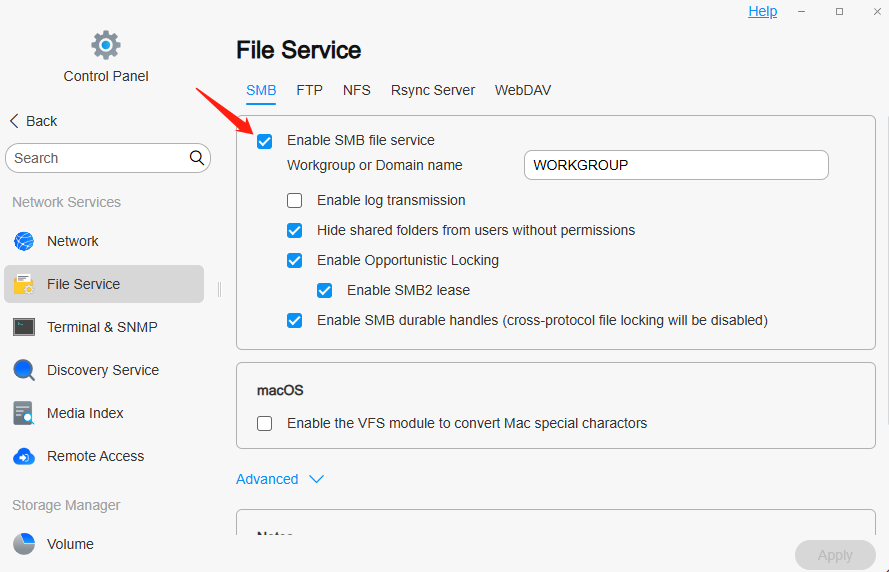
1. Enable the SMB protocol on the source TNAS_A:
· Go to the "Control Panel" > "File Service" of the source TNAS_A, find and enable the SMB file protocol.
Image

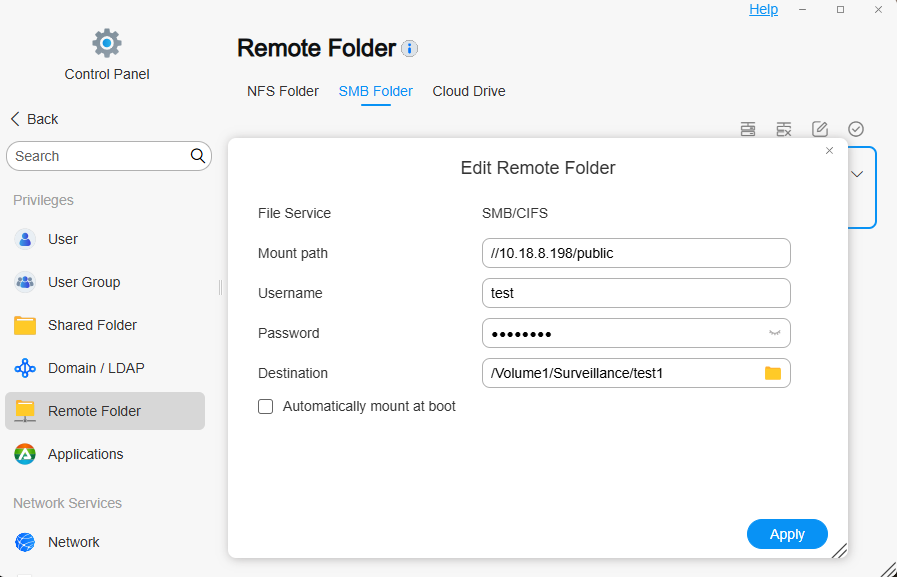
2. Mount the remote folder on the target TNAS_B:
· Go to the target TNAS_B's "Control Panel" > "Remote Folder" > "SMB Folder".

· Click "Mount". In the pop-up window, fill in the source TNAS_A's mount path, username and password, and select a mount destination, which is an empty folder on the target TNAS_B to mount the source TNAS_A's shared folder.

· Finally, click "Apply" > "Enable" to complete the mount.
Image

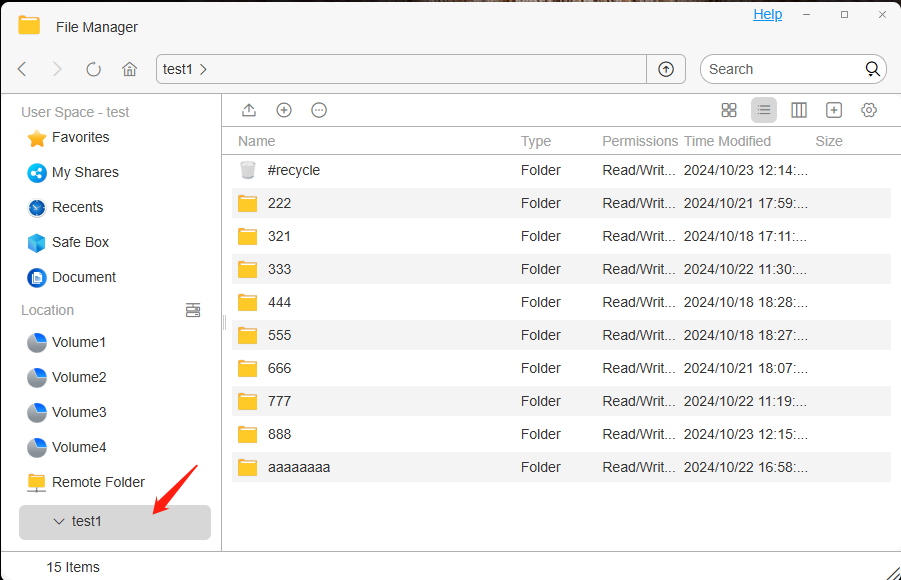
3. Access the mounted folder:
· After mounting successfully, you can see the mounted directory in "File Manager" on the target TNAS_B.

· Copy the files or folders to be migrated from the mounted directory to the target location.
Image

Method 2: Mount using the NFS protocol

1.Enable NFS protocol on the source TNAS_A:

· Go to "Control Panel" > "File Service" on the source TNAS_A, find and enable NFS file protocol.

Image

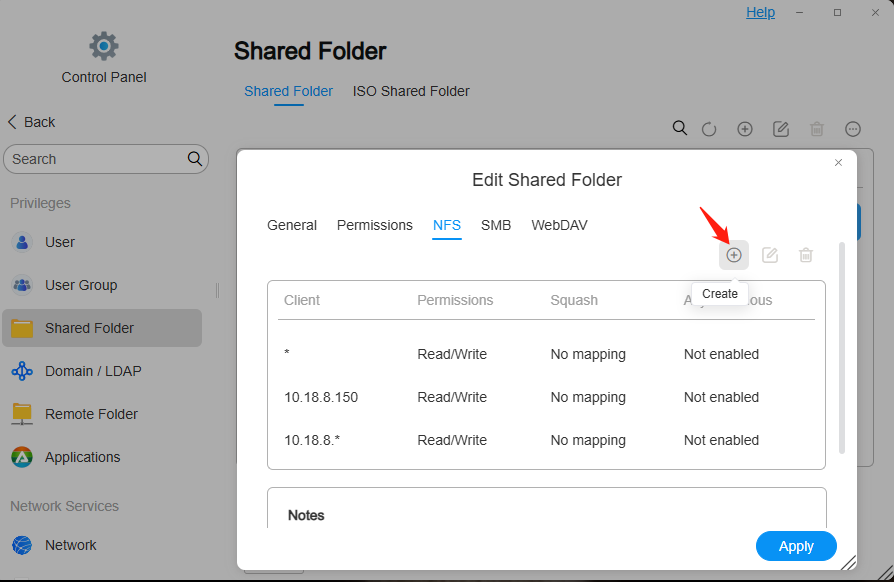
2.Set the IP address allowed to be accessed on the source TNAS_A (that is, the IP address of the target TNAS_B):

· Go to the "Control Panel" > "Shared Folder" of the source TNAS_A, click "Edit" shared folder, and create NFS rules to allow the target TNAS_B to access the shared folder.
Image

3.Mount the remote folder on the target TNAS_B:

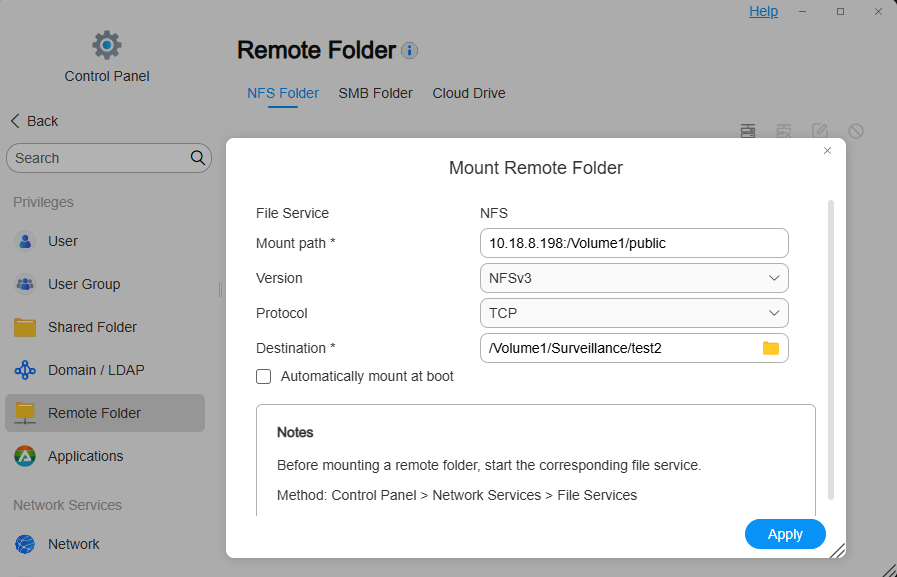
· Go to the target TNAS_B's "Control Panel" > "Remote Folder" > "NFS Folder".

· Click "Mount". In the pop-up window, fill in the source TNAS_A's mount path, select the NFS version and protocol, and then select a mount destination, which is an empty folder on the target TNAS_B to mount the source TNAS_A's shared folder.

· Finally, click "Apply" > "Enable" to complete the mount.
Image

4. Access the mounted folder:
· After mounting successfully, you can see the mounted directory in "File Manager" on the target TNAS_B.

· Copy the files or folders to be migrated from the mounted directory to the target location.

Image

Method 3: Mount using the WebDAV protocol

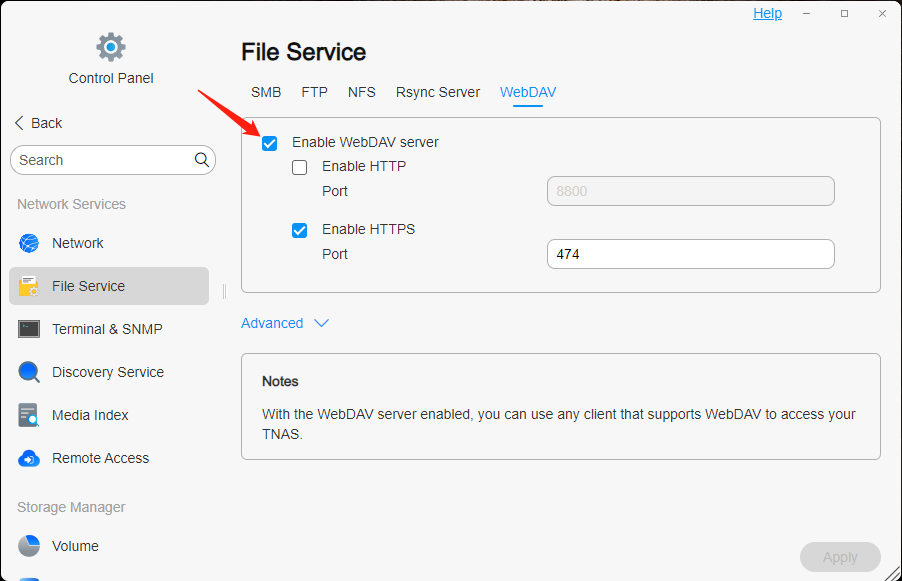
1.Enable the WebDAV protocol on the source TNAS_A:

· Go to the "Control Panel" > "File Service" of the source TNAS_A, find and enable the WebDAV file protocol.
Image

2.Mount the remote folder on the target TNAS_B:

· Go to the target TNAS_B's "Control Panel" > "Remote Folder" > "Cloud Drive".

· Click "Mount". In the pop-up window, select the WebDAV cloud service provider, customize the name, fill in the source TNAS_A's mount path, username and password, click Next, select the cloud disk directory to be mounted, and specify the mount destination, which is an empty folder on the target TNAS_B.

· Finally, click "Apply" > "Enable" to complete the mount.

Image

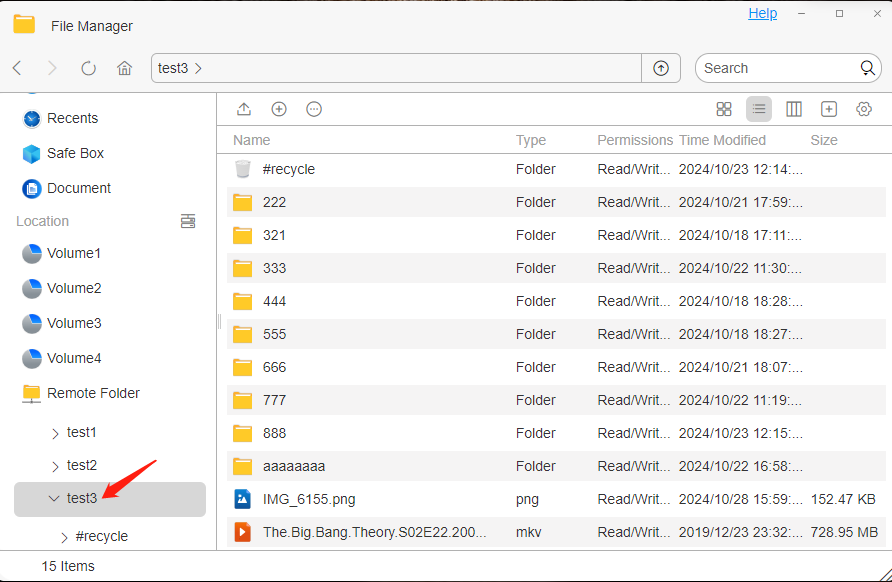
3. Access the mounted folder:
· After mounting successfully, you can see the mounted directory in "File Manager" on the target TNAS_B.

· Copy the files or folders to be migrated from the mounted directory to the target location.
Image


Scenario 2:Use the iSCSI protocol to mount the storage space of another TNAS device on the local TNAS


Operation Guide:
Using the iSCSI protocol, users can mount the storage space of another TNAS device to the local TNAS, achieving flexible expansion and efficient use of storage resources.

Operation steps:
1.Configure iSCSI on the source TNAS_A:

· Install the iSCSI Manager application in the “APP Center” of the TOS system, and create iSCSI Target and iSCSI LUN.

Image
Image

2.Mount iSCSI on the target TNAS_B:
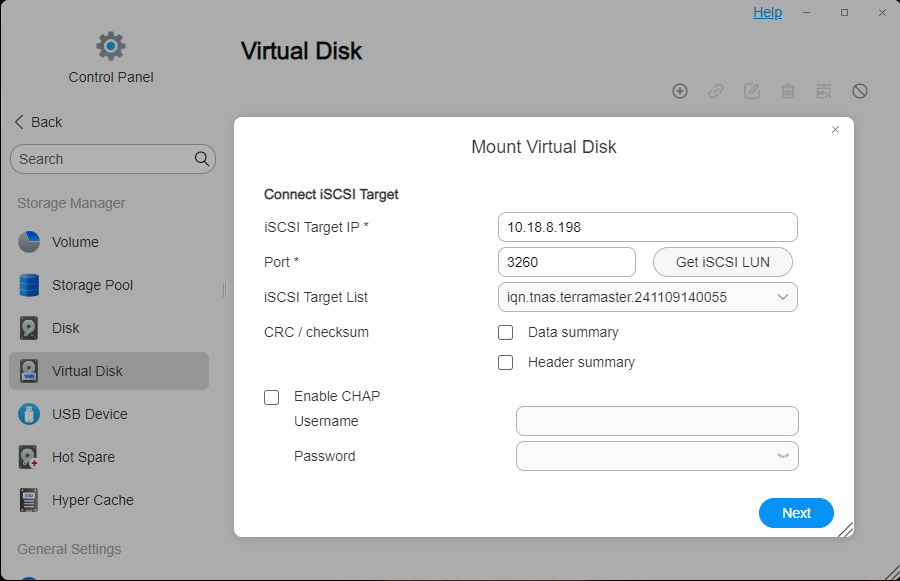
· Go to the target TNAS_B's "Control Panel" > "Storage Manager" > "Virtual Disk".

· Click "Mount", enter the server IP address where the iSCSI Target is located and its communication port (the default port is: 3260), and then click "Get iSCSI LUN". If password authentication is required, please enter the username and password. You can optionally enable “Data Digest” or “Header Digest”, which are verification items for the iSCSI initiator connecting to the iSCSI Target. Then click "Next".
Image

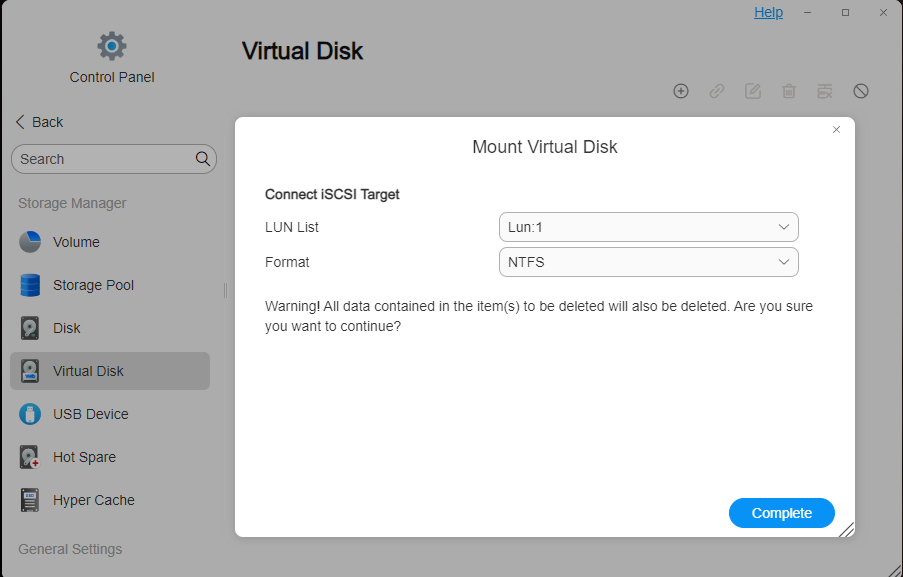
 · Select the iSCSI LUN and click “Finish”. Note tha t an iSCSI LUN disk can only be connected to one host or server simultaneously. TNAS supports mounting EXT4 and NTFS disk formats.
Image

3. Access the mounted storage space:
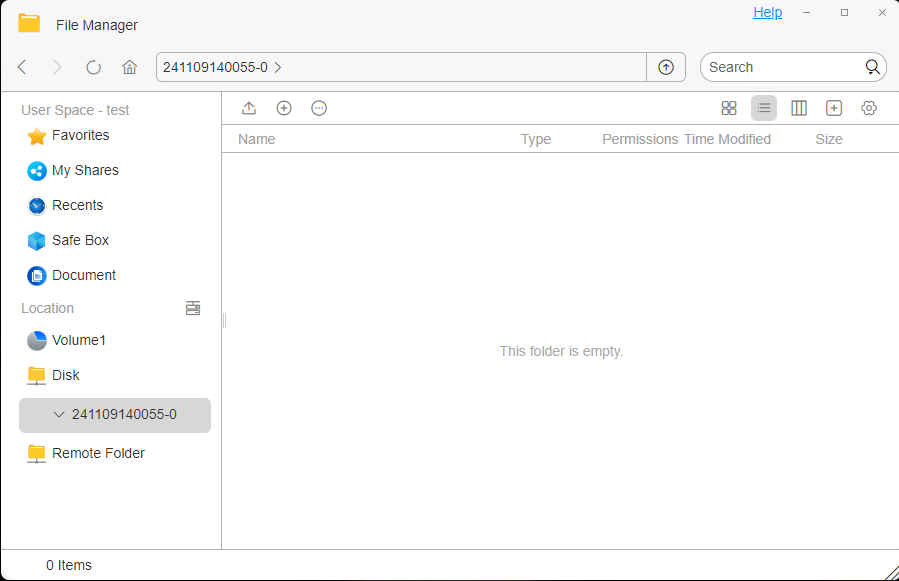
· After mounting successfully, you can see the mounted disk directory in "File Manager" on the target TNAS_B.

· Upload the file or files you want to store to the disk directory.
Image
To contact our team, please send email to following addresses, remember to replace (at) with @
Technical team: support(at)terra-master.com (for technical support)
Service team: service(at)terra-master.com (for purchasing, return, replacement, RMA service)
User avatar
CathyW
Posts: 26
Joined: 18 Feb 2025, 14:16
United States of America

Re: How to mount one TNAS to another TNAS?

Post by CathyW »

I would like to know if the 2 TANS need the same TOS revision or not . If one NAS is TOS 4 or TOS 5 and the other one is TOS 6 , can it works or we need to upgrade the TOS to TOS 6 first .
User avatar
Peterlll06
Posts: 17
Joined: 18 Feb 2025, 12:12
Netherlands

Re: How to mount one TNAS to another TNAS?

Post by Peterlll06 »

CathyW wrote: 25 Apr 2025, 14:46 I would like to know if the 2 TANS need the same TOS revision or not . If one NAS is TOS 4 or TOS 5 and the other one is TOS 6 , can it works or we need to upgrade the TOS to TOS 6 first .
A unified system version is required.
User avatar
Gremlin
Gold Member
Posts: 1620
Joined: 02 Dec 2022, 22:31
Great Britain

Re: How to mount one TNAS to another TNAS?

Post by Gremlin »

CathyW wrote: 25 Apr 2025, 14:46 I would like to know if the 2 TANS need the same TOS revision or not . If one NAS is TOS 4 or TOS 5 and the other one is TOS 6 , can it works or we need to upgrade the TOS to TOS 6 first .
Presume you are referring to 'Remote Folder' :?:
No reason it should not work, provided both systems use the same protocols (SMB/NFS) and within that compatible versions.
(e.g. no point restricting one to SMB1 and the other to SMB3)
F5-221 TOS7.0.0777 - 4x4TB (Ironwolf) Traid
F2-424 TOS7.0.0777 - 2x500GB nvme (P3) Traid, 2x6TB HDD (HGST) Traid
F2-221 TOS7.0.0777 - 1x3TB Ext4, 1x4TB Btrfs
F2-425+ TOS7.0.0777 - 2x500GB nvme (P3) Traid, 2x6TB HDD (EXOS) Traid
User avatar
Frostbyte
Posts: 27
Joined: 19 Feb 2025, 17:36
United States of America

Re: How to mount one TNAS to another TNAS?

Post by Frostbyte »

Very detailed instructions, just what I needed!
User avatar
sianderson
Silver Member
Posts: 417
Joined: 02 Aug 2020, 03:42
Great Britain

Re: How to mount one TNAS to another TNAS?

Post by sianderson »

CathyW wrote: 25 Apr 2025, 14:46 I would like to know if the 2 TANS need the same TOS revision or not . If one NAS is TOS 4 or TOS 5 and the other one is TOS 6 , can it works or we need to upgrade the TOS to TOS 6 first .
i have the F2-210 set up as a remote folder on the F2-423 so it backups up over the network every day, the F2-210 being the older ARM device can only have TOS4 while the newer F2-423 is running the latest so it definitely works across the TOS versions as its using SMB it shouldnt matter what its connected to, even a windows PC if you wanted etc
F2-424 TOS 7.0.0765
F2-423 TOS 7.0.0765
F2-210 TOS 4.2.44
D4-320

C/O
F4-424 TOS 6.0.794
User avatar
Dareshiranu
Posts: 3
Joined: 25 Jan 2026, 01:37
United States of America

Re: How to mount one TNAS to another TNAS?

Post by Dareshiranu »

I just got a second f4-423, but I have zero idea of how to access it. I can scarcely create a Remote Folder if I can't get to TNAS_B, can I? I have no way to see TNAS_B. Currently it's cabled to the first TNAS, which is in turn cabled to my router. Though I did just change the connection from TNAS_B directly to the router, but that didn't really seem to change the visibility of the unit.
User avatar
Gremlin
Gold Member
Posts: 1620
Joined: 02 Dec 2022, 22:31
Great Britain

Re: How to mount one TNAS to another TNAS?

Post by Gremlin »

When connected via TNAS_A, TNAS_B could not reach the internet since TOS os does not provide routing functions. If TOS install was attempted in this configuration it probably would fail. Typical instruction provide for only the LAN1 connected to the internet during installation.

If TOS did install you would need to check your ip address settings to ensure both nas are on the same network segment. If you cannot access TNAS_B, it might be simplest to re-install TOS while correctly connected.
F5-221 TOS7.0.0777 - 4x4TB (Ironwolf) Traid
F2-424 TOS7.0.0777 - 2x500GB nvme (P3) Traid, 2x6TB HDD (HGST) Traid
F2-221 TOS7.0.0777 - 1x3TB Ext4, 1x4TB Btrfs
F2-425+ TOS7.0.0777 - 2x500GB nvme (P3) Traid, 2x6TB HDD (EXOS) Traid
User avatar
OrionXie
TM Support
Posts: 151
Joined: 14 Apr 2025, 18:30
Saudi Arabia

Re: How to mount one TNAS to another TNAS?

Post by OrionXie »

Dareshiranu wrote: 05 Feb 2026, 12:28
Hello, you can review this guide for troubleshooting and then take a look:
viewtopic.php?t=3815
To contact our team, please send email to following addresses. "(at)" = "@"
Technical team: support(at)terra-master.com
Service team: service(at)terra-master.com
Post Reply

Return to “File Service”