
Hello,
Actually, I wouldn't recommend operating them to avoid any functional issues that may arise from direct background operations. You mentioned earlier that you are backing up from one NAS to another using an application. Since the two NAS devices are using different applications, this might lead to inconsistencies in the utilized storage space.
[Help] F4-423 space lost on Volume?
Re: [Help] F4-423 space lost on Volume?
To contact our team, please send email to following addresses, remember to replace (at) with @:
Technical team: support(at)terra-master.com(for technical support)
Service team: service(at)terra-master.com(for purchasing, return, replacement, RMA service)
Technical team: support(at)terra-master.com(for technical support)
Service team: service(at)terra-master.com(for purchasing, return, replacement, RMA service)

Re: [Help] F4-423 space lost on Volume?
Could you please check and compare the metadata again?
Considering the possibility of errors, you might also want to try fixing the possible error:
viewtopic.php?t=2575
Code: Select all
btrfs fi us /Volume1viewtopic.php?t=2575
To contact our team, please send email to following addresses, remember to replace (at) with @:
Technical team: support(at)terra-master.com (for technical support)
Service team: service(at)terra-master.com (for purchasing, return, replacement, RMA service)
Technical team: support(at)terra-master.com (for technical support)
Service team: service(at)terra-master.com (for purchasing, return, replacement, RMA service)
-
larrymarvin

- Posts: 11
- Joined: 19 Jan 2026, 21:18

Re: [Help] F4-423 space lost on Volume?
A manual Defrag maybe ?


Re: [Help] F4-423 space lost on Volume?
You can run the following command to defragment:
Code: Select all
btrfs filesystem defragment -r -v /Volume1To contact our team, please send email to following addresses, remember to replace (at) with @
Technical team: support(at)terra-master.com(for technical support)
Service team: service(at)terra-master.com(for purchasing, return, replacement, RMA service)
Technical team: support(at)terra-master.com(for technical support)
Service team: service(at)terra-master.com(for purchasing, return, replacement, RMA service)
-
larrymarvin
- Posts: 11
- Joined: 19 Jan 2026, 21:18
Re: [Help] F4-423 space lost on Volume?
I'm using "Centralized Backup" from NAS1 to NAS2.
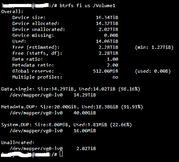
The metadata command : btrfs fi us /Volume1 gives the following data:
NAS1
NAS2
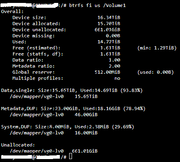
For complete information no failure or warning information occurs. I think the gap between NAS1 and NAS2 is to big (more than 500Gb).
The manual defrag didn't changed any thing, maybe a command to reallocate the files may do a better job.
The metadata command : btrfs fi us /Volume1 gives the following data:
NAS1
NAS2
For complete information no failure or warning information occurs. I think the gap between NAS1 and NAS2 is to big (more than 500Gb).
The manual defrag didn't changed any thing, maybe a command to reallocate the files may do a better job.
Re: [Help] F4-423 space lost on Volume?
Have you ever used Centralized Backup to back up your PC or folders on it with your NAS2? You can try checking in the log of Centralized Backup to confirm.
You can also check the actual disk usage of each folder under Volume using Btrfs commands:
You can also check the actual disk usage of each folder under Volume using Btrfs commands:
Code: Select all
btrfs filesystem du /Volume1/???To contact our team, please send email to following addresses, remember to replace (at) with @:
Technical team: support(at)terra-master.com (for technical support)
Service team: service(at)terra-master.com (for purchasing, return, replacement, RMA service)
Technical team: support(at)terra-master.com (for technical support)
Service team: service(at)terra-master.com (for purchasing, return, replacement, RMA service)
-
larrymarvin
- Posts: 11
- Joined: 19 Jan 2026, 21:18
Re: [Help] F4-423 space lost on Volume?
I'm actually using Centralized Backup on NAS2 to make sync from NAS1 to NAS2.
A full reset and format on NAS2 may be a way ?
A full reset and format on NAS2 may be a way ?
Re: [Help] F4-423 space lost on Volume?
If you confirm that you have backed up all data, you can try reformatting the hard drive and reinstalling the system.
To contact our team, please send email to following addresses, remember to replace (at) with @
Technical team: support(at)terra-master.com(for technical support)
Service team: service(at)terra-master.com(for purchasing, return, replacement, RMA service)
Technical team: support(at)terra-master.com(for technical support)
Service team: service(at)terra-master.com(for purchasing, return, replacement, RMA service)
-
larrymarvin
- Posts: 11
- Joined: 19 Jan 2026, 21:18
Re: [Help] F4-423 space lost on Volume?
Ok I'll do it soon and let you know, it takes time.
-
larrymarvin
- Posts: 11
- Joined: 19 Jan 2026, 21:18
Re: [Help] F4-423 space lost on Volume?
After a new format of Volume1 and new BTRFS Volume1 on NAS2 the space available was exactly the same as on NAS1.
The sync of all the shares from NAS 1 to NAS 2 has finished with no issues (via Central Backup App).
The sizes, files and folders have exactly the same values (no difference at all).
Unfortunately NAS 1 still have 500GB more free space than NAS 2.
Is magic in the air ?
The sync of all the shares from NAS 1 to NAS 2 has finished with no issues (via Central Backup App).
The sizes, files and folders have exactly the same values (no difference at all).
Unfortunately NAS 1 still have 500GB more free space than NAS 2.
Is magic in the air ?