I have 2 indenticals F4-423 NAS (TOS6) with 4 x 6GB disks each (strictly the same capacity 16.34TB each).
The main NAS mirrors every night the folders to the 2nd NAS via Centralized Backup app.
I don't understand why the space left free isn't the same on each NAS.
NAS 1 = Free space = 2.54 TB
NAS 2 = Free space = 1.87 TB
When I check the volumes I get exactly the same number of files, folders and space used...
Does some one have an idea of the reason why of this huge differece between NAS 1 and NAS 2 and how to solve it ?
[Help] F4-423 space lost on Volume?

Re: [Help] F4-423 space lost on Volume?
Please check if you have created a snapshot (Backup Management - File System Snapshot or App Center - Snapshot). Additionally, you can check the storage capacity in File Management to see if there are any extra files on one of the NASs.
To contact our team, please send email to following addresses, remember to replace (at) with @:
Technical team: support(at)terra-master.com (for technical support)
Service team: service(at)terra-master.com (for purchasing, return, replacement, RMA service)
Technical team: support(at)terra-master.com (for technical support)
Service team: service(at)terra-master.com (for purchasing, return, replacement, RMA service)
-
larrymarvin

- Posts: 11
- Joined: 19 Jan 2026, 21:18

Re: [Help] F4-423 space lost on Volume?
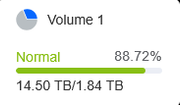
I've double checked. The app hasn't been installed on both NAS and isn't installed yet.

Re: [Help] F4-423 space lost on Volume?
The existing information is not sufficient for us to provide more possible guesses. I'm afraid you will have to compare and check from the upper folder to the lower folder gradually.
To contact our team, please send email to following addresses, remember to replace (at) with @:
Technical team: support(at)terra-master.com (for technical support)
Service team: service(at)terra-master.com (for purchasing, return, replacement, RMA service)
Technical team: support(at)terra-master.com (for technical support)
Service team: service(at)terra-master.com (for purchasing, return, replacement, RMA service)
-
larrymarvin
- Posts: 11
- Joined: 19 Jan 2026, 21:18
Re: [Help] F4-423 space lost on Volume?
I've checked both Volume1 of NAS1 & NAS2 and I got exactly the same number of files, folders and space used...
I think that the extra occuped space could be located in cache or administrative folders of the TNAS, but where ?
I think that the extra occuped space could be located in cache or administrative folders of the TNAS, but where ?
Re: [Help] F4-423 space lost on Volume?
Please open the terminal and enter the following command to check:
Code: Select all
btrfs subvolume show /Volume1
du -sh /Volume1/*
To contact our team, please send email to following addresses, remember to replace (at) with @:
Technical team: support(at)terra-master.com (for technical support)
Service team: service(at)terra-master.com (for purchasing, return, replacement, RMA service)
Technical team: support(at)terra-master.com (for technical support)
Service team: service(at)terra-master.com (for purchasing, return, replacement, RMA service)
-
larrymarvin
- Posts: 11
- Joined: 19 Jan 2026, 21:18
Re: [Help] F4-423 space lost on Volume?
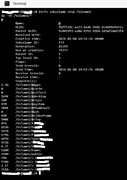
I've entered the command and for NAS1:
For NAS2:
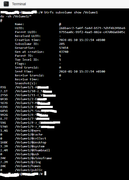
There is a very small difference between NAS1 and NAS2... The main folders have exactly the same values.
Are all the TNAS system files on Volume1 ?
For NAS2:
There is a very small difference between NAS1 and NAS2... The main folders have exactly the same values.
Are all the TNAS system files on Volume1 ?
Re: [Help] F4-423 space lost on Volume?
Please also provide the output information of the first commands.
Code: Select all
btrfs subvolume show /Volume1To contact our team, please send email to following addresses, remember to replace (at) with @:
Technical team: support(at)terra-master.com (for technical support)
Service team: service(at)terra-master.com (for purchasing, return, replacement, RMA service)
Technical team: support(at)terra-master.com (for technical support)
Service team: service(at)terra-master.com (for purchasing, return, replacement, RMA service)
-
larrymarvin
- Posts: 11
- Joined: 19 Jan 2026, 21:18
Re: [Help] F4-423 space lost on Volume?
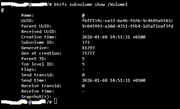
Find the output of the command.
NAS1:
NAS2:
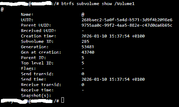
NAS1:
NAS2:
-
larrymarvin
- Posts: 11
- Joined: 19 Jan 2026, 21:18
Re: [Help] F4-423 space lost on Volume?
Do you think a manual TRIM could help ?