

Target Users:
Users currently running TOS 7.0.0299 beta or later versions.
Note:
If your TOS version is TOS 6, please refer to the TOS 7 beta update instructions first
Here, we sincerely thank user @EgorA, @Gremlin, @rfbjr, @ZiRo, @samius, @joka388, @red454, @usersky, @OttO1916, @wander1236, @mnewland, @SunDogBC and others, for their sharing and feedback. It is your support that has enabled us to quickly identify and resolve some issues.
Update Notes
Bugs fixed:
1. Fixed an issue where message notifications might display abnormally in specific scenarios.
2. Fixed an issue where CPU sorting might be incorrect in specific scenarios.
3. Fixed an issue where some directories in remote folders might not be fully displayed under certain conditions.
4. Fixed an issue where the sharing page might display abnormally.
5. Fixed an issue where transferring large files might fail during remote access.
6. Fixed an issue where traffic control rules for Wi-Fi interfaces might disappear after toggling OVS.
7. Fixed an issue where shared folders might not display properly in the control panel under specific scenarios.
8. Fixed an issue where OVS could still be turned off after running VMs when a BOND had already been created.
9. Fixed an issue where images in directories containing quotation marks could not be indexed.
10. Fixed other known issues.
Warning:
If you are using USB Copy, please go to the App Center to update Storage Manager and USB Copy; otherwise, the auto-mount function will not work.
If you are using virtual machines (VMs), please do not update yet and wait for us to update the related applications.
Important Information:
1.Updating the system theoretically will not affect the data on your hard drives, but for safety, please make sure to back up your data in advance.
2.Before updating, ensure that your primary volume (usually volume1) has at least 3GB of available space. Insufficient storage space may cause the update to fail.
3.After the update, the IP address of your TNAS may change. Please use the TNAS PC desktop client to search for and reconnect to the device.
Update Procedure:
1.Go to TOS > Control Panel > General Settings > System > Update, and click "Check for updates."
2.Follow the prompts to update the system.
3.After the system update is complete, you may need to refresh your browser.
4.The TNAS IP address may change after the update. If you cannot connect to your TNAS using the previous IP address, use the TNAS PC client to search for the new IP address.
Client Downloads:
1. Download TNAS PC 5.2.506 for Windows OS.
2. Download TNAS PC 5.2.506 for macOS (x86 and ARM architectures).
3. Download TNAS PC 5.2.506 for macOS (ARM architecture).
4. Download TNAS PC for Linux.
5. Download TNAS Mobile 3.X for Android.
6. For iOS, experience TNAS Mobile 3.X via: https://testflight.apple.com/join/wFWYABJS.
TOS 7.0.0403 Beta (X86) is Released for Update
TOS 7.0.0403 Beta (X86) is Released for Update
To contact our team, please send email to following addresses, remember to replace (at) with @
Technical team: support(at)terra-master.com (for technical support)
Service team: service(at)terra-master.com (for purchasing, return, replacement)
Technical team: support(at)terra-master.com (for technical support)
Service team: service(at)terra-master.com (for purchasing, return, replacement)


Re: TOS 7.0.0403 Beta (X86) is Released for Update
Hello,
I don't understand why the support team ignores the issue I encounter, still in this build iteration.
I have attached two pictures -one before using the TNAS Android app - normal operations and another - after the TNAP app did a search for a TNAS device on the subnet.
The result - the device gets clogged up with TNAS demon tasks and becomes unusable.
Please expedite the remediation of the issue.
Thanks
Pete
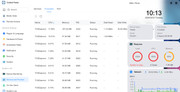
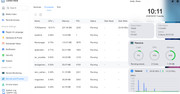
I don't understand why the support team ignores the issue I encounter, still in this build iteration.
I have attached two pictures -one before using the TNAS Android app - normal operations and another - after the TNAP app did a search for a TNAS device on the subnet.
The result - the device gets clogged up with TNAS demon tasks and becomes unusable.
Please expedite the remediation of the issue.
Thanks
Pete

Re: TOS 7.0.0403 Beta (X86) is Released for Update
Hello, are you referring to the TOSDaemon generated by searching for NAS through TNAS mobile? Please generate and download the log report in TOS > Technical Support > Issue Report, then send it to our technical support email. We will analyze it. Also, please include the link to this post in the body of your message.
To contact our team, please send email to following addresses, remember to replace (at) with @
Technical team: support(at)terra-master.com(for technical support)
Service team: service(at)terra-master.com(for purchasing, return, replacement, RMA service)
Technical team: support(at)terra-master.com(for technical support)
Service team: service(at)terra-master.com(for purchasing, return, replacement, RMA service)

Re: TOS 7.0.0403 Beta (X86) is Released for Update
F2-221 Updated. Appears to be OK, no issues with update.
Note update to ClamAV, but no actual release note(s) to identify changes.
Note:
No particular issues with searching network (Android 16 device) and logging into NAS (on updated device). TOSdaemon running 1 instance @ 17% (approx) cpu. (Just my old brain getting to grips with GUI )
)
@PeteBest: Which TNAS Mobile version are you running? Have you updated Mobile version to recommended?
Note update to ClamAV, but no actual release note(s) to identify changes.
Note:
No particular issues with searching network (Android 16 device) and logging into NAS (on updated device). TOSdaemon running 1 instance @ 17% (approx) cpu. (Just my old brain getting to grips with GUI
)@PeteBest: Which TNAS Mobile version are you running? Have you updated Mobile version to recommended?
F5-221 TOS7.0.1278 - 4x4TB (Ironwolf) Traid
F2-424 TOS7.0.1278 - 2x500GB nvme (P3) Traid, 2x6TB HDD (HGST) Traid
F2-221 TOS7.0.1278 - 1x3TB Ext4, 1x4TB Btrfs
F2-425+ TOS7.0.1278 - 2x500GB nvme (P3) Traid, 2x6TB HDD (EXOS) Traid
F2-424 TOS7.0.1278 - 2x500GB nvme (P3) Traid, 2x6TB HDD (HGST) Traid
F2-221 TOS7.0.1278 - 1x3TB Ext4, 1x4TB Btrfs
F2-425+ TOS7.0.1278 - 2x500GB nvme (P3) Traid, 2x6TB HDD (EXOS) Traid
-
alexivanov

- Posts: 3
- Joined: 03 Feb 2026, 20:23

Re: TOS 7.0.0403 Beta (X86) is Released for Update
Good afternoon. Installed TOS 7.0.0299 on F8 SSD Plus using this link viewtopic.php?t=9437 .
The system was installed without errors. After installation, the system asked to upgrade to the latest version. Go to TOS > Control Panel > General Settings > System > Update, and click "Check for updates." The status says "Couldn't check for updates. The TNAS device is not connected to the Internet." The Internet is available on the device. Tell me how to fix this or where to download the latest version of TOS 7.0.0403 Beta (X86) to update manually.
The system was installed without errors. After installation, the system asked to upgrade to the latest version. Go to TOS > Control Panel > General Settings > System > Update, and click "Check for updates." The status says "Couldn't check for updates. The TNAS device is not connected to the Internet." The Internet is available on the device. Tell me how to fix this or where to download the latest version of TOS 7.0.0403 Beta (X86) to update manually.


Re: TOS 7.0.0403 Beta (X86) is Released for Update
F4-223 and F4-425 Plus updated without issue. Hibernation settings are turned back after update.
Testing will continue.
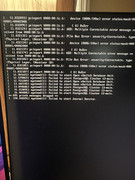
F4-424 Pro initial update did not work. Screen shot attached:
Unit is pingable, but putty will not connect.
Will have to force power off unit and then back on.
Testing will continue.
F4-424 Pro initial update did not work. Screen shot attached:
Unit is pingable, but putty will not connect.
Will have to force power off unit and then back on.
F6-424 & F4-425 Plus at 7.0.1298
F4-424 Pro (x2) at 7.0.1298
D4-320 (Offline until I can afford more HDDs)
F4-424 Pro (x2) at 7.0.1298
D4-320 (Offline until I can afford more HDDs)
Re: TOS 7.0.0403 Beta (X86) is Released for Update
Ok putty issue was my fault. The system came back up no initial messages on HDMI console. But like other updated, the journald was 99%. I uploaded the system report. Going to reboot again, this time gracefully.
F6-424 & F4-425 Plus at 7.0.1298
F4-424 Pro (x2) at 7.0.1298
D4-320 (Offline until I can afford more HDDs)
F4-424 Pro (x2) at 7.0.1298
D4-320 (Offline until I can afford more HDDs)
Re: TOS 7.0.0403 Beta (X86) is Released for Update
2nd reboot no difference with the journald. System is running and responding normally. I updloaded the system report after the gracefull reboot. No HDMI console errors.
The Rsysnc job I ran so far, the webgui doesn't show the job start time, it does show the end time stamp.
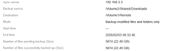
Now I see HDMI errors. Oh well.
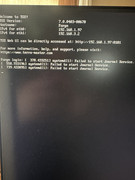
Completely different, The image upload process (I will double check again) does not like to upload photos from OneDrive.
The Rsysnc job I ran so far, the webgui doesn't show the job start time, it does show the end time stamp.
Now I see HDMI errors. Oh well.
Completely different, The image upload process (I will double check again) does not like to upload photos from OneDrive.
F6-424 & F4-425 Plus at 7.0.1298
F4-424 Pro (x2) at 7.0.1298
D4-320 (Offline until I can afford more HDDs)
F4-424 Pro (x2) at 7.0.1298
D4-320 (Offline until I can afford more HDDs)

Re: TOS 7.0.0403 Beta (X86) is Released for Update
Terra Search and Global Search open empty window. The same on previous build too.
p.s. sorry, this issue for reverse proxy connection only. for direct connection it's working.
p.s. sorry, this issue for reverse proxy connection only. for direct connection it's working.
Last edited by DMagister on 03 Feb 2026, 22:59, edited 1 time in total.
Re: TOS 7.0.0403 Beta (X86) is Released for Update
3rd reboot and all is fine. I'll upload system report once it's finished being created.
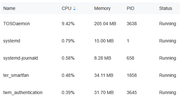
Nevermind, posting image from One Drive is fine.
Nevermind, posting image from One Drive is fine.

F6-424 & F4-425 Plus at 7.0.1298
F4-424 Pro (x2) at 7.0.1298
D4-320 (Offline until I can afford more HDDs)
F4-424 Pro (x2) at 7.0.1298
D4-320 (Offline until I can afford more HDDs)