TOS 7.0.0375 Beta (X86) is Released for Update

Official news about TOS, mobile app, PC app updates or beta releases.
User avatar
PeteBest
Posts: 7
Joined: 14 Jan 2026, 19:57
Great Britain

Re: TOS 7.0.0375 Beta (X86) is Released for Update

Post by PeteBest »

Ok,

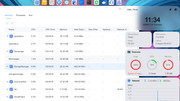
I managed to check the apps running at the time the device gets irresponsive.
The trigger is the moment I try to reach out remotely either through the mobile app or the Windows PC app.
Check the attached screenshot.
On a different occasion the devices kicks dozens of TOS spool or daemon files with the same result.

Let me know how to go back to the previous version, tried but it was refused to load, claiming its an old version!
V 7.0.0375 is no good yet.

Thanks
Pete

Image
User avatar
Lex
Posts: 44
Joined: 13 Mar 2024, 05:07
Russia

Re: TOS 7.0.0375 Beta (X86) is Released for Update

Post by Lex »

PeteBest wrote: 15 Jan 2026, 16:49
ssh is enable?
Or cab attach monitor and login as Linux user.
F4-423
User avatar
PeteBest
Posts: 7
Joined: 14 Jan 2026, 19:57
Great Britain

Re: TOS 7.0.0375 Beta (X86) is Released for Update

Post by PeteBest »

Hi,


SSH is enabled, but it is irrelevant.
I login using the normal TOS interface.

Thanks
P.
User avatar
TMzethar
TM Support
Posts: 2827
Joined: 27 Oct 2020, 16:43

Re: TOS 7.0.0375 Beta (X86) is Released for Update

Post by TMzethar »

PeteBest wrote: 15 Jan 2026, 23:39
We will keep an eye on this and try to reproduce the issue. If you can log in to the terminal via SSH, you might be able to check the source of high resource usage in other areas such as RAM using commands.

Just to confirm again, did this kind of exception not occur when performing the same operation in the previous TOS7 beta version?

I suggest you contact the official website's Live Chat. We can help you schedule an engineer to remotely troubleshoot the issue. (Please include the URL of this post and your forum nickname.)
To contact our team, please send email to following addresses, remember to replace (at) with @:
Technical team: support(at)terra-master.com (for technical support)
Service team: service(at)terra-master.com (for purchasing, return, replacement, RMA service)
User avatar
f2245Plus
Posts: 2
Joined: 16 Jan 2026, 20:43
Netherlands

Re: TOS 7.0.0375 Beta (X86) is Released for Update

Post by f2245Plus »

Hi everyone,

I recently updated my TerraMaster NAS to the latest TOS 7 version (7.0.0375). Previously, I had no issues, but since the update, I am experiencing a persistent high CPU load that won't go away.

The processes causing the most drain are:
tosdaemon: consistently around 75% CPU usage.
postgres: hovering around 35% CPU usage.

This results in a total load that keeps my NAS fans spinning and makes the web interface sluggish. I have already tried deactivating all installed applications, but the CPU usage remains unchanged. It seems like a core system process or a database re-indexing task is stuck in a loop.
Is anyone else experiencing this after the 0375 update? Is there a way to see what tosdaemon is specifically doing, or is there a known fix to stabilize the PostgreSQL database migration?
I’ve tried restarting the unit, but the load returns almost immediately. Any advice or insights from the community or the support team would be greatly appreciated.

My hardware: F2-425-plus
TOS Version: 7.0.0375

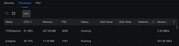
terminal command, top output;

PID USER PR NI VIRT RES SHR S %CPU %MEM TIME+ COMMAND
3098 *username 20 0 2459920 211216 4928 S 64.5 1.3 7:47.31 TOSDaemon
9147 postgres 20 0 220956 17872 14432 S 54.5 0.1 0:01.64 postgres
Image
User avatar
rfbjr
Silver Member
Posts: 400
Joined: 16 May 2024, 23:43
United States of America

Re: TOS 7.0.0375 Beta (X86) is Released for Update

Post by rfbjr »

I want to rule out something on my F4-424 Pro can I re-download the 375 release and will I be able to re-apply this update if the box is already at 375?
Thanks
F6-424 & F4-425 Plus at 7.0.0777
F4-424 Pro also at 7.0.0777
D4-320
User avatar
HeliaWu
TM Support
Posts: 61
Joined: 22 Aug 2024, 18:54
China

Re: TOS 7.0.0375 Beta (X86) is Released for Update

Post by HeliaWu »

rfbjr wrote: 17 Jan 2026, 00:10 I want to rule out something on my F4-424 Pro can I re-download the 375 release and will I be able to re-apply this update if the box is already at 375?
Thanks
The F4-424 Pro allows you to reinstall version 7.0.0375, and also to update to this same version again if needed.
User avatar
f2245Plus
Posts: 2
Joined: 16 Jan 2026, 20:43
Netherlands

Re: TOS 7.0.0375 Beta (X86) is Released for Update

Post by f2245Plus »

Update:
I ended up reinstalling/factory reset the device because the issue escalated. In addition to the high CPU load, the system started slowly consuming all available disk space. This version (7.0.0375) seems very unstable now using 7.0.0299
Last edited by f2245Plus on 17 Jan 2026, 20:43, edited 2 times in total.
User avatar
rfbjr
Silver Member
Posts: 400
Joined: 16 May 2024, 23:43
United States of America

Re: TOS 7.0.0375 Beta (X86) is Released for Update

Post by rfbjr »

So, is the 375 file on still on the NAS somewhere? (I could run the find command in the terminal window)
or what's the direct link to it (375) on the download site, only direct link I saw was from the initial post about TOS 7 and that version is too old.
F6-424 & F4-425 Plus at 7.0.0777
F4-424 Pro also at 7.0.0777
D4-320
User avatar
TMzethar
TM Support
Posts: 2827
Joined: 27 Oct 2020, 16:43

Re: TOS 7.0.0375 Beta (X86) is Released for Update

Post by TMzethar »

We have started investigating the high load issue mentioned by everyone after the update.
If you are experiencing this problem, you can contact the Live Chat on the official website homepage to schedule a time for remote troubleshooting and repair.
To contact our team, please send email to following addresses, remember to replace (at) with @:
Technical team: support(at)terra-master.com (for technical support)
Service team: service(at)terra-master.com (for purchasing, return, replacement, RMA service)
Post Reply

Return to “Update Notice”