Docker Engine installs to wrong Volume

Discussion of applications not mentioned above.
Post Reply
User avatar
Tallicia
Posts: 12
Joined: 19 Oct 2024, 02:28
United States of America

Docker Engine installs to wrong Volume

Post by Tallicia »

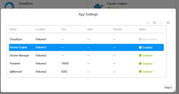
I have moved applications from /Volume1 to /Volume2 by uninstalling them and ensuring the
App Center -> Settings -> The location where applications are installed is set to /Volume2

But, Docker Engine keeps re-installing to /Volume1

How can I ensure that this installs to /Volume2 like other apps do after they have been uninstalled from /Volume1. :?


Image

Is there a command line way to install the tpk and ensure that it is installed to /Volume2? :?:
User avatar
Tallicia
Posts: 12
Joined: 19 Oct 2024, 02:28
United States of America

Re: Docker Engine installs to wrong Volume

Post by Tallicia »

FWIW, On the fifth attempt, I uninstalled, rebooted, and then installed and it did install to the correct /Volume2 location.
User avatar
rigveda
Posts: 21
Joined: 04 Apr 2024, 01:59
Canada

Re: Docker Engine installs to wrong Volume

Post by rigveda »

It seems to be similar to the problem I had here:viewtopic.php?t=9533

So did you have to reboot the NAS service multiple times for the "/Volume2" location to hold?
User avatar
Tallicia
Posts: 12
Joined: 19 Oct 2024, 02:28
United States of America

Re: Docker Engine installs to wrong Volume

Post by Tallicia »

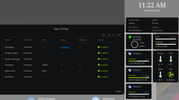
This one has been running without reboot since the last update to the TOS version, so "holding", but without rebooting, that's inconclusive.
Image

CloudSync still needs to move, but it is planned to relocate to a different TNAS
User avatar
CursaYang
TM Support
Posts: 740
Joined: 06 Jan 2025, 16:34
China

Re: Docker Engine installs to wrong Volume

Post by CursaYang »

It is currently unclear whether the restart is related to the effectiveness of the position modification. This issue involves the latest version of TOS 6 and the test version of TOS 7, so we need further testing.
To contact our team, please send email to following addresses, remember to replace (at) with @

Technical team: support(at)terra-master.com(for technical support)
Service team: service(at)terra-master.com(for purchasing, return, replacement, RMA service)
Post Reply

Return to “Others”