Configure camera with 2 lens

A CCTV monitoring and recording application
Post Reply
User avatar
shanny
Posts: 3
Joined: 14 Dec 2025, 06:51
Italy

Configure camera with 2 lens

Post by shanny »

Hi,
i'm newer in TOS. I bought my NAS one month ago and i try to set up it the best i can (with my friend Google :D )
Yesterday i installed Surveillance Manager and i connected my camera Imou Cruiser 8MP (that has 2 lens) with ONVIF protocol
The software recognizes the camera and connects it, but only using 1 lens, not 2 lenses.
How can i do to recognize the second lens?

also, there is no way to change the storage folder to another directory other than the default ones (Surveillance, public etc.)

thank you all
User avatar
crisisacting
Silver Member
Posts: 500
Joined: 20 Jan 2022, 16:42

Re: Configure camera with 2 lens

Post by crisisacting »

shanny wrote: 14 Dec 2025, 07:02 … installed Surveillance Manager and connected my camera Imou Cruiser 8MP (that has 2 lens) with ONVIF protocol
The software recognizes the camera and connects it, but only using 1 lens, not 2 lenses.
How can i do to recognize the second lens?
Despite having two cameras, the firmware on that unit only has ONVIF support on the Pan+Tilt camera.


There's a discussion regarding it & frigate @ https://github.com/blakeblackshear/frig ... ions/11848, which alludes to that single camera ONVIF.
User avatar
shanny
Posts: 3
Joined: 14 Dec 2025, 06:51
Italy

Re: Configure camera with 2 lens

Post by shanny »

Thanks a lot, I managed to set up the PT lens with ONVIF and the Fixed Lens with RSPT. it was enough to add the first lens with ONVIF and then the second lens with RSPT, as if it were a second camera. They work great!!! Is there a way to change the storage directory instead?
User avatar
TMzethar
TM Support
Posts: 2827
Joined: 27 Oct 2020, 16:43

Re: Configure camera with 2 lens

Post by TMzethar »

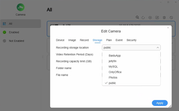
You can change the recording storage location here:
Surveillance - Camera - Edit - Storage
Image
To contact our team, please send email to following addresses, remember to replace (at) with @:
Technical team: support(at)terra-master.com (for technical support)
Service team: service(at)terra-master.com (for purchasing, return, replacement, RMA service)
User avatar
shanny
Posts: 3
Joined: 14 Dec 2025, 06:51
Italy

Re: Configure camera with 2 lens

Post by shanny »

Thanks, but I've already tried it from there. The problem is that I have two HDDs and I want to move/record to the second HDD. The program only allows me to select system folders (such as public, Photo, etc.). Thanks in advance.
User avatar
CursaYang
TM Support
Posts: 740
Joined: 06 Jan 2025, 16:34
China

Re: Configure camera with 2 lens

Post by CursaYang »

You can first create a storage pool and volume using the second hard drive, then create a shared folder located on this volume, and finally select this shared folder in the storage location options.
To contact our team, please send email to following addresses, remember to replace (at) with @

Technical team: support(at)terra-master.com(for technical support)
Service team: service(at)terra-master.com(for purchasing, return, replacement, RMA service)
Post Reply

Return to “Surveillance Manager”