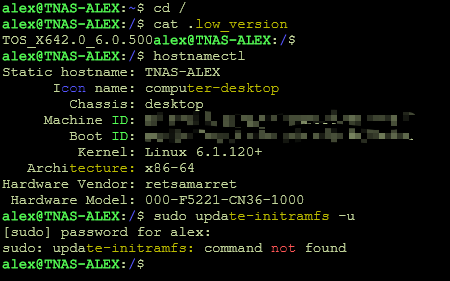
System Information:
- NAS Model: TerraMaster (Custom/Generic)
- TOS Version: X64 2.06.0.794
- Storage: Multiple RAID1 arrays with LVM
Problem Description:
After upgrading TOS, all my volumes completely disappeared from the system. The web interface showed no volumes, and accessing /Volume2 and /Volume3 returned "not found" errors.
 PostgreSQL Race Condition Issue?
The Problem:
During system startup, I noticed this critical error in the logs:
Code: Select all
2025/12/09 01:41:24 /buildAgent/work/b4988470bd41b41d/cmd/storagedevicetool/storagedevicetool.go:354 failed to connect to `user=terramaster database=tos`: 127.0.0.1:5032 (127.0.0.1): dial error: dial tcp 127.0.0.1:5032: connect: connection refused
[0.948ms] [rows:-] SELECT * FROM "share" WHERE device IN ('@usb','@disk')
2025/12/09 01:41:24 Failed to scan share table: failed to connect to `user=terramaster database=tos`: 127.0.0.1:5032 (127.0.0.1): dial error: dial tcp 127.0.0.1:5032: connect: connection refused
2025/12/09 01:41:29 ==========Inserting storage device==========
2025/12/09 01:41:29 insert device name:  sdza
2025/12/09 01:41:29 insert device type(0 USB / 1 Hard disk):  1
[DEBUG /usr/sbin/mdadm -EY /dev/sdza4]
2025/12/09 01:41:29 ==========Inserting storage device==========
2025/12/09 01:41:29 insert device name:  sdb
2025/12/09 01:41:29 insert device type(0 USB / 1 Hard disk):  1
2025/12/09 01:41:29 ==========Inserting storage device==========
2025/12/09 01:41:29 insert device name:  sdd
2025/12/09 01:41:29 insert device type(0 USB / 1 Hard disk):  1
2025/12/09 01:41:29 ==========Inserting storage device==========
2025/12/09 01:41:29 insert device name:  sda
2025/12/09 01:41:29 insert device type(0 USB / 1 Hard disk):  1
E1209 01:41:29.285273    6757 storagedevicepool.go:141] 1. The device has created a Raid
   1).  TOSDeamon/cmd/storagedevicetool/storagedevicepool.(*StorageDevice).Insert
        /buildAgent/work/b4988470bd41b41d/cmd/storagedevicetool/storagedevicepool/storagedevicepool.go:140
   2).  main.serveHTTP.func1
        /buildAgent/work/b4988470bd41b41d/cmd/storagedevicetool/storagedevicetool.go:155
   3).  main.serveHTTP.WrapResp.func9.1
        /home/test/go/pkg/mod/gitlab.local/golibrary/[email protected]/resp.go:116
   4).  gitlab.local/golibrary/resp.TimeConsumed
        /home/test/go/pkg/mod/gitlab.local/golibrary/[email protected]/resp.go:52
   5).  main.serveHTTP.WrapResp.func9
        /home/test/go/pkg/mod/gitlab.local/golibrary/[email protected]/resp.go:115
2025/12/09 01:41:29 ==========Inserting storage device==========
2025/12/09 01:41:29 insert device name:  sdc
2025/12/09 01:41:29 insert device type(0 USB / 1 Hard disk):  1
E1209 01:41:29.312431    6757 storagedevicepool.go:141] 1. The device has created a Raid
   1).  TOSDeamon/cmd/storagedevicetool/storagedevicepool.(*StorageDevice).Insert
        /buildAgent/work/b4988470bd41b41d/cmd/storagedevicetool/storagedevicepool/storagedevicepool.go:140
   2).  main.serveHTTP.func1
        /buildAgent/work/b4988470bd41b41d/cmd/storagedevicetool/storagedevicetool.go:155
   3).  main.serveHTTP.WrapResp.func9.1
        /home/test/go/pkg/mod/gitlab.local/golibrary/[email protected]/resp.go:116
   4).  gitlab.local/golibrary/resp.TimeConsumed
        /home/test/go/pkg/mod/gitlab.local/golibrary/[email protected]/resp.go:52
   5).  main.serveHTTP.WrapResp.func9
        /home/test/go/pkg/mod/gitlab.local/golibrary/[email protected]/resp.go:115
E1209 01:41:29.405672    6757 storagedevicepool.go:141] 1. The device has created a Raid
   1).  TOSDeamon/cmd/storagedevicetool/storagedevicepool.(*StorageDevice).Insert
        /buildAgent/work/b4988470bd41b41d/cmd/storagedevicetool/storagedevicepool/storagedevicepool.go:140
   2).  main.serveHTTP.func1
        /buildAgent/work/b4988470bd41b41d/cmd/storagedevicetool/storagedevicetool.go:155
   3).  main.serveHTTP.WrapResp.func9.1
        /home/test/go/pkg/mod/gitlab.local/golibrary/[email protected]/resp.go:116
   4).  gitlab.local/golibrary/resp.TimeConsumed
        /home/test/go/pkg/mod/gitlab.local/golibrary/[email protected]/resp.go:52
   5).  main.serveHTTP.WrapResp.func9
        /home/test/go/pkg/mod/gitlab.local/golibrary/[email protected]/resp.go:115
This is a race condition during boot. The sequence is:
1. System boots → mdadm assembles RAID arrays → LVM activates volumes
2. TOS services start (TOSDaemon, storagedevicetool)
3. PostgreSQL starts
The problem: storagedevicetool tries to connect to PostgreSQL BEFORE the database is fully ready. This happens because:
- PostgreSQL takes time to initialize (especially with large databases)
- TOS storage services start immediately and expect the database to be available
At first I thought it couldn't be a race condition issue, since it seems to insert data after 5 seconds. The problem is that it's generating new RAID arrays.
Current State:
System is stable NOW but reboot risk exists---
Evidence/Diagnosis:
1. Initial RAID Status:
Code: Select all
# cat /proc/mdstat
md1 : active raid1 sdza1[0]
md9 : active raid1 sdb2[2] sda2[0]

# Only md1 and md9 were active - md0 and md2 were missing!
The diagnostic files revealed:
- Array md0 (7.3TB): /dev/sda4 + /dev/sdb4 - UUID a33e66aa-6544-a767-8ee5-b7f56939d541 NOT ASSEMBLED
- Array md2 (5.5TB): /dev/sdc4 + /dev/sdd4 - UUID 4a5b9ffc-b954-9344-009e-8b75389cbc45 NOT ASSEMBLED
3. LVM Volume Status:
Code: Select all
# pvdisplay
PV Name: unknown        <-- Physical volume couldn't be found
VG Name: vg0
PV Size: 7.27 TiB

# lvdisplay
LV Status: NOT available    <-- Volume was offline!
LV Size: 7.27 TiB
Running
Code: Select all
mdadm --assemble --scan --verboseCode: Select all
mdadm: /dev/sda4 has wrong uuid.
mdadm: /dev/sdb4 has wrong uuid.
mdadm: /dev/sdc4 has wrong uuid.
mdadm: /dev/sdd4 has wrong uuid.
TOSDaemon rewrite it several times after the crash
Solution - Step by Step:
Step 1: Manually Assemble RAID Arrays
Instead of using --scan, assemble each array manually with its correct UUID:
Code: Select all
# Assemble main volume (7.3TB)
mdadm --assemble /dev/md0 --uuid=a33e66aa-6544-a767-8ee5-b7f56939d541 /dev/sda4 /dev/sdb4

# Assemble secondary volume (5.5TB)
mdadm --assemble /dev/md2 --uuid=4a5b9ffc-b954-9344-009e-8b75389cbc45 /dev/sdc4 /dev/sdd4

# Assemble swap (optional but recommended)
mdadm --assemble /dev/md3 --uuid=f5b4c951-b9e5-088d-723a-2e6d993e4d5b /dev/sda3 /dev/sdb3
Code: Select all
# cat /proc/mdstat
md3 : active raid1 sda3[0] sdb3[1]
md2 : active raid1 sdc4[0] sdd4[1]
      5848949636 blocks super 1.2 [2/2] [UU]
md0 : active raid1 sda4[0] sdb4[1]
      7802074636 blocks super 1.2 [2/2] [UU]
Code: Select all
# Scan for volume groups
vgscan

# Activate the volume group
vgchange -ay vg0

# Verify volumes are active
lvscan
# Should show: ACTIVE '/dev/vg0/lv1' and '/dev/vg1/lv2'
Code: Select all
# Generate correct configuration
mdadm --detail --scan > /etc/mdadm/mdadm.conf

# Verify the file
cat /etc/mdadm/mdadm.conf
This updates the boot configuration so arrays assemble automatically on next boot:
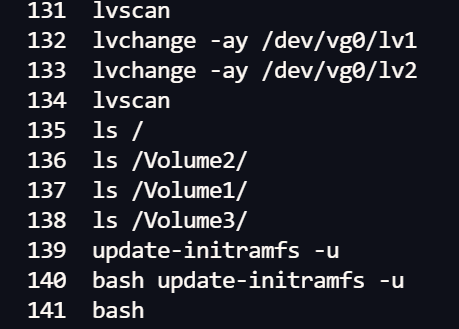
Code: Select all
update-initramfs -u
Code: Select all
# Mount the volumes
mount /dev/vg0/lv1 /Volume2
mount /dev/vg1/lv2 /Volume3

# Verify
df -h | grep Volume
# /dev/mapper/vg0-lv1  7.3T  3.9T  3.5T  53% /Volume2
# /dev/mapper/vg1-lv2  5.5T  2.0T  3.6T  36% /Volume3

# Extraction
(Extract important data if needed)

# Umount
umount /Volume3
umount /Volume2
Step 6: Restart TOS Services
Code: Select all
# Restart TOSDaemon to recognize volumes
systemctl restart tosdaemon

# Restart Samba for network shares
systemctl restart smbd nmbd

# Verify TOSDaemon recognizes the volumes
tail -f /var/log/syslog | grep TOSDaemon
After completing all steps:
- ✓ All RAID arrays showing [UU] status
- ✓ LVM volumes active and mounted
- ✓ TOSDaemon monitoring arrays correctly
- ✓ Web interface shows volumes
- ✓ Data fully accessible
Potential Solutions Before Rebooting:
Workaround: Add PostgreSQL Delay?
No, actually that's not possible since the service is already waiting for Postgres to start:
/etc/systemd/system/tnas-system.target.wants/TOSDaemon.service
Code: Select all
[Unit]
Description=Start TOSDeamon service
Wants=postgresql.service nginx.service network.target network-online.target redis.service tnas-mntdata.service
After=postgresql.service nginx.service network.target network-online.target redis.service tnas-mntdata.service
What Could Happen on Reboot:
Best case scenario:
- RAID arrays assemble correctly (thanks to updated mdadm.conf)
- LVM activates volumes
- Volumes mount from /etc/fstab
- PostgreSQL eventually starts
- TOS recognizes everything (might take 30-60 seconds)
Worst case scenario:
- storagedevicetool fails to load volume config from database
- TOS web interface shows "no volumes"
- Data is physically there but not accessible through TOS UI
- Would need to follow the previous steps again and restart TOSDaemon/services