Losing Disk Space

RAID, Volume, storage pool, hard drive, USB, SSD cache and iSCSI LUN
Post Reply
User avatar
sianderson
Silver Member
Posts: 417
Joined: 02 Aug 2020, 03:42
Great Britain

Losing Disk Space

Post by sianderson »

Hi, i know this has been asked before however i now am sure on specifics

i am losing disk space on my NAS configured under BTRFS

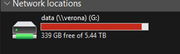
so my start test i had 339gb free
Image

over the network from my PC i navigated to a shared drive, there was a 12gb file, replaced it with a 2gb file
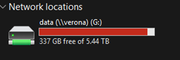
this should then have given me 349gb free right? wrong it took an extra 2gb from me so i am now down to 337gb !!
there is only the 2gb file in the folder, so it has definitely been replaced and the 12gb file is no longer anywhere to be seen

Image

i have checked the recycle bin, thats empty so its as if the NAS drive is holding onto the 12gb file somewhere and adding the 2gb to it, short of reformatting the drive as EXT4 and reloading all the data back onto it again, how do i clear up the space being taken up? and before support tell me to be patient, how long should i wait? hours? i am not talking about a couple of seconds since i did this this was more than 12 hours ago now and it hasnt released the disk space

any advice would be appreciated
F2-424 TOS 7.0.0765
F2-423 TOS 7.0.0765
F2-210 TOS 4.2.44
D4-320

C/O
F4-424 TOS 6.0.794
User avatar
CursaYang
TM Support
Posts: 740
Joined: 06 Jan 2025, 16:34
China

Re: Losing Disk Space

Post by CursaYang »

Hello, please check if file system snapshots or shared folder snapshots are enabled, and whether TerraSync is activated.
To contact our team, please send email to following addresses, remember to replace (at) with @

Technical team: support(at)terra-master.com(for technical support)
Service team: service(at)terra-master.com(for purchasing, return, replacement, RMA service)
User avatar
sianderson
Silver Member
Posts: 417
Joined: 02 Aug 2020, 03:42
Great Britain

Re: Losing Disk Space

Post by sianderson »

could you give me some instructions on how to check these things?

i dont see anything called snapshots in any settings and i havent installed the snapshot app,i dont use TerraSync, however i do use TFM that manages a nightly backup to USB / Network Path (however this is currently disabled)

i did some reading last night and kicked off a btrfs balance, i now have 342gb free, however doesnt explain the loss as to be honest i do believe im a few hundred gig short, i havent messed about with anything technical, set up the nas, created a shared folder and copied data into the folder

if the answer is to go back to EXT4 then i will just have to do that, as i would rather my system be reliable and logical, i.e if i change a file on the nas drive then it recovers the space straight away, but if there is a quick fix to recover the space (or clear up old snapshots then please do let me know)

i did briefly look into snapshots via SSH and a few were showing but trying to delete them just told me it was a read only file system?

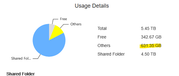
i'm guessing the 631.35gb is my missing space that the system is using?
Image
F2-424 TOS 7.0.0765
F2-423 TOS 7.0.0765
F2-210 TOS 4.2.44
D4-320

C/O
F4-424 TOS 6.0.794
User avatar
CursaYang
TM Support
Posts: 740
Joined: 06 Jan 2025, 16:34
China

Re: Losing Disk Space

Post by CursaYang »

Please generate and download the log report in TOS > Technical Support > Issue Report, then send it to our technical support email ([email protected]). We will analyze it.
To contact our team, please send email to following addresses, remember to replace (at) with @

Technical team: support(at)terra-master.com(for technical support)
Service team: service(at)terra-master.com(for purchasing, return, replacement, RMA service)
User avatar
sianderson
Silver Member
Posts: 417
Joined: 02 Aug 2020, 03:42
Great Britain

Re: Losing Disk Space

Post by sianderson »

i appreciate the offer, but in the absence of a quick fix being offered, i just restored the data over night to EXT4

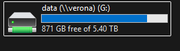
i will just know to stay away from BTRFS in future, as clearly i do actually have 871gb free with the exact same data

Image
F2-424 TOS 7.0.0765
F2-423 TOS 7.0.0765
F2-210 TOS 4.2.44
D4-320

C/O
F4-424 TOS 6.0.794
User avatar
TMroy
TM Support
Posts: 3060
Joined: 10 Mar 2020, 14:04
China

Re: Losing Disk Space

Post by TMroy »

The Btrfs file system manages deleted files differently from traditional file systems, and the time it takes to free up space isn't instantaneous. Here’s a breakdown of the process and the factors that influence it.

🔄 The Deletion Process in Btrfs

When you delete a file in Btrfs, the action doesn't immediately erase the file's data blocks from the disk. Instead, Btrfs marks the space previously occupied by that file as "no longer needed." This space is then considered free for future use by the file system's internal allocator .

This design is closely tied to Btrfs's Copy-on-Write (CoW) nature. In a CoW file system, when a file is modified, the changes are written to new free space on the disk, and the file system then updates pointers to the new data. When a file is deleted, Btrfs simply removes the pointers to the data blocks. The actual data blocks are not overwritten until that space is needed for new data .

⏱️ When is the Space Actually Freed?

The release of space back to the pool available for the operating system is not always immediate and can depend on several factors:

1. Background Reclamation: Btrfs typically handles the final freeing of blocks in the background. This process might take some time, usually from a few seconds to several minutes. If the disk was very full, this background operation might be delayed or hindered .
2. The Balance Operation: The key command that actively reclaims free space is the balance operation (btrfs balance start). This process reorganizes data and metadata across the available storage, which also releases unused blocks. You can initiate this manually to force space reclamation . For targeted reclamation, you can start a balance with filters like -dusage=0 or -musage=0 to process blocks that are barely used .
3. Presence of Snapshots: This is a crucial factor. If a Btrfs snapshot exists that references the deleted file, the space will not be freed until that snapshot is also deleted. This is because snapshots rely on the CoW mechanism to preserve the state of the file system at a point in time, meaning they retain pointers to all data blocks that existed when the snapshot was taken, even if the file is deleted from the live file system . To check for snapshots, you can use the command btrfs subvolume list /path .
4. Open Files: If a file was deleted while still being held open by a process (a common scenario with virtual machine disk images or log files), the space will not be released until the process closes the file. The operating system keeps the file's data blocks allocated until the last reference to it is closed . You can check for such files with commands like lsof | grep deleted.

💡 How to Check Space Usage in Btrfs

Because of its unique structure, the standard df command can sometimes be misleading for Btrfs. It's more accurate to use the Btrfs-specific command to see how space is allocated between data, metadata, and the unallocated free space that can be reclaimed :
btrfs filesystem usage /path/to/mountpoint


💎 Summary

In summary, Btrfs doesn't immediately wipe data upon deletion. Space is marked for reuse and freed up by background tasks or manual balancing. The main factors causing delay are:
• Background Operations: The internal process of freeing space isn't always instant.

• Snapshots: Any existing snapshots will prevent the space from being freed.

• Open Files: Processes holding onto deleted files will block space reclamation.

Understanding these factors should help you diagnose situations where free space doesn't appear to increase immediately after deleting files.

I hope this gives you a clear picture of how Btrfs handles file deletion. If you are facing a specific issue with space not being freed, feel free to share more details.
To contact our team, please send email to following addresses, remember to replace (at) with @:
Support team: support(at)terra-master.com (for technical support only)
Service team: service(at)terra-master.com (for purchasing, return, replacement, RMA service)
User avatar
sianderson
Silver Member
Posts: 417
Joined: 02 Aug 2020, 03:42
Great Britain

Re: Losing Disk Space

Post by sianderson »

TMroy wrote: 22 Nov 2025, 19:04 The Btrfs file system manages deleted files differently from traditional file systems, and the time it takes to free up space isn't instantaneous. Here’s a breakdown of the process and the factors that influence it.

🔄 The Deletion Process in Btrfs

When you delete a file in Btrfs, the action doesn't immediately erase the file's data blocks from the disk. Instead, Btrfs marks the space previously occupied by that file as "no longer needed." This space is then considered free for future use by the file system's internal allocator .

This design is closely tied to Btrfs's Copy-on-Write (CoW) nature. In a CoW file system, when a file is modified, the changes are written to new free space on the disk, and the file system then updates pointers to the new data. When a file is deleted, Btrfs simply removes the pointers to the data blocks. The actual data blocks are not overwritten until that space is needed for new data .

⏱️ When is the Space Actually Freed?

The release of space back to the pool available for the operating system is not always immediate and can depend on several factors:

1. Background Reclamation: Btrfs typically handles the final freeing of blocks in the background. This process might take some time, usually from a few seconds to several minutes. If the disk was very full, this background operation might be delayed or hindered .
2. The Balance Operation: The key command that actively reclaims free space is the balance operation (btrfs balance start). This process reorganizes data and metadata across the available storage, which also releases unused blocks. You can initiate this manually to force space reclamation . For targeted reclamation, you can start a balance with filters like -dusage=0 or -musage=0 to process blocks that are barely used .
3. Presence of Snapshots: This is a crucial factor. If a Btrfs snapshot exists that references the deleted file, the space will not be freed until that snapshot is also deleted. This is because snapshots rely on the CoW mechanism to preserve the state of the file system at a point in time, meaning they retain pointers to all data blocks that existed when the snapshot was taken, even if the file is deleted from the live file system . To check for snapshots, you can use the command btrfs subvolume list /path .
4. Open Files: If a file was deleted while still being held open by a process (a common scenario with virtual machine disk images or log files), the space will not be released until the process closes the file. The operating system keeps the file's data blocks allocated until the last reference to it is closed . You can check for such files with commands like lsof | grep deleted.

💡 How to Check Space Usage in Btrfs

Because of its unique structure, the standard df command can sometimes be misleading for Btrfs. It's more accurate to use the Btrfs-specific command to see how space is allocated between data, metadata, and the unallocated free space that can be reclaimed :
btrfs filesystem usage /path/to/mountpoint


💎 Summary

In summary, Btrfs doesn't immediately wipe data upon deletion. Space is marked for reuse and freed up by background tasks or manual balancing. The main factors causing delay are:
• Background Operations: The internal process of freeing space isn't always instant.

• Snapshots: Any existing snapshots will prevent the space from being freed.

• Open Files: Processes holding onto deleted files will block space reclamation.

Understanding these factors should help you diagnose situations where free space doesn't appear to increase immediately after deleting files.

I hope this gives you a clear picture of how Btrfs handles file deletion. If you are facing a specific issue with space not being freed, feel free to share more details.
thank you for your explanation

but in summary it didn't clear up hundred of gigs over many many months and numerous reboots so while i agree with you that it doesn't delete it immediately it also seems like it was never actually going to clear them up either

but thank you for confirming that BTRFS is a bad thing in terms of disk space usage and something i will now avoid in future due to the limitations of using it that you have highlighted
F2-424 TOS 7.0.0765
F2-423 TOS 7.0.0765
F2-210 TOS 4.2.44
D4-320

C/O
F4-424 TOS 6.0.794
Post Reply

Return to “Storage”