gracias
TOS 6.0.783 (X86) is Released for Update
-
Nitrokalel

- Posts: 53
- Joined: 24 Apr 2024, 05:51

Re: TOS 6.0.783 (X86) is Released for Update
F8 SSD Plus (8x4TB NVMe, TRaid, 48GB, prod)
F8 SSD Plus (6x1TB+2x2TB, TRaid, 48GB, prod)
F4-424 Pro (2x22TB+2x10TB HDD +1TB+500GB NVMe, TRaid, 32GB, prod)
F2-423 (2x18TB, TRaid, 32GB, prod)
F2-221 (6TB+10TB, TRaid, 10GB, prod)
D1 SSD (2TB, prod)
F8 SSD Plus (6x1TB+2x2TB, TRaid, 48GB, prod)
F4-424 Pro (2x22TB+2x10TB HDD +1TB+500GB NVMe, TRaid, 32GB, prod)
F2-423 (2x18TB, TRaid, 32GB, prod)
F2-221 (6TB+10TB, TRaid, 10GB, prod)
D1 SSD (2TB, prod)


Re: TOS 6.0.783 (X86) is Released for Update
Is 6.0.783 going to be last release on version 6? Are we going to ver 7 next?
Current System:
F4-424 Pro
40TB storage.
TOS- 7.0.0746
F4-424 Pro
40TB storage.
TOS- 7.0.0746


Re: TOS 6.0.783 (X86) is Released for Update
TOS 7 is still in the internal testing phase and will be released after the testing is completed.
To contact our team, please send email to following addresses, remember to replace (at) with @
Technical team: support(at)terra-master.com(for technical support)
Service team: service(at)terra-master.com(for purchasing, return, replacement, RMA service)
Technical team: support(at)terra-master.com(for technical support)
Service team: service(at)terra-master.com(for purchasing, return, replacement, RMA service)


Re: TOS 6.0.783 (X86) is Released for Update
I just installed a M.2 drive (NVMe, 256 GB), I initialized the drive and nothing happened. How do I migrate the OS to the M.2 drive? The migration option does not show the M2...
EDIT: people with several HDDs in (T)RAID, as the system is on all HDDs, we have to select all drives to migrate from and then, it will show the SSD as the destiny to the migration
Now another question: I have the 256 GB SSD with the system, can I use it for something else (still being the system drive?) I wanted to have the SSD as the system drive + cache but now that the SSD has the system, it is greyed out on the cache creation window...

Re: TOS 6.0.783 (X86) is Released for Update
When using an SSD as storage, the system reserves a system partition on the SSD that can be used as the system at any time. However, when used as cache, the entire SSD is required to be formatted and utilized, and no system partition can be reserved for the system.
To contact our team, please send email to following addresses, remember to replace (at) with @:
Technical team: support(at)terra-master.com (for technical support)
Service team: service(at)terra-master.com (for purchasing, return, replacement, RMA service)
Technical team: support(at)terra-master.com (for technical support)
Service team: service(at)terra-master.com (for purchasing, return, replacement, RMA service)
Re: TOS 6.0.783 (X86) is Released for Update
Thank you. Can I use the NAS as a dropbox-like decide too? How? The idea is to sync and access from everywhere, not only at home.TMzethar wrote: ↑17 Nov 2025, 09:58When using an SSD as storage, the system reserves a system partition on the SSD that can be used as the system at any time. However, when used as cache, the entire SSD is required to be formatted and utilized, and no system partition can be reserved for the system.

Re: TOS 6.0.783 (X86) is Released for Update
The TerraSync tool on the TNAS PC (in conjunction with the TerraSync Server app installed on the TOS) can achieve synchronization. If you want to implement remote synchronization, you need to set up your network and open the ports required by TerraSync.
To contact our team, please send email to following addresses, remember to replace (at) with @:
Technical team: support(at)terra-master.com (for technical support)
Service team: service(at)terra-master.com (for purchasing, return, replacement, RMA service)
Technical team: support(at)terra-master.com (for technical support)
Service team: service(at)terra-master.com (for purchasing, return, replacement, RMA service)
Re: TOS 6.0.783 (X86) is Released for Update
but does it work with phones like android and ios? The idea is not to pay for Dropbox services and similar. Is there a tutorial?
-
StephenNaylor

- Posts: 41
- Joined: 07 May 2023, 00:33
Re: TOS 6.0.783 (X86) is Released for Update
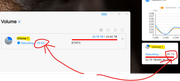
I just added a new drive to my F5-422 to replace an older smaller drive. A few hours later I logged back in and the dashboard said Volume 1 was rebuilding and was at 98.1%. That seemed to be very quick progress so I went into Control Panel > Volume and this shows that the volume is rebuilding but only at 78%. I assume these two displays should show the same figure. I assume the dashboard is wrong. Estimated time is 2500+ minutes:
Re: TOS 6.0.783 (X86) is Released for Update
You can enter the following command in the terminal to view the actual progress: cat /proc/mdstatStephenNaylor wrote: ↑20 Nov 2025, 22:01 I just added a new drive to my F5-422 to replace an older smaller drive. A few hours later I logged back in and the dashboard said Volume 1 was rebuilding and was at 98.1%. That seemed to be very quick progress so I went into Control Panel > Volume and this shows that the volume is rebuilding but only at 78%. I assume these two displays should show the same figure. I assume the dashboard is wrong. Estimated time is 2500+ minutes:
To contact our team, please send email to following addresses, remember to replace (at) with @
Technical team: support(at)terra-master.com(for technical support)
Service team: service(at)terra-master.com(for purchasing, return, replacement, RMA service)
Technical team: support(at)terra-master.com(for technical support)
Service team: service(at)terra-master.com(for purchasing, return, replacement, RMA service)