

1. UPS brand + Model: Cyber Power Systems LE1000DG
2. TNAS model: F4-425 TOS version 6.0.783
3. Experience: Instant recognition that UPS has been connected - on entering power settings and enabling the UPS tickbox, UPS details are shown correctly. It will receive the message from the UPS that it is on battery supply when I unplug the UPS.
4. Problems / shortcomings: when you try to enable USB UPS control and save the settings it errors and loses connection with the UPS.
5. Workaround that worked: I tried all the external USB ports and it didn't work. I connected to the internal port and successfully got a working connection that provides all the information. I then tried connecting back to an external port but it wouldn't work. I then tried a cheap USB hub that I had for an old laptop and plugged it into the hub in one of the rear USP port and success. It works. The USB hub is no longer available on amazon. "Slimmest USB Hub, TROND D2 Ultra Slim Aluminum USB 3.0 Hub (4 Port Compact, Bus-Powered, 4.5" USB Cable, Silver), Ideal for Laptops, Ultrabooks, MacBooks & Microsoft Surface (Windows 10 Compatible)"
UPS Compatibility List (will be continuously updated)


Re: UPS Compatibility List (will be continuously updated)
[My UPS + TNAS Experience]
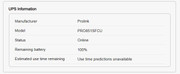
UPS brand + model: Prolink PRO851SFCU (850 VA rating)
TNAS model: F2-223, TOS6.
Experience: Connected to F2-223 & PC for few months. No obvious issues occurred. Once connected, NAS unit immediately auto identified UPS & model.
Problems / shortcomings: Not tested for manual activating of power off.
Useful tips: UPS manufacturer "did not" include cable for UPS/NAS. Did buy 5 various UPS models of Prolink UPS to support 3 PC, 3 mesh routers, 2 NAS (F2-223 and old WD EX2 NAS). Make sure you have the cable or ensure it is given by supplier.
Purchase channel: Lazada Malaysia, usually getting good discounts like the terra NAS. This 850VA is about US$60 with a bigger battery 12VDC 10AH, 2 years warranty.
F2-223, TOS 6.0.648, 2x8T N300 HDD Vol 1 & 3 (Singles)
1x1T Kingston NVME SSD Vol 2 (Single)
1x256G Hynix NVME SSD Hyper Cache (Balance Mode, 238G)
32G RAM
1x1T Kingston NVME SSD Vol 2 (Single)
1x256G Hynix NVME SSD Hyper Cache (Balance Mode, 238G)
32G RAM

Re: UPS Compatibility List (will be continuously updated)
1. UPS brand + model: Ubiquiti UniFi UPS 2U
2. TNAS model: F8-SSD
3. Experience: The UPS provides a NUT server. In the UniFi Network Application we need to name the UPS "ups", Then we can use the option "TNAS UPS Server" to connect to something like http://192.168.1.111:3493
4. Problems or shortcomings: I had to dig into TNAS log files / config to find out the correct way to address the UPS, there should be a GUI option to connect to a NUT server.
5. Tips & tricks: -
6. Where you bought it: eu.store.ui.com, 300€
2. TNAS model: F8-SSD
3. Experience: The UPS provides a NUT server. In the UniFi Network Application we need to name the UPS "ups", Then we can use the option "TNAS UPS Server" to connect to something like http://192.168.1.111:3493
4. Problems or shortcomings: I had to dig into TNAS log files / config to find out the correct way to address the UPS, there should be a GUI option to connect to a NUT server.
5. Tips & tricks: -
6. Where you bought it: eu.store.ui.com, 300€

Re: UPS Compatibility List (will be continuously updated)
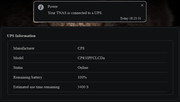
UPS brand + model: CyberPower CP850PFCLCD
TNAS model: F8 SSD Plus
Experience: Tested and worked as expected
Problems / shortcomings: None, system recognized it upon plugging in to USB
Useful tips: Just plug it in
TNAS model: F8 SSD Plus
Experience: Tested and worked as expected
Problems / shortcomings: None, system recognized it upon plugging in to USB
Useful tips: Just plug it in
-
infinitespecter

- Posts: 2
- Joined: 09 Nov 2024, 10:23

Re: UPS Compatibility List (will be continuously updated)
UPS brand + model: APC Back-UPS ES 550G
TNAS model: F2-423
Experience: It was immediately recognized and provides data to the UPS on how long it can stay up before shutting down instead of immediately shutting down at power loss. I've had it stay up for almost an hour while also powering my Xfinity X10 cable modem.
Problems / shortcomings: It doesn't restart itself once power is restored. I've applied the patch provided to see if that helps in the future.
Useful tips: None, it just works.
Purchase channel: Got it new, open boxed at a used computer store.
TNAS model: F2-423
Experience: It was immediately recognized and provides data to the UPS on how long it can stay up before shutting down instead of immediately shutting down at power loss. I've had it stay up for almost an hour while also powering my Xfinity X10 cable modem.
Problems / shortcomings: It doesn't restart itself once power is restored. I've applied the patch provided to see if that helps in the future.
Useful tips: None, it just works.
Purchase channel: Got it new, open boxed at a used computer store.

Re: UPS Compatibility List (will be continuously updated)
I think the subject is misleading. I mean the body of the message points out a possible issue. Which in my case happened as I was specifically testing my UPS and it shutting down multiple NAS(s).
It should be "UPS users please read", something like that.
For reference mine is: APC Back-UPS XS 1500M
Yes, after reading this I did now apply the patch.
It should be "UPS users please read", something like that.
For reference mine is: APC Back-UPS XS 1500M
Yes, after reading this I did now apply the patch.
F6-424 & F4-425 Plus at 7.0.1163
F4-424 Pro (x2) also at 7.0.1163
D4-320
F4-424 Pro (x2) also at 7.0.1163
D4-320


Re: UPS Compatibility List (will be continuously updated)
Hello,
This post was originally intended for sharing UPS compatibility information. However, during the feedback process from everyone, this issue was discovered, so we have released the patch package in this post.
After installing the patch, you can test it and let us know the results.
This post was originally intended for sharing UPS compatibility information. However, during the feedback process from everyone, this issue was discovered, so we have released the patch package in this post.
After installing the patch, you can test it and let us know the results.
To contact our team, please send email to following addresses, remember to replace (at) with @
Technical team: support(at)terra-master.com(for technical support)
Service team: service(at)terra-master.com(for purchasing, return, replacement, RMA service)
Technical team: support(at)terra-master.com(for technical support)
Service team: service(at)terra-master.com(for purchasing, return, replacement, RMA service)
Re: UPS Compatibility List (will be continuously updated)
Will do, soon as I get the energy to crawl under the table and yank the power wire from the wall. Not as young as I used to be. Bad enough dealing replacing the 12lb UPS battery.CursaYang wrote: ↑25 Nov 2025, 14:07 Hello,
This post was originally intended for sharing UPS compatibility information. However, during the feedback process from everyone, this issue was discovered, so we have released the patch package in this post.
After installing the patch, you can test it and let us know the results.
F6-424 & F4-425 Plus at 7.0.1163
F4-424 Pro (x2) also at 7.0.1163
D4-320
F4-424 Pro (x2) also at 7.0.1163
D4-320
Re: UPS Compatibility List (will be continuously updated)
Ok test was successful. Patch worked. (I did reboot the F4-424 Pro yesterday after the patch was applied)
F4-424 Pro has APC Back-UPS XS 1500M connected via USB
F4-223 has UPS via network
AC Power plus pulled, after 10 minutes (what I have it set to) both F4's shutdown.
AC Power restored, I powered on F4-424 Pro, waited the usual startup time and system was back online w/o any issues.
F4-223 was fine, up w/o any issues.
**Note should I apply the patch to F4-223 even though the UPS is network attached?
F4-424 Pro has APC Back-UPS XS 1500M connected via USB
F4-223 has UPS via network
AC Power plus pulled, after 10 minutes (what I have it set to) both F4's shutdown.
AC Power restored, I powered on F4-424 Pro, waited the usual startup time and system was back online w/o any issues.
F4-223 was fine, up w/o any issues.
**Note should I apply the patch to F4-223 even though the UPS is network attached?
F6-424 & F4-425 Plus at 7.0.1163
F4-424 Pro (x2) also at 7.0.1163
D4-320
F4-424 Pro (x2) also at 7.0.1163
D4-320
Re: UPS Compatibility List (will be continuously updated)
Yes, you can also install this patch on F4-223.
To contact our team, please send email to following addresses, remember to replace (at) with @
Technical team: support(at)terra-master.com(for technical support)
Service team: service(at)terra-master.com(for purchasing, return, replacement, RMA service)
Technical team: support(at)terra-master.com(for technical support)
Service team: service(at)terra-master.com(for purchasing, return, replacement, RMA service)