
Good day!
I connect to NAS from external access http://nas.kineetic.ru everything is fine. But when I want to make an external link to a photo I get a local address http://192.168.1.178/******** How can I configure it to get an external link?
[Share] remote access via domain

Re: [Share] remote access via domain
You can replace the LAN IP and port part with the tnas link. If you are using TOS6, you can customize the generated remote link in 'File Modification'.
To contact our team, please send email to following addresses, remember to replace (at) with @:
Technical team: support(at)terra-master.com (for technical support)
Service team: service(at)terra-master.com (for purchasing, return, replacement, RMA service)
Technical team: support(at)terra-master.com (for technical support)
Service team: service(at)terra-master.com (for purchasing, return, replacement, RMA service)
-
SugarOuYang

- Posts: 3
- Joined: 09 Apr 2025, 17:16

Re: [Share] remote access via domain
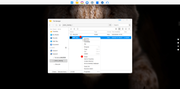
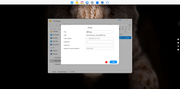
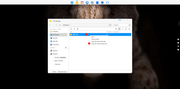
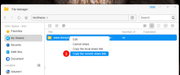
Hello, you can complete remote image sharing by following the steps shown in the screenshot below. The specific operation is: after creating the share, right-click on the "My Shares" page to copy the remote sharing link.
Re: [Share] remote access via domain
No, I need to get a link for external access as a domain, but I only get a link of the IP type
Re: [Share] remote access via domain
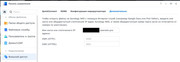
for example on sinology you can do it like this

Re: [Share] remote access via domain
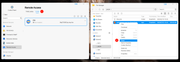
Hello! Please first confirm that your DDNS configuration is correct and has been successfully enabled. After enabling it, we recommend re-sharing the required image. In the 「My Shares」 module, select the sharing link of this image, click Edit, and verify that the address of the remote sharing link is in the form of a domain name. Once the address is confirmed to be correct, simply select and copy the remote link.

Re: [Share] remote access via domain
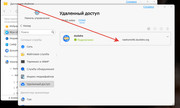
I tried through the Duckdns service, when copying the link it asks to enable TNAS Online.
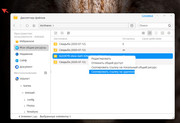
And if I turn on TNAS ONLINE, I get a link like this: https://tnas.online/****
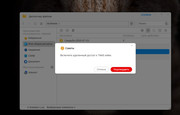
And if I turn on TNAS ONLINE, I get a link like this: https://tnas.online/****
Re: [Share] remote access via domain
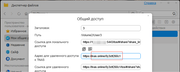
Please edit any existing share and change the 'tnas.online/TNASID' part of the remote link to 'DDNS/WAN IP + mapped port' (e.g., ttyy2349.duckdns.org). After that, all your future shares will automatically use this custom remote link.
To contact our team, please send email to following addresses, remember to replace (at) with @:
Technical team: support(at)terra-master.com (for technical support)
Service team: service(at)terra-master.com (for purchasing, return, replacement, RMA service)
Technical team: support(at)terra-master.com (for technical support)
Service team: service(at)terra-master.com (for purchasing, return, replacement, RMA service)