

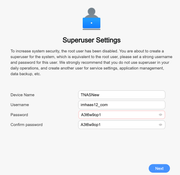
[Help] TOS 6 Superuser setup bad password error
[Help] TOS 6 Superuser setup bad password error
I am trying to setup a new F4-423. After the TOS 6 installation completes and the F4-423 reboots, I get the Superuser setup screen. I create a user id and password that meet the suggerstions and click next. Then I put in my email and click to get the verification code email . When I enter the verification code I get a "password contains illegal characters" pop up error message for about 1 second and then the Superuser setup screen reappears. The same thing happens if I skip verification. I am stuck in this loop and cant get past it. My password is 9 characters and contains uppercase letters, lowercase letters and numbers, so it should meet the criteria. Any idea?


Re: [Help] TOS 6 Superuser setup bad password error
Try a 'special character' in the password?
F5-221 TOS7.0.1201 - 4x4TB (Ironwolf) Traid
F2-424 TOS7.0.1278 - 2x500GB nvme (P3) Traid, 2x6TB HDD (HGST) Traid
F2-221 TOS7.0.1278 - 1x3TB Ext4, 1x4TB Btrfs
F2-425+ TOS7.0.1278 - 2x500GB nvme (P3) Traid, 2x6TB HDD (EXOS) Traid
F2-424 TOS7.0.1278 - 2x500GB nvme (P3) Traid, 2x6TB HDD (HGST) Traid
F2-221 TOS7.0.1278 - 1x3TB Ext4, 1x4TB Btrfs
F2-425+ TOS7.0.1278 - 2x500GB nvme (P3) Traid, 2x6TB HDD (EXOS) Traid


Re: [Help] TOS 6 Superuser setup bad password error
Your system has been installed abnormally, resulting in an abnormal error in the verification of the security mailbox, reporting "The password contains illegal characters". It is recommended that you try to reinstall the system.
To contact our team, please send email to following addresses, remember to replace (at) with @
Technical team: support(at)terra-master.com (for technical support)
Service team: service(at)terra-master.com (for purchasing, return, replacement, RMA service)
Technical team: support(at)terra-master.com (for technical support)
Service team: service(at)terra-master.com (for purchasing, return, replacement, RMA service)