Slow Rsync transfer speeds

Rsync is a backup tool common to most Linux servers and clients.
Post Reply
User avatar
Keane16
Posts: 3
Joined: 19 Oct 2024, 00:49
Seychelles

Slow Rsync transfer speeds

Post by Keane16 »

Hi, I recently got a F6-424. I've been tsting it's capabilities and so far it does everything I want from a functional standpoint, but it's lacking from a performance standpoint when using Rsync.
  • I have my Terra-master F6 server
  • I have another server running Synology DSM
My network is wired - GbE. DSM is using SHR. F6 is using TRAID. Both have spinning hard drives.

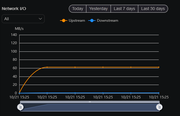
Test 1
Transfer from F6 to DSM (mounted as NFS Remote Folder within TOS 6)
Speed test for copying files - between 60MB/s and 70 MB/s
Image

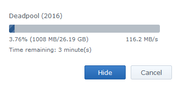
Test 2
Transfer from DSM to F6 (mounted as NFS Remote Folder within DSM)
Speed test for copying files - Between 100MB/s and 120MB/s
Image

Test 3
Connect both servers using Rsync (using Duple Rsync task backup files from F6 to DSM).
Speed test for of backup - between 9MB/s and 10MB/s

Image

The Rsync speed is very slow. I have 8TB of data to transfer via Rsync which would take over 9 days! The same transfer via NFS would take less than a day.

Questions...
1. Is this a limitation of Rsync?
2. Is this a limitation of TOS?
3. Is this a limitation of the F6 hardware?

I am going to try installing OpenMediaVault on my F6 and see if that shows any difference in Rsync speed. If it is faster I can assume the issue is with TOS.
User avatar
TMzethar
TM Support
Posts: 2815
Joined: 27 Oct 2020, 16:43

Re: Slow Rsync transfer speeds

Post by TMzethar »

Regarding the speed of Duple Bakcup's Rsync backups, we did find isolated speed-related issues. We are optimizing it. Please wait for the next version update.
To contact our team, please send email to following addresses, remember to replace (at) with @:
Technical team: support(at)terra-master.com (for technical support)
Service team: service(at)terra-master.com (for purchasing, return, replacement, RMA service)
User avatar
Keane16
Posts: 3
Joined: 19 Oct 2024, 00:49
Seychelles

Re: Slow Rsync transfer speeds

Post by Keane16 »

TMzethar wrote: 22 Oct 2024, 18:26
Thanks for the update. This is a dealbreaker unfortunately. A shame as everything else about the NAS was great, including the price.

Also, I couldn’t install OpenMediaVault. It’s more difficult than it should be to remove the default USB, and you need a tiny USB drive to fit in the space (I didn’t have one small enough). That was a poor design decision on the F6-424. It should’ve been easy to remove/replace the boot USB.
User avatar
Gremlin
Gold Member
Posts: 1620
Joined: 02 Dec 2022, 22:31
Great Britain

Re: Slow Rsync transfer speeds

Post by Gremlin »

Keane16 wrote: 23 Oct 2024, 00:42
TMzethar wrote: 22 Oct 2024, 18:26
Thanks for the update. This is a dealbreaker unfortunately. A shame as everything else about the NAS was great, including the price.

Also, I couldn’t install OpenMediaVault. It’s more difficult than it should be to remove the default USB, and you need a tiny USB drive to fit in the space (I didn’t have one small enough). That was a poor design decision on the F6-424. It should’ve been easy to remove/replace the boot USB.
It's a great design decision if you don't want people running alternative software :roll: There is no reason in your scenario that "it should have been easy".

In any case, it's not that hard to fix. Get an extension usb port on a ribbon cable and use that in the m/board port. Then you have the choice to use other suitable usb drives where they fit.
F5-221 TOS7.0.0777 - 4x4TB (Ironwolf) Traid
F2-424 TOS7.0.0777 - 2x500GB nvme (P3) Traid, 2x6TB HDD (HGST) Traid
F2-221 TOS7.0.0777 - 1x3TB Ext4, 1x4TB Btrfs
F2-425+ TOS7.0.0777 - 2x500GB nvme (P3) Traid, 2x6TB HDD (EXOS) Traid
User avatar
TMroy
TM Support
Posts: 3060
Joined: 10 Mar 2020, 14:04
China

Re: Slow Rsync transfer speeds

Post by TMroy »

Keane16 wrote: 23 Oct 2024, 00:42
As long as the hardware components are not damaged, erasing the native system and installing a third-party system will not void your product warranty. However, we do not encourage such usage.
To contact our team, please send email to following addresses, remember to replace (at) with @:
Support team: support(at)terra-master.com (for technical support only)
Service team: service(at)terra-master.com (for purchasing, return, replacement, RMA service)
User avatar
McCoder67
Posts: 22
Joined: 14 Oct 2024, 03:19
Denmark

Re: Slow Rsync transfer speeds

Post by McCoder67 »

Keane16 wrote: 21 Oct 2024, 22:55
Test 3
Connect both servers using Rsync (using Duple Rsync task backup files from F6 to DSM).
Speed test for of backup - between 9MB/s and 10MB/s
Image

The Rsync speed is very slow. I have 8TB of data to transfer via Rsync which would take over 9 days! The same transfer via NFS would take less than a day.
Had the same experience, or kinda the same

transfering 6.2TB from a Synology NAS (DS-218Plus with mirrored 8TB WD Red) to Terramaster (F4-424 Pro with 12TB Ironwolf Pro as "single disk") i got 15MB/s using RSync :shock:

The Synology was using on average 54% cpu, and the Terramaster was being bored at max 4% CPU
User avatar
Keane16
Posts: 3
Joined: 19 Oct 2024, 00:49
Seychelles

Re: Slow Rsync transfer speeds

Post by Keane16 »

Gremlin wrote: 23 Oct 2024, 17:39 There is no reason in your scenario that "it should have been easy".
I didn't buy this device to hack around, I understand what I bought. I actually wanted to use TOS but it wasn't performant. Thanks to that design decision I returned the device instead of keeping it and using an alt OS.
Gremlin wrote: 23 Oct 2024, 17:39 In any case, it's not that hard to fix. Get an extension usb port on a ribbon cable and use that in the m/board port. Then you have the choice to use other suitable usb drives where they fit.
Or I'd just buy a small USB drive. It would've lived there permanently. Regardless I'm not after buying more stuff. I weighed up a self built NAS vs an off the shelf solution. I went with the F6-424, which ticked all the boxes on paper. But if I'm buying more things and dismantling the NAS to install OMV to get the features I need I may as well have built my own for cheaper and more performance (which is an option again).
TMroy wrote: 24 Oct 2024, 10:07 As long as the hardware components are not damaged, erasing the native system and installing a third-party system will not void your product warranty. However, we do not encourage such usage.
Thanks for clarifying. I didn't want to erase the original drive in case of issues. I'll definitely be keeping an eye on Terramaster products in the future. Looks like you're moving in the right direction. This NAS was nearly perfect for me aside from the Rsync issue.
McCoder67 wrote: 25 Oct 2024, 00:46 Had the same experience, or kinda the same

transfering 6.2TB from a Synology NAS (DS-218Plus with mirrored 8TB WD Red) to Terramaster (F4-424 Pro with 12TB Ironwolf Pro as "single disk") i got 15MB/s using RSync :shock:

The Synology was using on average 54% cpu, and the Terramaster was being bored at max 4% CPU
Yeah shame. Hopefully the updated version with a fix comes out soon if you're still using it.
User avatar
McCoder67
Posts: 22
Joined: 14 Oct 2024, 03:19
Denmark

Re: Slow Rsync transfer speeds

Post by McCoder67 »

Keane16 wrote: 25 Oct 2024, 09:16
McCoder67 wrote: 25 Oct 2024, 00:46 Had the same experience, or kinda the same

transfering 6.2TB from a Synology NAS (DS-218Plus with mirrored 8TB WD Red) to Terramaster (F4-424 Pro with 12TB Ironwolf Pro as "single disk") i got 15MB/s using RSync :shock:

The Synology was using on average 54% cpu, and the Terramaster was being bored at max 4% CPU
Yeah shame. Hopefully the updated version with a fix comes out soon if you're still using it.
Yeah i'm still using it , or rather i still intend to use it. After spending a whole week transferring 6.2TB via Rsync i have "frozen" both my NAS' as the TOS6 update seems to be right around the corner, and i don't want to have to make yet another backup before updating

I'm not disappointed , i knew from reviews that TOS was a little more rough around the edges than Synology and Qnap, but i went with Terramaster anyway because of the price vs hardware specs. And if all else fails i know i can just install TrueNas or OMV.

I also still intend to use Rsync, when i have my F4 up and running with TOS6 , i'm going to set up Rsync the important files to the Synology once a week, powering it down in between, using it as an offline backup.

It'll also be interesting to see how Rsync will perform when it's the TM that's the active part, seeing how much CPU the Synology was using.

the Synology has a dualcore CPU , and it using 54% on average suggests that Rsync was using an entire core running more or less single threaded, and that CPU was the limiting factor.
User avatar
Stevie
Posts: 10
Joined: 07 Jun 2025, 04:18
Germany

Re: Slow Rsync transfer speeds

Post by Stevie »

I see the very same issue: TNAS > DiskStation, transfers at around 17 MB/s on a 2.5 GbE network. Was the fix already released?
Post Reply

Return to “Rsync”