Move to/Copy to shortcuts  [Accepted]

Already accepted requirements or suggestions.
Post Reply
User avatar
koalakoala
Posts: 96
Joined: 14 Jan 2023, 06:34
Australia

Move to/Copy to shortcuts  [Accepted]

Post by koalakoala »

Hi, If possible can you add the following shortcuts to move/copy to? thanks in advance,

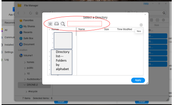
a. Favorites shortcut, once pressed show them in 'directory list'
b. HDD shortcut, once pressed show the HDD's in the 'directory list']
c. search shortcut to find a specific folder
Image

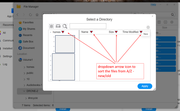
Also, can you add a dropdown arrow icon to sort the files from A/Z - new/old
Image
User avatar
MikeZhang
TM Support
Posts: 381
Joined: 05 Sep 2023, 22:21

Re: Move to/Copy to shortcuts

Post by MikeZhang »

koalakoala wrote: 28 May 2025, 14:08
Hi, this requirement is recorded, please wait for our tech team to verify.

You can click "Name" or "Size" to rearrange display order.
To contact our team, please send email to following addresses, remember to replace (at) with @

Technical team: support(at)terra-master.com(for technical support)
Service team: service(at)terra-master.com(for purchasing, return, replacement, RMA service)
User avatar
koalakoala
Posts: 96
Joined: 14 Jan 2023, 06:34
Australia

Re: Move to/Copy to shortcuts

Post by koalakoala »

Thanks MikeZhang, much appreciated
User avatar
koalakoala
Posts: 96
Joined: 14 Jan 2023, 06:34
Australia

Re: Move to/Copy to shortcuts

Post by koalakoala »

MikeZhang wrote: 28 May 2025, 14:23
koalakoala wrote: 28 May 2025, 14:08
Hi, this requirement is recorded, please wait for our tech team to verify.

You can click "Name" or "Size" to rearrange display order.
Just tested this on TOS 6.0.694.... No, "Name" or "Size" are not clickables. Also Size does not show the size of folders. It seems only works for files.

Thanks again.
User avatar
OrionXie
TM Support
Posts: 151
Joined: 14 Apr 2025, 18:30
Saudi Arabia

Re: Move to/Copy to shortcuts

Post by OrionXie »

koalakoala wrote: 29 May 2025, 12:31
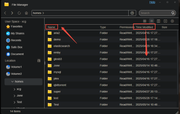
Here, clicking on 'Name' or 'Time Modified' will sort the folders and files within this folder, and modification time can also be sorted.


Image
To contact our team, please send email to following addresses. "(at)" = "@"
Technical team: support(at)terra-master.com
Service team: service(at)terra-master.com
User avatar
koalakoala
Posts: 96
Joined: 14 Jan 2023, 06:34
Australia

Re: Move to/Copy to shortcuts

Post by koalakoala »

OrionXie wrote: 29 May 2025, 16:06Here, clicking on 'Name' or 'Time Modified' will sort the folders and files within this folder, and modification time can also be sorted.

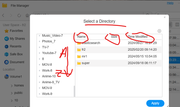
Thanks but this post refers to the "move to/ copy to" workflows. Try to move/copy a file/folder.
These actions " clicking on 'Name' or 'Time Modified' are not supported in the "Select a directory" window.


Image

The A-Z or alphabetically order issue can be seen on the left side. It seems TOS sorts the folder alphabetically - but for volumes-. This is why I suggested the changes described in my original post.

Thanks again
User avatar
TMzethar
TM Support
Posts: 2818
Joined: 27 Oct 2020, 16:43

Re: Move to/Copy to shortcuts

Post by TMzethar »

Understood. Your requirements have been added to the list for discussion.
To contact our team, please send email to following addresses, remember to replace (at) with @:
Technical team: support(at)terra-master.com (for technical support)
Service team: service(at)terra-master.com (for purchasing, return, replacement, RMA service)
User avatar
koalakoala
Posts: 96
Joined: 14 Jan 2023, 06:34
Australia

Re: Move to/Copy to shortcuts

Post by koalakoala »

TMzethar wrote: 30 May 2025, 04:53 Understood. Your requirements have been added to the list for discussion.
Thanks TMzethar , much appreciated
Post Reply

Return to “Accepted”