

Dear TerraMaster Users,
Since the release of TOS 6.0.688 beta, we have received many valuable suggestions and enthusiastic participation from our users. We would like to express our heartfelt gratitude for your support. In order to further enhance the product experience, we have decided to incorporate the three new features from TOS 6.0.688 beta into the upcoming official release. The specific features are as follows:
1.New network management tool
2.Dynamic management of system disks (Add/Move/Delete)
3.Comprehensive optimization of TNAS.online remote access
At the same time, the testing domain https://beta.tnas.online will be taken offline on July 4, 2025, at 16:00 (UTC+8). To avoid any remote access issues after the domain is offline, users who have participated in the TOS 6.0.688 beta testing are advised to reinstall the system to the official version TOS 6.0.694 as soon as possible.
For instructions on reinstalling the system, please refer to the method B in the following link:viewtopic.php?t=423
We sincerely apologize for any inconvenience caused and thank you for your understanding and support.
Best regards,
TerraMaster Technical Support Team
June 26, 2025
-------------------------------------------------------------------------------------------------------------------------------------------------------------------------------------
Dear TerraMaster Users,
TerraMaster is committed to providing you with a more efficient and convenient NAS experience. To further enhance the efficiency and flexibility of the NAS, we are about to launch a brand-new version of the network tools and introduce dynamic system disk management. This TNAS.online update incorporates advanced TPT penetration technology, optimizing connection speed and stability comprehensively. We sincerely invite you to join this beta test and witness the groundbreaking innovations brought by technology!
1. Key Information for Beta Test Participants
①.The TOS system must be version TOS6.0.500 or higher to upgrade.
②.The current system version is incompatible with the SPC function. Please do not enable SPC functionality before or after updating to the beta test version of the system.
③If you have installed TOS 6.0.688 beta version, do not directly upgrade to other stable versions, as this may cause some features to malfunction. The correct approach is to reinstall the system with the stable version.
2. Three Key Features Awaiting Your Exploration
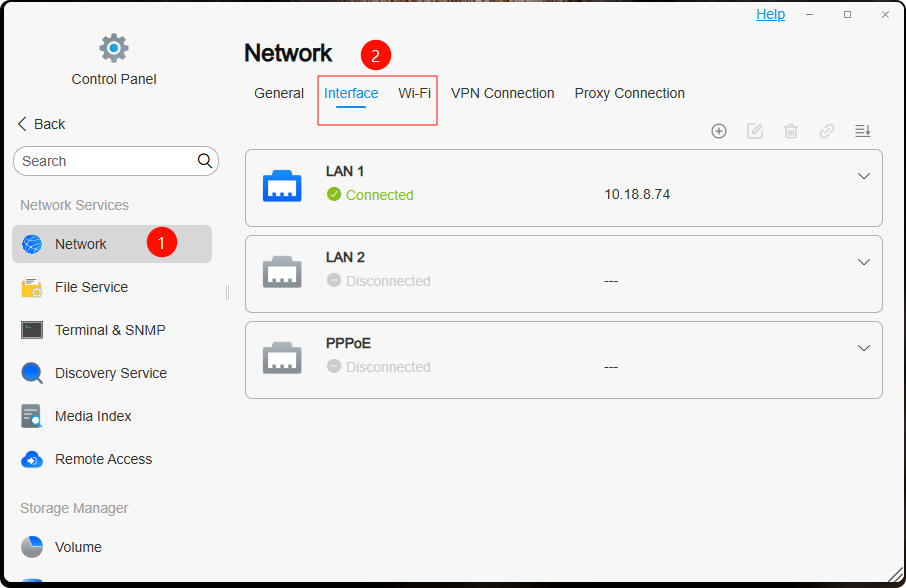
 ①. Network Architecture Upgrade
Technological Innovation: We have integrated a new network management tool. It supports more complex network configurations and fixes and optimizes the IPv6 default gateway setting functionality.
Core Advantage: This upgrade provides advanced users with refined network management capabilities, precisely solving IPv6 gateway configuration issues and aligning network settings more closely with your professional needs.
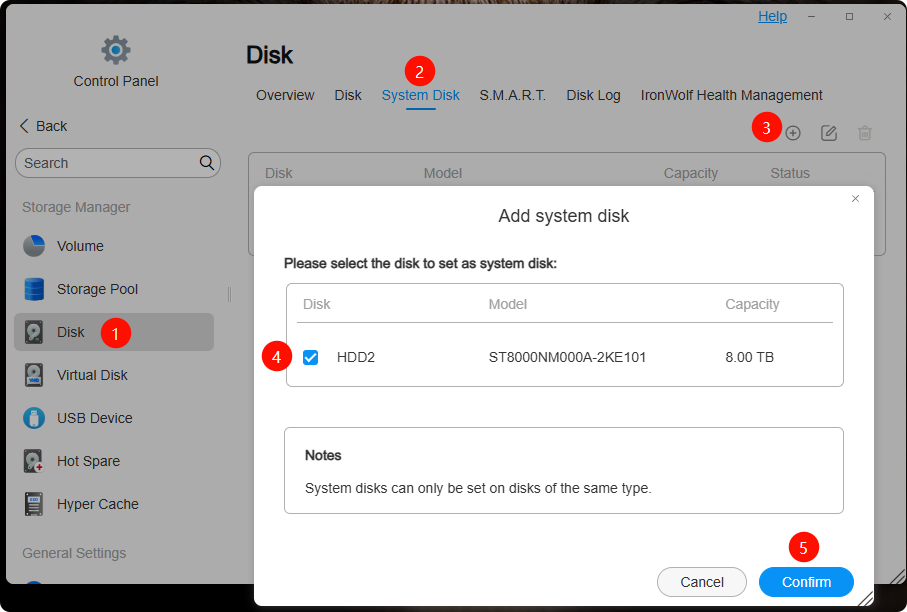
 ②. Dynamic System Disk Management (Add/Move/Delete)
Pain Point Resolution: Previously, when installing TOS6, the system disk configuration was limited to two disks, and changes could not be made later, which restricted system expansion and adjustments. This upgrade breaks that limitation and supports dynamic management of system disks.
Application Scenario: Whether you want to expand your system disk, migrate the system to another disk, or remove an old system disk, you can now do so easily. This not only enhances system security but also greatly improves the flexibility of system resource deployment.
 ③. Full Optimization of TNAS.online Remote Access (Empowered by TPT Technology)
Speed Boost: With the new TPT (TerraMaster Punching Technology), remote access connection speeds are significantly improved.
Enhanced Stability: A new real-time link status monitoring feature has been added, allowing for timely detection of connection interruptions caused by network fluctuations, ensuring that your remote operations remain smooth and uninterrupted.
3. Beta Test Members Enjoy Exclusive Benefits
 Priority Access: You will be the first to unlock the latest features of TOS 6, enjoying the convenience and efficiency brought by cutting-edge technology. Exclusive Feedback Channel: Your feedback and suggestions are crucial. As a beta tester, you have access to an exclusive feedback channel where you can directly report issues to the product team. Your valuable insights will directly impact the product's optimization and iteration process.
4. Detailed Steps for New Feature Experience
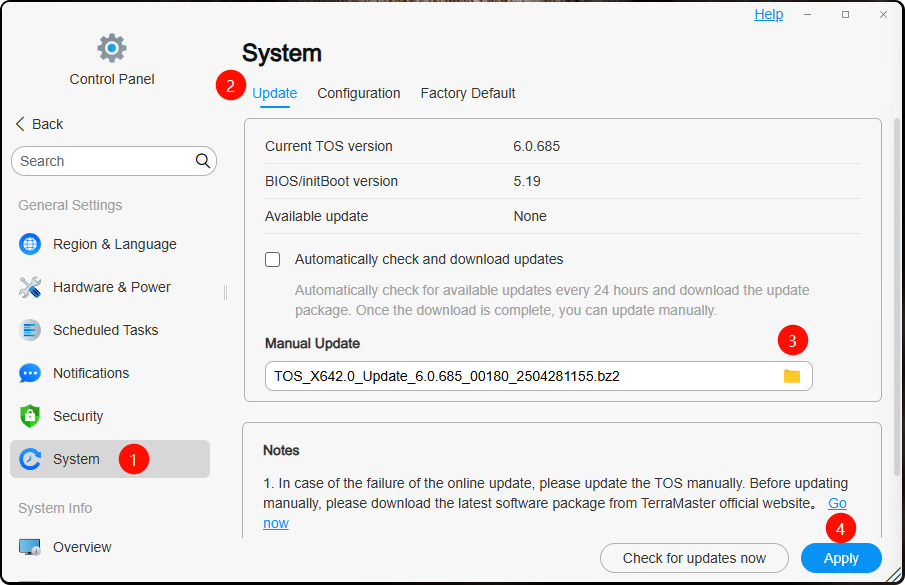
 Update the System to Beta Version TOS6.0.688
Download the TOS6.0.688 update package to your computer. Then, upload and update the system, as shown below:
 Network Architecture Upgrade
The network tools have been updated to involve all functions related to network "interfaces" and "Wi-Fi," as shown below:
 System Disk Management Experience
The new "system disk" function enables the addition, migration, and deletion of system disks, as shown below:
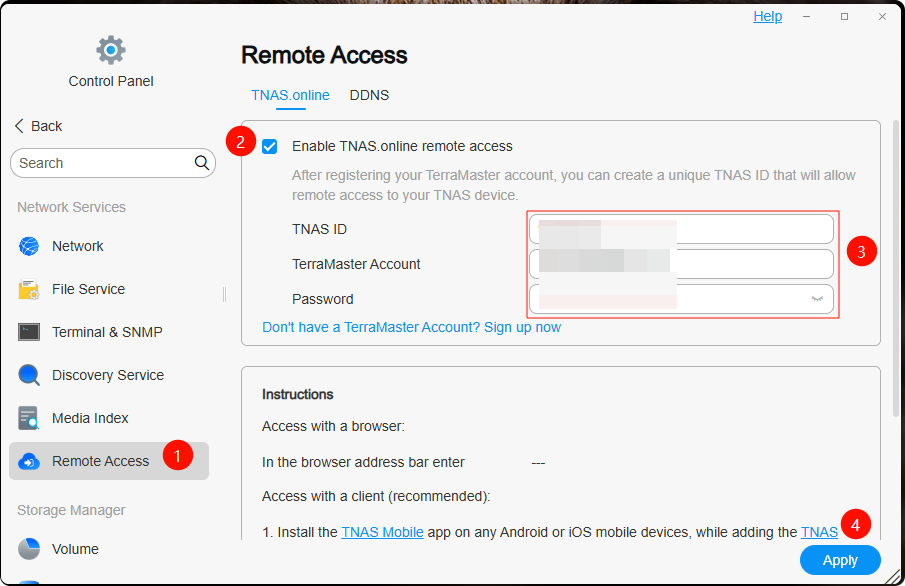
 Steps to Enable TNAS.online Feature
TNAS Configuration:
Create a unique TNAS ID and log in using your TerraMaster account. If you haven’t registered yet, please complete registration in advance via here https://account.terra-master.com/#/register.
Remote Access Methods:
Browser Access: You can access your NAS via the beta-exclusive domain https://beta.tnas.online/TNASID (e.g., if your TNAS ID is jacknas, access it via https://beta.tnas.online/jacknas). This method is suitable for quick, temporary access, but please note that the beta.tnas.online domain is only for this beta test and will be adjusted once officially launched. As this method uses a forwarding server, access speed may be limited by server performance.
Client Access (Recommended - Requires the new version of the client below):
For example, using the TNAS PC for Windows client:
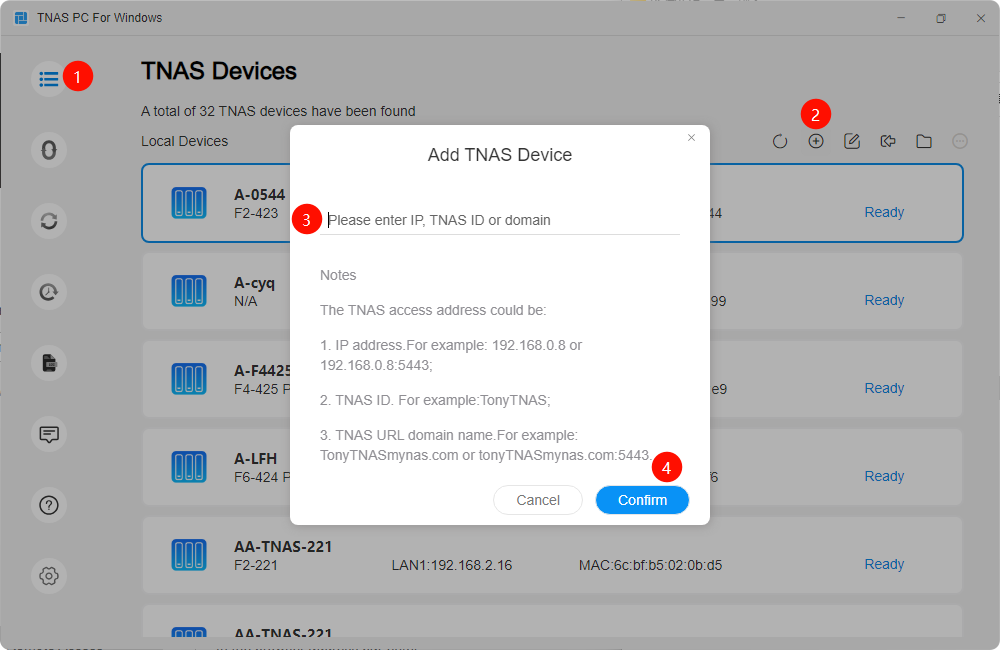
Open the TNAS PC client, click the "+" sign to add the device.
Enter your TNAS ID, TNAS account, and password, then click login.
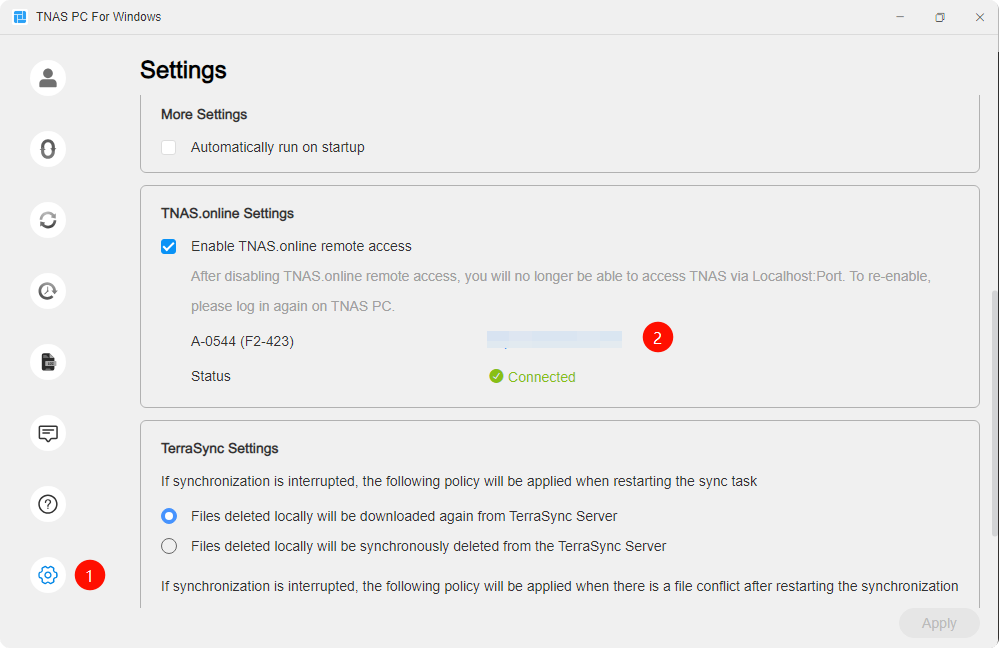
Once logged in, you can view the TNAS.online network connection status in the settings module and quickly access your NAS via http://virtualIP:8181.
For mobile access (TNAS Mobile), the operation logic is similar to the TNAS PC client.
5. Important Notices
 This beta version may contain some issues that have not been fixed. To avoid data loss, please do not use it in a production environment or for critical business scenarios. Before participating in the beta test, it is strongly recommended that you back up important data in case of any unexpected issues during the upgrade. During the upgrade, there may be a change in the NAS IP address. If this occurs, you can use the TNAS PC tool to search and obtain the new IP address.
6. Feedback and Support
 Feedback Channels:
For any issues with the three features above, please reply to this beta test post with a detailed description of the problem and any relevant screenshots to help us understand the situation more clearly.
You may also email us at [email protected] with the subject line [TOS6.0.688 Beta Feedback], and please include a detailed description of the issue along with any screenshots or logs (if available), as this will help us efficiently diagnose and resolve the issue.
The TerraMaster team looks forward to your active participation! Your feedback is our driving force in continuously improving our products. If you have any questions during the beta test, feel free to contact us.
Thank you for your continued support and trust!
TerraMaster Product Team
May 20, 2025


