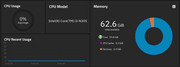
I just bought the F8 SSD Plus and I successfully upgraded the RAM to 48GB (Corsair CMSX48GX5M1A4800C40) under TOS 6.0
I took about 5 minutes to boot, after the RAM change
Guide 48GB RAM in F8 SSD Plus works great!


Re: Guide 48GB RAM in F8 SSD Plus works great!
Due to the large memory, the verification time may not be as fast. We suggest waiting for 5-15 minutes before trying again.
To contact our team, please send email to following addresses. "(at)" = "@"
Technical team: support(at)terra-master.com
Service team: service(at)terra-master.com
Technical team: support(at)terra-master.com
Service team: service(at)terra-master.com
-
godfather73

- Posts: 2
- Joined: 19 May 2025, 17:31


Re: Guide 48GB RAM in F8 SSD Plus works great!
i gave it another try : after waiting 3 min, the NAS did boot succesfully. indeed just need to be patient
F8 SSD Plus / 16GB
Lexar NM790 2 to * 8
MADN0301.V02 / TOS 6.0.673 / BIOS Revision: 5.26
Lexar NM790 2 to * 8
MADN0301.V02 / TOS 6.0.673 / BIOS Revision: 5.26
Re: Guide 48GB RAM in F8 SSD Plus works great!
Thank you for your patience and sharing. This might help others who face the similiar issues.
To contact our team, please send email to following addresses. "(at)" = "@"
Technical team: support(at)terra-master.com
Service team: service(at)terra-master.com
Technical team: support(at)terra-master.com
Service team: service(at)terra-master.com

Re: Guide 48GB RAM in F8 SSD Plus works great!
Thanks for the inspiration. I successfully booted TrueNAS with 64GB Crucial - CT64G56C46S5.