
We apologize that the previous download link is no longer available. The download address has been updated and you may now attempt to download again.
TNAS PC Update
Re: TNAS PC Update
To contact our team, please send email to following addresses, remember to replace (at) with @:
Technical team: support(at)terra-master.com(for technical support)
Service team: service(at)terra-master.com(for purchasing, return, replacement, RMA service)
Technical team: support(at)terra-master.com(for technical support)
Service team: service(at)terra-master.com(for purchasing, return, replacement, RMA service)


Re: TNAS PC Update
Updated by downloading from the downloads page. The link provided here is working.
https://support.terra-master.com/downlo ... t=F8%20SSD
https://support.terra-master.com/downlo ... t=F8%20SSD
TerraMaster F8, TerraMaster F2-425, Syno 218+
Re: TNAS PC Update
Why does a NAS manufacturer make an installer that can't install a program from a network volume?! Why does macOS even need an installer? But the launch restriction is something else.


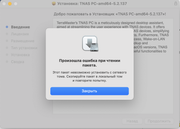
An error occurred while reading the package.
This package cannot be installed from a network volume. Copy the package to a local volume and try again.
TerraMaster F8, TerraMaster F2-425, Syno 218+
Re: TNAS PC Update
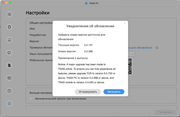
A new version of TNAS for macOS has been released, I click the Download button, a link opens:
https://download3.terra-master.com/Apps ... .2.288.pkg
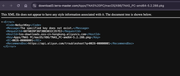
An error file opens:
I was able to download from the product download page
https://support.terra-master.com/downlo ... t=F8%20SSD
https://download3.terra-master.com/Apps ... .2.288.pkg
An error file opens:
This XML file does not appear to have any style information associated with it. The document tree is shown below.
<Error>
<Code>NoSuchKey</Code>
<Message>The specified key does not exist.</Message>
<RequestId>687AB39F36F3BB3032C357E2</RequestId>
<HostId>tos-downloads.oss-cn-hongkong.aliyuncs.com</HostId>
<Key>Apps/TNAS PC/macOS/X86/TNAS_PC-amd64-5.2.288.pkg</Key>
<EC>0026-00000001</EC>
<RecommendDoc>https://api.aliyun.com/troubleshoot?q=0 ... commendDoc>
</Error>
I was able to download from the product download page
https://support.terra-master.com/downlo ... t=F8%20SSD
TerraMaster F8, TerraMaster F2-425, Syno 218+
Re: TNAS PC Update
B again I can't install the program for NAS because it is on NAS.
I am amazed by the level of your employees...
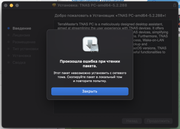
I am amazed by the level of your employees...
TerraMaster F8, TerraMaster F2-425, Syno 218+
Re: TNAS PC Update
How to install an application, why it is not installed from a network drive. All regular applications are installed from a network drive without problems.
TerraMaster F8, TerraMaster F2-425, Syno 218+


Re: TNAS PC Update
We are very sorry for the trouble caused to you. Please try downloading the installation package to your mac before installing it.
Meanwhile, I will feed back your issue to the product team.
Meanwhile, I will feed back your issue to the product team.
To contact our team, please send email to following addresses, remember to replace (at) with @
Technical team: support(at)terra-master.com(for technical support)
Service team: service(at)terra-master.com(for purchasing, return, replacement, RMA service)
Technical team: support(at)terra-master.com(for technical support)
Service team: service(at)terra-master.com(for purchasing, return, replacement, RMA service)
Re: TNAS PC Update
I will not download the program for NAS on Mac, I am waiting for the correction of the crooked craft and when it will start to run from the network drive, what is the time frame for the solution?
TerraMaster F8, TerraMaster F2-425, Syno 218+

Re: TNAS PC Update
We sincerely apologize for the inconvenience! Due to an error during our download resource reorganization, the latest version file was mistakenly modified, causing the download link to become invalid. This issue has now been resolved. Please re-download the update package.
To contact our team, please send email to following addresses, remember to replace (at) with @
Technical team: support(at)terra-master.com (for technical support)
Service team: service(at)terra-master.com (for purchasing, return, replacement, RMA service)
Technical team: support(at)terra-master.com (for technical support)
Service team: service(at)terra-master.com (for purchasing, return, replacement, RMA service)