Hello. I've updated from 6.0.650 to 6.0.673. For the first try countdown timer reached zero and nothing. after rebooting page and manual update, update have began.
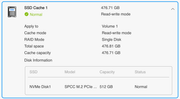
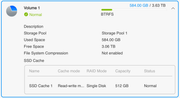
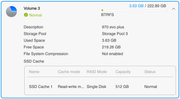
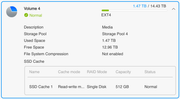
but bug with volumes is presented. recently i've configured hyper cache for Volume 1. When I open the details for Volume 1, I see the ssd cache info. then when I open the details of the other Volumes, they also have the ssd cache info. If I don't open the info for Volume 1, the others won't have that information.
We've been experiencing the problem since TOS 6, with email notifications not working. They don't work via local or custom SMTP. I'm trying it, and nothing has worked since TOS 5.
Please explain how you're getting notifications.
I'd also like to add that when I set the custom SMTP option, it deletes the password field and won't let me send test emails.
Your issue could be different from the email notification common issue, because yours always exist from TOS 5.
During the initial release phase of TOS 6, we implemented a new email toolkit that inadvertently caused validation issues with certain mail server configurations in specific environments. This matter was subsequently resolved through adjustments to our email delivery protocols. Since then, no further reports of similar issues have been received from users who previously experienced email delivery failures.
Regarding your case, we believe the issue may be related to unique network conditions or configuration settings within your environment. To resolve this effectively, we will need to conduct a thorough investigation tailored to your specific setup.
To contact our team, please send email to following addresses, remember to replace (at) with @:
Support team: support(at)terra-master.com (for technical support only)
Service team: service(at)terra-master.com (for purchasing, return, replacement, RMA service)
Gremlin wrote: ↑23 Apr 2025, 21:48
If you are seeing 'local' as being a problem I wonder if this is geographical blocking on one side or other.
The problem may be geographical, we're waiting for Terramaster to respond, as it's not working for many users.
Your information is incorrect. You can check the forum records; since the release of version 6.0.650, you are the first to report that the email notification feature is not working. Anyway, please cooperate with us as we investigate your case.
To contact our team, please send email to following addresses, remember to replace (at) with @:
Support team: support(at)terra-master.com (for technical support only)
Service team: service(at)terra-master.com (for purchasing, return, replacement, RMA service)
In view of the abnormal problem you encountered, please contact LiveChat on our official website. We will arrange professional technicians to provide remote technical support for you and fully assist you in locating and solving the problem.
To contact our team, please send email to following addresses, remember to replace (at) with @
Technical team: support(at)terra-master.com (for technical support)
Service team: service(at)terra-master.com (for purchasing, return, replacement, RMA service)
Please contact the customer service window on our homepage or the technical support email: https://www.terra-master.com/
support(at)terra-master.com
we can offer remote inspection services.
HI!
1. Regarding your feedback: No response after decompression countdown. It might be due to various reasons that the system failed to complete decompression within 60 seconds, resulting in no reaction. We will add progress indicators and decompression result prompts in future updates. Thank you for your feedback.
2. Since the system automatically checks for available updates and downloads update packages every 24 hours, it will perform the next automatic check and download only when the scheduled time arrives.
3. System update notifications have been designed to operate independently from regular "system event" notifications and will be pushed as a separate notification in the future.
2. Since the system automatically checks for available updates and downloads update packages every 24 hours, it will perform the next automatic check and download only when the scheduled time arrives.
I had expected, since I could see the available update referenced in the control panel, that it would have been downloaded at that point. Otherwise, I would not have mentioned it.
What is "the scheduled time" - I have no setting as far as I can see, so that would depend on the update server?
Hi!
"Scheduled time" refers to the system automatically checking for available updates and downloading update packages every 24 hours after enabling automatic check and download.