

In my case, it's not the fault of the TOS OS or of BRTFS or EXT4; I had a slow disk. I performed a low-level format with HDD Low Level Format Tool and everything works like a Swiss watch. The testing tools from Terramaster on the NAS are not useful for identifying a problem in the HDD, but their software is solid, which makes me happy.
Edit: well, solid... not so much while I'm installing phpMyAdmin and clicking to install Plex, phpMyAdmin appears flashing as installed, and after a while, the installation percentage shows up lol
TOS 6.0.610 (X86) is Released for Update

Re: TOS 6.0.610 (X86) is Released for Update
This issue has already been resolved in an earlier update. Please update to the latest version of TOS6 to ensure you have the fix.
To contact our team, please send email to following addresses, remember to replace (at) with @:
Technical team: support(at)terra-master.com (for technical support)
Service team: service(at)terra-master.com (for purchasing, return, replacement, RMA service)
Technical team: support(at)terra-master.com (for technical support)
Service team: service(at)terra-master.com (for purchasing, return, replacement, RMA service)


Re: TOS 6.0.610 (X86) is Released for Update
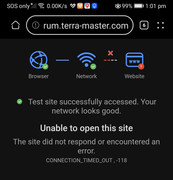
Thanks for clarification, only way NOW still using phone data as link to access TerraMaster forum. PC can access all sites except TerraMaster forum through router. Will troubleshoot.
Below is a pic to have verification of my router/pc no internet access problem. Strange outcome?
F2-223, TOS 6.0.648, 2x8T N300 HDD Vol 1 & 3 (Singles)
1x1T Kingston NVME SSD Vol 2 (Single)
1x256G Hynix NVME SSD Hyper Cache (Balance Mode, 238G)
32G RAM
1x1T Kingston NVME SSD Vol 2 (Single)
1x256G Hynix NVME SSD Hyper Cache (Balance Mode, 238G)
32G RAM
Re: TOS 6.0.610 (X86) is Released for Update
Due to recent attacks, some address segments have been temporarily blocked by the system. Unfortunately, this may include your address. The block should be lifted after some time, but we cannot provide an exact timeframe.
To contact our team, please send email to following addresses, remember to replace (at) with @:
Technical team: support(at)terra-master.com (for technical support)
Service team: service(at)terra-master.com (for purchasing, return, replacement, RMA service)
Technical team: support(at)terra-master.com (for technical support)
Service team: service(at)terra-master.com (for purchasing, return, replacement, RMA service)
Re: TOS 6.0.610 (X86) is Released for Update
Thanks for the supports. Now can access forum in a normal way through the router but slow.
Hoping the attack story is over, peace n happiness.
F2-223, TOS 6.0.648, 2x8T N300 HDD Vol 1 & 3 (Singles)
1x1T Kingston NVME SSD Vol 2 (Single)
1x256G Hynix NVME SSD Hyper Cache (Balance Mode, 238G)
32G RAM
1x1T Kingston NVME SSD Vol 2 (Single)
1x256G Hynix NVME SSD Hyper Cache (Balance Mode, 238G)
32G RAM


Re: TOS 6.0.610 (X86) Fan speed is abnormal
current TOS is 6.0.648TMeric wrote: ↑09 Feb 2025, 10:55Please try switching the fan mode to "Full Speed" and then observe the fan speed. By the way, what is the BIOS version of your F5-422? You can check the BIOS version by going to TOS Control Panel > General Settings > System > Update > BIOS/InitBoot.Sam5spd wrote: ↑09 Feb 2025, 07:20 Just updated to 6.0.610 and shorty after got notification to "please check for blockage or malfunctions in the fan" noticed the fan not spinning, went to setting then hardware - Fan , low speed was selected , switched to automatic and APPLY. a few seconds later the fan started. about 30 min later got the same notification when i looked at the setting it was back to LOW. switched to Medium and Apply. then fan turned on. when i closed the setting tab, and went back to check it was back to LOW. it seems the Apply function is not working. and the fan will stop on its own after 30 min and push a notification. fan will stay off until I adjust fan settings. but will go back to LOW regardless.
any suggestions. ? hopefully a fix
BIOS is MADN0101.v05
for the F4-424 PRo
so the notification goes off every 30 min. the fan is working . temps are good. but for some reason the beeping and notification happen every 30 min. the fan speed selection will not save after making a change. it will always go back to "low" even after selecting another option and hitting "apply" when I leave the tab or close it. the fan setting is back to LOW. is there a way to disable the beeping ?
I hoped that the most recent update would have fixed this.
thanks for your reply
Re: TOS 6.0.610 (X86) Fan speed is abnormal
We suggest starting with system and storage troubleshooting. When the issue occurs again, please generate and download the log report package in TOS > Technical Support > Report Issues, and then send it to support(at)terra-master.com for inspection.Sam5spd wrote: ↑01 Mar 2025, 22:18current TOS is 6.0.648TMeric wrote: ↑09 Feb 2025, 10:55Please try switching the fan mode to "Full Speed" and then observe the fan speed. By the way, what is the BIOS version of your F5-422? You can check the BIOS version by going to TOS Control Panel > General Settings > System > Update > BIOS/InitBoot.Sam5spd wrote: ↑09 Feb 2025, 07:20 Just updated to 6.0.610 and shorty after got notification to "please check for blockage or malfunctions in the fan" noticed the fan not spinning, went to setting then hardware - Fan , low speed was selected , switched to automatic and APPLY. a few seconds later the fan started. about 30 min later got the same notification when i looked at the setting it was back to LOW. switched to Medium and Apply. then fan turned on. when i closed the setting tab, and went back to check it was back to LOW. it seems the Apply function is not working. and the fan will stop on its own after 30 min and push a notification. fan will stay off until I adjust fan settings. but will go back to LOW regardless.
any suggestions. ? hopefully a fix
BIOS is MADN0101.v05
for the F4-424 PRo
so the notification goes off every 30 min. the fan is working . temps are good. but for some reason the beeping and notification happen every 30 min. the fan speed selection will not save after making a change. it will always go back to "low" even after selecting another option and hitting "apply" when I leave the tab or close it. the fan setting is back to LOW. is there a way to disable the beeping ?
I hoped that the most recent update would have fixed this.
thanks for your reply
Additionally, if you can accept, you can try to reinstall TOS, which can reset the system files that may be incorrect.
To contact our team, please send email to following addresses, remember to replace (at) with @:
Technical team: support(at)terra-master.com (for technical support)
Service team: service(at)terra-master.com (for purchasing, return, replacement, RMA service)
Technical team: support(at)terra-master.com (for technical support)
Service team: service(at)terra-master.com (for purchasing, return, replacement, RMA service)
-
bubblegumchik

- Posts: 0
- Joined: 06 Mar 2025, 03:23

Re: TOS 6.0.610 (X86) is Released for Update
hello,
does anyone has issue with high cpu utilisation of TOSDaemon?
i have a strange behavior of this process. it's rise just for fun until not use all cpu and of course it slow the nas.
it started **.610 firmware
does anyone has issue with high cpu utilisation of TOSDaemon?
i have a strange behavior of this process. it's rise just for fun until not use all cpu and of course it slow the nas.
it started **.610 firmware
Re: TOS 6.0.610 (X86) is Released for Update
TOSDamon is mainly related to TOS web functions. Are you continuously running relevant features on the TOS webpage or have multiple TOS webpages opened simultaneously?
If you believe the observed phenomenon is clearly abnormal, you can contact the official website's customer service window or technical support email to schedule an engineer for a remote inspection.
To contact our team, please send email to following addresses, remember to replace (at) with @:
Technical team: support(at)terra-master.com (for technical support)
Service team: service(at)terra-master.com (for purchasing, return, replacement, RMA service)
Technical team: support(at)terra-master.com (for technical support)
Service team: service(at)terra-master.com (for purchasing, return, replacement, RMA service)