VPN says Connected but not working

IPv4/6, Port, VPN, proxy, SSH, remote access and more.
User avatar
francmua
Posts: 6
Joined: 21 Dec 2024, 17:37
Great Britain

VPN says Connected but not working

Post by francmua »

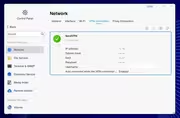
I have managed to connect OpenVPN config in TOS6, however whenever the NAS reboots (or starts up again after a shutdown), even though the VPN says it's connected in TOS, nothing is assigned and the VPN is not working.

I have to manually disconnect the VPN and reconnect, then it assigns the IP. Is this a known issue and is it something that will be fixed in a future TOS update? Or is there a workaround?

Image
User avatar
EthanLiu
TM Product Manager
Posts: 177
Joined: 13 Nov 2023, 14:25
China

Re: VPN says Connected but not working

Post by EthanLiu »

francmua wrote: 16 Jan 2025, 20:25
Please describe the detailed operational steps, and we will arrange for the laboratory to conduct relevant verification.
To contact our team, please send email to following addresses, remember to replace (at) with @
Technical team: support(at)terra-master.com (for technical support)
Service team: service(at)terra-master.com (for purchasing, return, replacement, RMA service)
User avatar
francmua
Posts: 6
Joined: 21 Dec 2024, 17:37
Great Britain

Re: VPN says Connected but not working

Post by francmua »

TMpraj wrote: 16 Jan 2025, 21:40
francmua wrote: 16 Jan 2025, 20:25
Please describe the detailed operational steps, and we will arrange for the laboratory to conduct relevant verification.
Sure - here's what I did.

1. Setting Up the VPN Connection:
• Navigated to TOS → Control Panel → Network → VPN Connection.
• Selected “OpenVPN by importing a .ovpn file.”
• Filled in Name, Username & Password: (NordVPN credentials), Imported .ovpn file (Downloaded from NordVPN).
• SSL Certificate*: Extracted the certificate from the .ovpn file, saved it as a separate .crt file, and uploaded it in the SSL Certificate field.
• Advanced Settings: Left all fields blank.

*TOS threw a “Configuration failed!” error when trying to add the VPN without an SSL certificate. Adding it as a seperate .crt allowed the VPN configuration to be added successfully.

2. VPN Connection Behavior:
• After adding the VPN, it connects successfully.
• IP address, subnet mask, sent and received bytes all display correctly.
• VPN connection works as expected.

3. Issue After Reboot:
• Restarted the NAS.
• Logged back into to check TOS → Control Panel → Network → VPN Connection.
• The VPN connection shows as “Connected”, but: IP address is blank. Subnet mask is blank. Sent and received bytes are blank.
• Username remains filled in, but everything else is missing (as in the photo in the original post)
• The NAS is not actually using the VPN connection, despite showing as “Connected.”

4. Temporary Workaround:
• Manually disconnect and reconnect the VPN.
• After reconnecting, the VPN functions normally again.

Expected Behavior:
• The VPN should retain its connection state after a reboot and assign a NordVPN IP properly without requiring a manual reconnect.
User avatar
GevinKe
TM Product Manager
Posts: 251
Joined: 08 Dec 2023, 10:27
China

Re: VPN says Connected but not working

Post by GevinKe »

francmua wrote: 17 Jan 2025, 00:43
Hello, regarding the VPN issue, we have received your feedback and will arrange for a fix as soon as possible. Please be patient and wait for the release of the new version.
To contact our team, please send email to following addresses, remember to replace (at) with @:

Technical team: support(at)terra-master.com(for technical support)
Service team: service(at)terra-master.com(for purchasing, return, replacement, RMA service)
User avatar
Phildefer
Posts: 30
Joined: 05 Oct 2024, 04:00
France

Re: VPN says Connected but not working

Post by Phildefer »

Hi,
I'm trying to do the same thing. I have extracted the certificate. I choose add vpn connection -> openvpn with ovpn file I don't fill the advanced fields but I have a error when I want to connect the NAS. Is it possible to have the complete process to add this vpn client connection ?
Thx.
Philippe
User avatar
Hausmeier
Posts: 49
Joined: 03 Dec 2024, 07:09
Greenland

Re: VPN says Connected but not working

Post by Hausmeier »

Same issue here. I can save save a connection, but to do so I have to Extrakt the crt key. When I want to activate it, it loads and loads (Shopping the loading circle) but Nottingham happened. If I reload the web-if it says connected but it isn't as the ip doesn't change.
Please help, in tos5 it worked without problems
User avatar
Phildefer
Posts: 30
Joined: 05 Oct 2024, 04:00
France

Re: VPN says Connected but not working

Post by Phildefer »

Still no solution for this issue? I have tried a lot of options but without success :-(
User avatar
Phildefer
Posts: 30
Joined: 05 Oct 2024, 04:00
France

Re: VPN says Connected but not working

Post by Phildefer »

Sorry to insist, but is there someone from TM who could try to help us or solve this issue?
Thx
User avatar
TMzethar
TM Support
Posts: 2819
Joined: 27 Oct 2020, 16:43

Re: VPN says Connected but not working

Post by TMzethar »

Sorry, for the time being, configurations from some third-party VPN services are not compatible. They may come with unique standards that are not compatible with the Linux standard VPN client for NAS.
We are discussing to add adaptations for some highly utilized VPN services.
To contact our team, please send email to following addresses, remember to replace (at) with @:
Technical team: support(at)terra-master.com (for technical support)
Service team: service(at)terra-master.com (for purchasing, return, replacement, RMA service)
User avatar
Phildefer
Posts: 30
Joined: 05 Oct 2024, 04:00
France

Re: VPN says Connected but not working

Post by Phildefer »

Thx, I'm looking forward to see these new adaptations.
Post Reply

Return to “Network”