TMpraj wrote: ↑16 Jan 2025, 21:40
Please describe the detailed operational steps, and we will arrange for the laboratory to conduct relevant verification.
Sure - here's what I did.
1. Setting Up the VPN Connection:
• Navigated to TOS → Control Panel → Network → VPN Connection.
• Selected “OpenVPN by importing a .ovpn file.”
• Filled in Name, Username & Password: (NordVPN credentials), Imported .ovpn file (Downloaded from NordVPN).
• SSL Certificate*: Extracted the certificate from the .ovpn file, saved it as a separate .crt file, and uploaded it in the SSL Certificate field.
• Advanced Settings: Left all fields blank.
*TOS threw a “Configuration failed!” error when trying to add the VPN without an SSL certificate. Adding it as a seperate .crt allowed the VPN configuration to be added successfully.
2. VPN Connection Behavior:
• After adding the VPN, it connects successfully.
• IP address, subnet mask, sent and received bytes all display correctly.
• VPN connection works as expected.
3. Issue After Reboot:
• Restarted the NAS.
• Logged back into to check TOS → Control Panel → Network → VPN Connection.
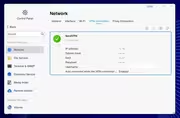
• The VPN connection shows as “Connected”, but: IP address is blank. Subnet mask is blank. Sent and received bytes are blank.
• Username remains filled in, but everything else is missing (as in the photo in the original post)
• The NAS is not actually using the VPN connection, despite showing as “Connected.”
4. Temporary Workaround:
• Manually disconnect and reconnect the VPN.
• After reconnecting, the VPN functions normally again.
Expected Behavior:
• The VPN should retain its connection state after a reboot and assign a NordVPN IP properly without requiring a manual reconnect.