6.0.610 running fine on the F2-423, it came with TOS5 so did the two updates and now have it fully set up on 6.0.610
its definitely a step up from TOS4
TOS 6.0.610 (X86) is Released for Update
-
sianderson

- Silver Member
- Posts: 457
- Joined: 02 Aug 2020, 03:42

Re: TOS 6.0.610 (X86) is Released for Update
F2-424 TOS 7.0.1341
F2-423 TOS 7.0.1341
F2-210 TOS 4.2.44
D4-320
C/O
F4-424 TOS 6.0.794
F2-423 TOS 7.0.1341
F2-210 TOS 4.2.44
D4-320
C/O
F4-424 TOS 6.0.794


Re: TOS 6.0.610 (X86) is Released for Update
6.0.577 -> 6.0.610 update fine, NAS work for about 10 minutes, BUT next media index rebuild started and device became unaccessible on network.
device changed their IP address, its strange because it have static IP address based on its MAC address. reboot helps.
device changed their IP address, its strange because it have static IP address based on its MAC address. reboot helps.
F5-221 | 7.0.0517 | 10GB RAM | 4x4.00TB Seagate IronWolf TRAID/BTRFS
F4-423 | 6.0.794-01324 | 32GB RAM | 2x512GB NVME System | 4x8.00TB Seagate IronWolf TRAID/BTRFS
F4-423 | 6.0.794-01324 | 32GB RAM | 2x512GB NVME System | 4x8.00TB Seagate IronWolf TRAID/BTRFS


Re: TOS 6.0.610 (X86) is Released for Update
Hello! We sincerely apologize for the inconvenience caused.
Rebuilding the index is definitely not the reason for the IP change. Under normal circumstances, updating the system should not alter a static IP address. The issue might be due to unknown reasons in our experiments, and we will pay close attention to this matter for further verification. Additionally, if you are unable to access the device, you can try using TNAS PC to modify the IP address.
Re: TOS 6.0.610 (X86) is Released for Update
It seems strange, because it's not really static on device. It's statically defined by my DHCP server on the LAN, so DHCP renewal shouldn't change the IP address in any way.
F5-221 | 7.0.0517 | 10GB RAM | 4x4.00TB Seagate IronWolf TRAID/BTRFS
F4-423 | 6.0.794-01324 | 32GB RAM | 2x512GB NVME System | 4x8.00TB Seagate IronWolf TRAID/BTRFS
F4-423 | 6.0.794-01324 | 32GB RAM | 2x512GB NVME System | 4x8.00TB Seagate IronWolf TRAID/BTRFS

Re: TOS 6.0.610 (X86) is Released for Update
How to update f2-423 from tos5 to tos6, please write?sianderson wrote: ↑27 Jan 2025, 00:19 6.0.610 running fine on the F2-423, it came with TOS5 so did the two updates and now have it fully set up on 6.0.610
its definitely a step up from TOS4

Re: TOS 6.0.610 (X86) is Released for Update
F5-221 TOS7.0.1278 - 4x4TB (Ironwolf) Traid
F2-424 TOS7.0.1278 - 2x500GB nvme (P3) Traid, 2x6TB HDD (HGST) Traid
F2-221 TOS7.0.1278 - 1x3TB Ext4, 1x4TB Btrfs
F2-425+ TOS7.0.1278 - 2x500GB nvme (P3) Traid, 2x6TB HDD (EXOS) Traid
F2-424 TOS7.0.1278 - 2x500GB nvme (P3) Traid, 2x6TB HDD (HGST) Traid
F2-221 TOS7.0.1278 - 1x3TB Ext4, 1x4TB Btrfs
F2-425+ TOS7.0.1278 - 2x500GB nvme (P3) Traid, 2x6TB HDD (EXOS) Traid
-
sianderson
- Silver Member
- Posts: 457
- Joined: 02 Aug 2020, 03:42
Re: TOS 6.0.610 (X86) is Released for Update
Yep, upgraded to 6.0.530 manually as per the link from Gremlin, then the unit sees 610 as an update from within the control panel rather than doing manual updates
F2-424 TOS 7.0.1341
F2-423 TOS 7.0.1341
F2-210 TOS 4.2.44
D4-320
C/O
F4-424 TOS 6.0.794
F2-423 TOS 7.0.1341
F2-210 TOS 4.2.44
D4-320
C/O
F4-424 TOS 6.0.794
-
StephenNaylor

- Posts: 41
- Joined: 07 May 2023, 00:33
Re: TOS 6.0.610 (X86) is Released for Update
Spotted an issue today. Renamed a file using File Manager and got a message that the update had failed as the file name was invalid. I did a bit of analysis around this and it happens if the original file has an apostrophe in the file name (which I assume must be valid) and the renamed file still includes the apostrophe.
Example
Shake Your Money Maker [30th Anniversary Deluxe] [Disc 3]-02-Thick N' Thin [Live]-The Black Crowes.flac
Changing to
Shake Your Money Maker [30th Anniversary Deluxe] [Disc 3]-302-Thick N' Thin [Live]-The Black Crowes.flac
Gives, "The file name contains invalid characters"
If I try again and remove the apostrophe in "Thick N' Thin" :
Shake Your Money Maker [30th Anniversary Deluxe] [Disc 3]-302-Thick N Thin [Live]-The Black Crowes.flac
The renaming completes successfully.
I think this is a bug because the apostrophe in the original file name must have been valid when the file was copied to the plex server.
Example
Shake Your Money Maker [30th Anniversary Deluxe] [Disc 3]-02-Thick N' Thin [Live]-The Black Crowes.flac
Changing to
Shake Your Money Maker [30th Anniversary Deluxe] [Disc 3]-302-Thick N' Thin [Live]-The Black Crowes.flac
Gives, "The file name contains invalid characters"
If I try again and remove the apostrophe in "Thick N' Thin" :
Shake Your Money Maker [30th Anniversary Deluxe] [Disc 3]-302-Thick N Thin [Live]-The Black Crowes.flac
The renaming completes successfully.
I think this is a bug because the apostrophe in the original file name must have been valid when the file was copied to the plex server.
-
StephenNaylor
- Posts: 41
- Joined: 07 May 2023, 00:33
Re: TOS 6.0.610 (X86) is Released for Update
My NAS (F5-422) has decided to run a synchronisation a day after I upgraded (possibly as I powered it off when it fell off the network (NB that seems to be an issue with my Network rather than the NAS). There is nothing on my dashboard notifications to say that a synchronisation has started. I assume there should be as I was not aware that this was going on.
The Dashboard says that the synchronisation is at 93.8%. The Control Panel (Volume and Storage Pool) both say it is at 84.75. I assume the dashboard and Control Panel should show the same figure.
I looked at the resource monitor. The Resource Utilization graph shows the Resource Utilization at 100%.
The Y Axis of the Resource Monitor goes up to 200%! I assume that scale should be set to 100% maximum.
The dashboard says that the system is sluggish with 100% load. The Resource Monitor says that Load is between 40, 41 and 42% (5, 10, 15 minute counters). I assume that the dashboard and Resource Monitor figures should be the same.
Dashboard says the CPU is 4% -7%. Resource Monitor says 26-29%. both figures are changing but always very different from each other.
Disk I/O is flat at zero, I'd assume if the raid is being synchronised that the disk I/O in the resource monitor should be very high.
Other stuff that was going on on the box earlier was Plex scanning it's libraries after a re-install. I suspect that this high load activity could be causing issues for the synchronisation (or the opposite as Plex seems to be stuck updating the same film for the last couple of hours).
I thought that stopping Plex would be a sensible thing to do but the app center does not show any icons under "installed".
Process page shows MD0_Raid5 at 33% CPU. mdo_resync at 13% CPU and Plex Media Server at 6.5% CPU.
After writing the above, I logged out and logged back in again to see if this would bring the resource monitor and dashboard values in line. I got to the desktop fine but no icons. I can get to user settings by right-clicking the desktop and this is snappy. Other than that I can't do anything. I'm going to leave the NAS for a few hours to see if it catches up with itself.
The Dashboard says that the synchronisation is at 93.8%. The Control Panel (Volume and Storage Pool) both say it is at 84.75. I assume the dashboard and Control Panel should show the same figure.
I looked at the resource monitor. The Resource Utilization graph shows the Resource Utilization at 100%.
The Y Axis of the Resource Monitor goes up to 200%! I assume that scale should be set to 100% maximum.
The dashboard says that the system is sluggish with 100% load. The Resource Monitor says that Load is between 40, 41 and 42% (5, 10, 15 minute counters). I assume that the dashboard and Resource Monitor figures should be the same.
Dashboard says the CPU is 4% -7%. Resource Monitor says 26-29%. both figures are changing but always very different from each other.
Disk I/O is flat at zero, I'd assume if the raid is being synchronised that the disk I/O in the resource monitor should be very high.
Other stuff that was going on on the box earlier was Plex scanning it's libraries after a re-install. I suspect that this high load activity could be causing issues for the synchronisation (or the opposite as Plex seems to be stuck updating the same film for the last couple of hours).
I thought that stopping Plex would be a sensible thing to do but the app center does not show any icons under "installed".
Process page shows MD0_Raid5 at 33% CPU. mdo_resync at 13% CPU and Plex Media Server at 6.5% CPU.
After writing the above, I logged out and logged back in again to see if this would bring the resource monitor and dashboard values in line. I got to the desktop fine but no icons. I can get to user settings by right-clicking the desktop and this is snappy. Other than that I can't do anything. I'm going to leave the NAS for a few hours to see if it catches up with itself.

Re: TOS 6.0.610 (X86) is Released for Update
I updated my F5-221 from TOS 5.1.145 to TOS 6.0.530, and then to TOS 6.0.610. It seems that almost everything is working fine, but whenever I shut down my device, it automatically turns on every day at 1 AM (Spanish time).
I have disabled all the on/off schedule, auto power on, and WOL options.
Do you have any idea why this is happening?
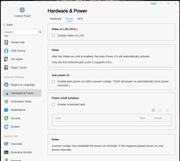
I have disabled all the on/off schedule, auto power on, and WOL options.
Do you have any idea why this is happening?