

I've had a F4-423 for a few months and I'm generally quite happy with it. However, I noticed a strange behavior with SMB compared to AFP.
My main machine is a Mac Mini and I'm using the latest macOS version. With SMB, after some tweaks, I get fast folder listings and big files transfer at full speed. Smaller files, however, seem to take a while compared to AFP.
I'm aware that small files require more overhead regardless of medium, but it's surprising how much faster AFP behaves. When moving many small files via the Finder — e.g. a folder with 250 images, all less than 1 MB in size — in both cases it will pre-allocate the space on the NAS, which takes about the same time. Then AFP will transfer the files in a couple of seconds, while SMB takes a lot longer; it's as if SMB starts and stop for every file.
My configuration on the NAS side is as follows:
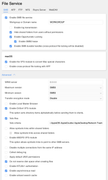
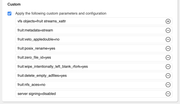
And on the Mac I have enabled both mc_prefer_wired and DSDontWriteNetworkStores.
When I run `smbutil statshares` I get the following:
Code: Select all
==================================================================================================
SHARE                         ATTRIBUTE TYPE                VALUE
==================================================================================================
jollino
                              SERVER_NAME                   Supernova(SMB)._smb._tcp.local
                              USER_ID                       501
                              SMB_NEGOTIATE                 SMBV_NEG_SMB1_ENABLED
                              SMB_NEGOTIATE                 SMBV_NEG_SMB2_ENABLED
                              SMB_NEGOTIATE                 SMBV_NEG_SMB3_ENABLED
                              SMB_VERSION                   SMB_3.1.1
                              SMB_ENCRYPT_ALGORITHMS        AES_128_CCM_ENABLED
                              SMB_ENCRYPT_ALGORITHMS        AES_128_GCM_ENABLED
                              SMB_ENCRYPT_ALGORITHMS        AES_256_CCM_ENABLED
                              SMB_ENCRYPT_ALGORITHMS        AES_256_GCM_ENABLED
                              SMB_CURR_ENCRYPT_ALGORITHM    OFF
                              SMB_SIGN_ALGORITHMS           AES_128_CMAC_ENABLED
                              SMB_SIGN_ALGORITHMS           AES_128_GMAC_ENABLED
                              SMB_CURR_SIGN_ALGORITHM       AES_128_GMAC
                              COMPRESSION_IO_THRESHOLD      4096
                              COMPRESSION_CHUNK_LEN         262144
                              COMPRESSION_MAX_FAIL_CNT      5
                              WRITE_COMPRESSION_CNT         0
                              WRITE_CNT_LZ77Huff            0
                              WRITE_CNT_LZ77                0
                              WRITE_CNT_LZNT1               0
                              WRITE_CNT_FWD_PATTERN         0
                              WRITE_CNT_BWD_PATTERN         0
                              READ_COMPRESSION_CNT          0
                              READ_CNT_LZ77Huff             0
                              READ_CNT_LZ77                 0
                              READ_CNT_LZNT1                0
                              READ_CNT_FWD_PATTERN          0
                              READ_CNT_BWD_PATTERN          0
                              SMB_SHARE_TYPE                DISK
                              SIGNING_SUPPORTED             TRUE
                              EXTENDED_SECURITY_SUPPORTED   TRUE
                              LARGE_FILE_SUPPORTED          TRUE
                              FILE_IDS_SUPPORTED            TRUE
                              DFS_SUPPORTED                 TRUE
                              FILE_LEASING_SUPPORTED        TRUE
                              MULTI_CREDIT_SUPPORTED        TRUE
                              MULTI_CHANNEL_SUPPORTED       TRUE
                              SESSION_RECONNECT_TIME        0:0
                              SESSION_RECONNECT_COUNT       0

--------------------------------------------------------------------------------------------------
Code: Select all
Info: Setup Time: 2024-11-27 11:32:03, Multichannel ON: yes, Reconnect Count: 0
	Total RX Bytes: 113067 (Packets: 299)
	Total TX Bytes: 89384 (Packets: 298)
       id         client IF             server IF   state                     server ip                 port   speed
========================================================================================================================
M      78  en11   (Ethernet)   13             3 (RSS_0)  [session active       ]   192.168.0.50              445    2.5 Gb
ALT    79  en1    (wifi    )   20             3 (RSS_1)  [session inactive     ]   192.168.0.50              445    78.4 Mb
Server NIC:
	name: NA, idx: 3, type:    NA, speed 2.5 Gb, state connected
		ip_addr: 192.168.0.50
		capabilities: RSS_CAPABLE
Client NIC:
	name: en11, idx: 13, type: wired, speed 2.5 Gb, state connected
		ip_addr: fe80:0000:0000:0000:10f4:dd44:6d43:8a35
		ip_addr: 192.168.0.2
		ip_addr: 2a07:7e87:[redacted]
		ip_addr: 2a07:7e87:[redacted]
Client NIC:
	name: awdl0, idx: 22, type: wireless, speed 990.0 Mb, state idle
		ip_addr: fe80:0000:0000:0000:b007:5fff:fe6a:560f
Client NIC:
	name: en1, idx: 20, type: wireless, speed 78.4 Mb, state connected
		ip_addr: fe80:0000:0000:0000:10fb:718c:a1e7:a7b1
		ip_addr: 2a07:7e87:[redacted]
		ip_addr: 2a07:7e87:[redacted]
		ip_addr: 192.168.0.236
		ip_addr: 2a07:7e87:[redacted]
I'd be most thankful if anyone could suggest anything that I may have overlooked!


