BTRFS compression disabled after reboot

RAID, Volume, storage pool, hard drive, USB, SSD cache and iSCSI LUN
Locked
User avatar
obvious
Posts: 8
Joined: 16 Jan 2025, 19:45
Spain

BTRFS compression disabled after reboot

Post by obvious »

Hello TerraMaster:

With TOS 6.0.577 and TOS 6.0.610 and tested in several boxes (F8 Plus & F4 424 Max):

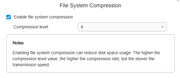
When BTRFS compression is enabled it works until the system is restarted. Once the system is rebooted the BTRFS filesystem is no longer mounted with compression enabled.
Image

Before reboot:

/dev/mapper/vg0-lv0 on /Volume1 type btrfs (rw,noatime,compress=zlib:4,ssd,space_cache=v2,subvolid=256,subvol=/@)

After reboot:

/dev/mapper/vg0-lv0 on /Volume1 type btrfs (rw,noatime,ssd,space_cache=v2,subvolid=256,subvol=/@)

If compression settings are modified, then compression is reenabled... until next reboot...

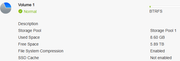
On the Control Panel side, the compression setting looks "enabled" but the filesystem its not mounted with compression enabled.
Image

Thank you.
Regards!
User avatar
TMbuddy
TM Product Manager
Posts: 93
Joined: 29 Nov 2024, 14:29
China

Re: BTRFS compression disabled after reboot

Post by TMbuddy »

obvious wrote: 17 Jan 2025, 04:45
Hello, thank you very much for your valuable feedback. The issue with the file system compression is a known bug that is yet to be fixed. Please stay tuned for updates in our future versions, and we will resolve this issue as soon as possible.
User avatar
obvious
Posts: 8
Joined: 16 Jan 2025, 19:45
Spain

Re: BTRFS compression disabled after reboot

Post by obvious »

Thank you very much.

Meanwhile I have disabled btrfs compression.

I hope to hear from you soon
Locked

Return to “Storage”