

Thank you for your feedback. We have addressed and resolved the issue regarding TNAS mobile. Please be patient and await the release of subsequent versions. For the file management accessed through web browsers, we will continue to investigate the cause of the problem.
TOS 6.0.610 (X86) is Released for Update
Re: TOS 6.0.610 (X86) is Released for Update
To contact our team, please send email to following addresses, remember to replace (at) with @
Technical team: support(at)terra-master.com (for technical support)
Service team: service(at)terra-master.com (for purchasing, return, replacement, RMA service)
Technical team: support(at)terra-master.com (for technical support)
Service team: service(at)terra-master.com (for purchasing, return, replacement, RMA service)
-
CraftyClown

- Posts: 48
- Joined: 03 Jan 2023, 17:13

Re: TOS 6.0.610 (X86) is Released for Update
@TMpraj could you share a downloadable link to 6.0.610? One of my devices is having issues connecting to the WAN so I can't update it
EDIT: Sorry please ignore, someone has shared it with me
EDIT: Sorry please ignore, someone has shared it with me


Re: TOS 6.0.610 (X86) is Released for Update
fcs001fcs wrote: ↑16 Jan 2025, 01:49
I did a little investigating concerning the "resource-monitor.db" file and it seems a little strange. The file has a date of Dec 2 and seems to have some data in it by the file size. The file permissions seem to be OK, but I am not sure on that.
Code: Select all
Defult_SuperUser@NAS-F4_423:~# cd /tmp/TOS_CONFIG
Defult_SuperUser@NAS-F4_423:/tmp/TOS_CONFIG# ls -l
total 15880
-rwxr-xr-x 1 Defult_SuperUser Defult_SuperUser     3382 Jan 16 10:12 nginx.conf
-rw-r--r-- 1 Defult_SuperUser Defult_SuperUser 16252928 Dec  2 23:36 resource-monitor.db
-rwxr-xr-x 1 Defult_SuperUser Defult_SuperUser       12 Jan 16 10:12 standby.conf
drwxr-xr-x 2 Defult_SuperUser Defult_SuperUser      120 Mar 25  2024 zlog
I renamed the file with a ".bak" and rebooted the NAS and the exact same file was recreated and the ".bak" file was deleted. Since it is a "tmp" directory, I suspect it is picking this file up from another location.
I let it run for a while and the file size is not increasing (16252928) which indicates to me that it is not receiving any data.
Still no data in the graphs after 10 hours of run time on the NAS after last reboot.
Any ideas on how to fix this?
F4-423 - 2 x12TB & 1x14TB & 1x16TB - BTRFS TRAID


Re: TOS 6.0.610 (X86) is Released for Update
I updated from TOS 6.0.577 using the automatic update function from TOS. After update, all my saved data on TNAS (from TNAS mobile Album Backup on my smartphone) are gone. All directories and files in the "home>user>album backup"-folder on TNAS disappeared. When I restart the album backup on my smartphone, only last 16 photos are transfered to album backup folder on TNAS. But on my smartphone are more then 1000 photos. Mobile App version is 3.3.038. I did not changed any settings. Any ideas what is happened?
F4-423
Re: TOS 6.0.610 (X86) is Released for Update
Have you tried restarting your device? If the issue persists, please contact customer service through our official website, and we will arrange for an engineer to assist you remotely.
To contact our team, please send email to following addresses, remember to replace (at) with @
Technical team: support(at)terra-master.com (for technical support)
Service team: service(at)terra-master.com (for purchasing, return, replacement, RMA service)
Technical team: support(at)terra-master.com (for technical support)
Service team: service(at)terra-master.com (for purchasing, return, replacement, RMA service)
Re: TOS 6.0.610 (X86) is Released for Update
Yes, I already tried to restart and this issue persists.Have you tried restarting your device? If the issue persists, please contact customer service through our official website, and we will arrange for an engineer to assist you remotely.
Even if I create a new backup folder on TNAS and want to save the data from my smartphone, the data is not transferred to TNAS.
EDIT.
The problem was solved quite simply. Mike from technical support helped me with this. Thank you so much, Mike!
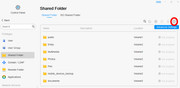
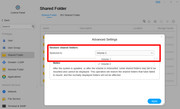
Here is the solution: control panel => shared folder => advanced settings => restore to (your desired volume). That's it.
F4-423
-
thierrys73

- Posts: 36
- Joined: 23 Jul 2022, 19:57

Re: TOS 6.0.610 (X86) is Released for Update
hello
i did the update without problem. but like the previous versions i had to do a 2nd restart for the smb to work on my local network
i did the update without problem. but like the previous versions i had to do a 2nd restart for the smb to work on my local network
Tnas T6-423
Tnas F2-221
Tnas F2-221
-
great0dane

- Posts: 9
- Joined: 08 Apr 2022, 23:14

Re: TOS 6.0.610 (X86) is Released for Update
Why was "Read-Only" SSD cache option removed from TOS 6? Trying to set this up on my SSD I have only two cache options "Balance mode" and "Read-Write mode". These are not the same as Read-only mode. I do not want to write files to the SSD, only the HDD. When a file is accessed from a PC, that file should then be cached into the SSD for later use. Its a huge waste of resource to cache files that are writing to disk that will never be read.

Re: TOS 6.0.610 (X86) is Released for Update
I'm very sorry, due to adjustments in the implementation of HyperCache, the read-only mode is no longer supported.
To contact our team, please send email to following addresses, remember to replace (at) with @:
Support team: support(at)terra-master.com (for technical support only)
Service team: service(at)terra-master.com (for purchasing, return, replacement, RMA service)
Support team: support(at)terra-master.com (for technical support only)
Service team: service(at)terra-master.com (for purchasing, return, replacement, RMA service)

Re: TOS 6.0.610 (X86) is Released for Update
Dear Customer, to facilitate the resolution of your issue more effectively, we recommend enabling the debug mode. Please perform the problematic operation, and upon completion, download the debug log. Subsequently, send this log to our technical support email for further analysis. The debug mode can be activated via the following path: Desktop > Support & Help > Debug Mode.