

Hi Guys!
New CB 3.0.078 app in TOS6 contain link to CB Agent 3.0.025 on China code page.
All attemps to exec with another code (1033, 1049) pages - only PRODUCTLANGUAGE = 2052 .
It's only my bug or not?
Installation of Centralized Backup on Win11


Re: Installation of Centralized Backup on Win11
Disable & enable service or reboot TNAS not had results.
New TOS6 (6.0.577) and update centralized backup app (3.0.85) with agent version 3.0.43 also display client with China code page.
And yes, agent not have a valid publisher
Any thinks comrade ?! Whats your CB agent code page show at install process?
New TOS6 (6.0.577) and update centralized backup app (3.0.85) with agent version 3.0.43 also display client with China code page.
And yes, agent not have a valid publisher
Any thinks comrade ?! Whats your CB agent code page show at install process?

Re: Installation of Centralized Backup on Win11
Hello, and thank you for reporting this issue. Could you kindly provide screenshots or videos of the error? This will help us verify and pinpoint the problem more effectively, so we can offer the appropriate solution. We appreciate your support and cooperation.sergo77 wrote: ↑27 Dec 2024, 08:41 Disable & enable service or reboot TNAS not had results.
New TOS6 (6.0.577) and update centralized backup app (3.0.85) with agent version 3.0.43 also display client with China code page.
And yes, agent not have a valid publisher
Any thinks comrade ?! Whats your CB agent code page show at install process?
To contact our team, please send email to following addresses, remember to replace (at) with @:
Technical team: support(at)terra-master.com(for technical support)
Service team: service(at)terra-master.com(for purchasing, return, replacement, RMA service)
Technical team: support(at)terra-master.com(for technical support)
Service team: service(at)terra-master.com(for purchasing, return, replacement, RMA service)
Re: Installation of Centralized Backup on Win11
Yep, for example, in the attached screenshot you can see the downloaded CB clients and the interface of the last of them.
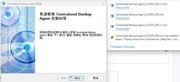
What other screenshots would you find useful?
PS: it's not error - it's mistake of client programming (IMHO) - client app not check a local codepage or not use EN code page by default
What other screenshots would you find useful?
PS: it's not error - it's mistake of client programming (IMHO) - client app not check a local codepage or not use EN code page by default
Re: Installation of Centralized Backup on Win11
Thank you very much for your assistance. We have carried out translation processing for the installation process page. Its language will switch automatically following the language of the Windows system. Except for Chinese, other languages will be automatically translated into English. We wonder what language your Windows system is using. We need it to conduct further verification of relevant issues. Could you please let us know?sergo77 wrote: ↑27 Dec 2024, 17:49 Yep, for example, in the attached screenshot you can see the downloaded CB clients and the interface of the last of them.
What other screenshots would you find useful?
PS: it's not error - it's mistake of client programming (IMHO) - client app not check a local codepage or not use EN code page by default
To contact our team, please send email to following addresses, remember to replace (at) with @:
Technical team: support(at)terra-master.com(for technical support)
Service team: service(at)terra-master.com(for purchasing, return, replacement, RMA service)
Technical team: support(at)terra-master.com(for technical support)
Service team: service(at)terra-master.com(for purchasing, return, replacement, RMA service)
Re: Installation of Centralized Backup on Win11
Thx for your changes! Will waiting fix in next updates.
My Win11 have a ANSI code page - 1251.
My Win11 have a ANSI code page - 1251.
Re: Installation of Centralized Backup on Win11
My respect for your update CB (3.0.090) - now client have a digital sign and install on English - super! I'm happy!)
非常感謝您的支持!
非常感謝您的支持!