Linux App not working


Linux App not working
The Tnas Desktop app for Linux not is working not discovering my NAS I am Zorin OS


Re: Linux App not working
Thank you for your feedback! We will check and make the necessary adjustments. In the meantime, you can try the following methods:
1. Install TNAS PC using a Windows system.
2. Log into the router to view connected devices and their IP addresses.
3. Install the `nmap` tool on Zorin OS to scan the IP addresses of devices on the local network. Here are the steps to install and use `nmap`:
# Adjust the IP range according to your network configuration
1. Install TNAS PC using a Windows system.
2. Log into the router to view connected devices and their IP addresses.
3. Install the `nmap` tool on Zorin OS to scan the IP addresses of devices on the local network. Here are the steps to install and use `nmap`:
Code: Select all
sudo apt updateCode: Select all
sudo apt install nmapCode: Select all
nmap 192.168.1.0/24To contact our team, please send email to following addresses, remember to replace (at) with @
Technical team: support(at)terra-master.com (for technical support)
Service team: service(at)terra-master.com (for purchasing, return, replacement)
Technical team: support(at)terra-master.com (for technical support)
Service team: service(at)terra-master.com (for purchasing, return, replacement)
Re: Linux App not working
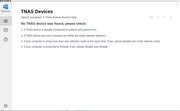
Still not seeing nas Via TNAS PC software please see attachment

Re: Linux App not working
Recently, we have completed the adaptation work for the new version of TNAS PC on Linux systems. You can try downloading the installation package from the following link:
https://download3.terra-master.com/Apps ... _amd64.deb
If you encounter any issues during installation or use, please contact us immediately. We will conduct further adaptation and optimization work based on your feedback.
To contact our team, please send email to following addresses, remember to replace (at) with @
Technical team: support(at)terra-master.com (for technical support)
Service team: service(at)terra-master.com (for purchasing, return, replacement, RMA service)
Technical team: support(at)terra-master.com (for technical support)
Service team: service(at)terra-master.com (for purchasing, return, replacement, RMA service)