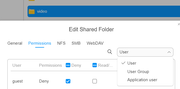
Hi, new to Terramaster and trying to set up Jellyfin. I am running into a similar permission issue for folders. I have set up a shared folder called Media, created to subfolders called Movies and TV Shows. When I go into the Jellyfin's web interface to create the libraries, I get to the folder selection step and see Volume1/Media but neither of the folders I can created are visible.
From the searches I have been doing to resolve the issue, everything is pointing to user permissions. The Jellyfin user appears to not have permission to access the folders in Volume1/Media. I have checking the permissions on that folder and the only users I see are my admin user and guest. Jellyfin is not there to give permissions to.
Like I have said I am new to Terramaster, Jellyfin, and NAS in general. Can someone please explain where I can find application user or how to give the Jellyfin user the permissions it needs? Explaining it in interface navigation or terminal commands is fine. Any help in this matter would be greatly appreciated. Thank you in advance for the help!
For additional understanding. I am not using docker to run Jellyfin. I installed Jellyfin app directly using the .tpk file from the community site. I have also installed the dependency apps: ModBase1, ffmpeg, and ffmpeg51. Below is the info of what NAS I am using, OS and version, as well as the version of all the apps.
Tech Info:
Terramaster - f6-424
OS - TOS 6.0.535
Jellyfin Version - 10.10.2
ModBase1 Version - 1.00.20
Ffmpeg Version - 4.4.3.3
Ffmpeg51 Version - 5.1.3.2