

I also have issues with more than one NVME drive and running this in Proxmox over a 20GBps USB 3.2 interface (and there are no problems with 4x 3.5" HDDs - but had to remove one NVME to get it more stable - still with the single NVME the NVME hangs frwuently and has to be reset, and smartctl works so so). How can I check the firmware version under linux and see if this upgrade would ?
I see (from lsusb) but nothing that points to firmware version:
iManufacturer 2 TerraMaster
iProduct 3 TDAS
iSerial 1 20240322000A
D8Hybrid reports the same SN for all NVMe drives
-
bitfidelity

- Posts: 6
- Joined: 02 Dec 2024, 14:45

Re: D8Hybrid reports the same SN for all NVMe drives
Is this a problem in single-drive mode? I'm planning to just use DrivePool.

Re: D8Hybrid reports the same SN for all NVMe drives
Please refer to this article, it will help you to solve the problem.
How to Resolve the Issue of Duplicate Serial Mumbers of M.2 NVMe SSD Recognized by the D8 Hybrid?
To contact our team, please send email to following addresses, remember to replace (at) with @:
Technical team: support(at)terra-master.com (for technical support)
Service team: service(at)terra-master.com (for purchasing, return, replacement, RMA service)
Technical team: support(at)terra-master.com (for technical support)
Service team: service(at)terra-master.com (for purchasing, return, replacement, RMA service)


Re: D8Hybrid reports the same SN for all NVMe drives
BTW, I applied the UTHSB_MPtoolLite [v2.0.0.30714] and I ended up with 1 of four drives updating correctly (as my Samsung 990evo) and the other 3 are now reporting as Realtek RTL9220. sigh
Note that all the drives are Samsung 990Evo.
See UTHSB_MPtool_Lite screenshot below:
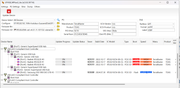
Is there anything I can do to fix this?
Note that all the drives are Samsung 990Evo.
See UTHSB_MPtool_Lite screenshot below:
Is there anything I can do to fix this?
Re: D8Hybrid reports the same SN for all NVMe drives
Well, I got it all the way to the image below:
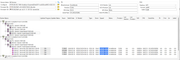
Which seems to accomplish what I need, different serial numbers and all high speed. But the fwver and Build Dates are off for three of them.
Which seems to accomplish what I need, different serial numbers and all high speed. But the fwver and Build Dates are off for three of them.
Re: D8Hybrid reports the same SN for all NVMe drives
Hi,
It seems that you have completed the firmware update for one slot. Please perform the same operation for the remaining three slots one by one.
To contact our team, please send email to following addresses, remember to replace (at) with @:
Technical team: support(at)terra-master.com (for technical support)
Service team: service(at)terra-master.com (for purchasing, return, replacement, RMA service)
Technical team: support(at)terra-master.com (for technical support)
Service team: service(at)terra-master.com (for purchasing, return, replacement, RMA service)

Re: D8Hybrid reports the same SN for all NVMe drives
I have a D5 Hybrid that has the same problem with duplicate IDs for the same model NVME drives in Debian. Can I use the same instructions and firmware as the D8 Hybrid, as described in [1]?
[1] viewtopic.php?t=6748
[1] viewtopic.php?t=6748
Re: D8Hybrid reports the same SN for all NVMe drives
The instructions are a little confusing.
They should read:
...
3. Run the UTHSB_MPtool_Lite tool. Ensure that all four ports (Port 1, Port 2, Port 3, Port 4) are recognized, indicating that four M.2 NVMe SSDs are detected. If only one SSD is present, update the firmware for Port 1 first, then install the SSD in the other slots for subsequent updates.
4. Check the current firmware version before updating. If it is:
fwvef version: 1.33.36 Build Date: 2023.12.08
then proceed with the update. Otherwise, the update will fail.
5. Select the port and click Update Device. Repeat this step for each port.
6. Verify that the fwvef version and Build Date match:
fwvef version: 9.33.89 Build Date: 2024.07.30
...
They should read:
...
3. Run the UTHSB_MPtool_Lite tool. Ensure that all four ports (Port 1, Port 2, Port 3, Port 4) are recognized, indicating that four M.2 NVMe SSDs are detected. If only one SSD is present, update the firmware for Port 1 first, then install the SSD in the other slots for subsequent updates.
4. Check the current firmware version before updating. If it is:
fwvef version: 1.33.36 Build Date: 2023.12.08
then proceed with the update. Otherwise, the update will fail.
5. Select the port and click Update Device. Repeat this step for each port.
6. Verify that the fwvef version and Build Date match:
fwvef version: 9.33.89 Build Date: 2024.07.30
...
Re: D8Hybrid reports the same SN for all NVMe drives
Yes, it can also be used for D5 Hybrid. Thank you for your correction; we will attempt to adjust them.
To contact our team, please send email to following addresses, remember to replace (at) with @:
Technical team: support(at)terra-master.com (for technical support)
Service team: service(at)terra-master.com (for purchasing, return, replacement, RMA service)
Technical team: support(at)terra-master.com (for technical support)
Service team: service(at)terra-master.com (for purchasing, return, replacement, RMA service)