TOS 6.0.507 (X86) is Released for Update

Official news about TOS, mobile app, PC app updates or beta releases.
User avatar
tanktarta
Posts: 18
Joined: 04 May 2024, 17:40
Great Britain

Re: TOS 6.0.507 (X86) is Released for Update

Post by tanktarta »

TMRyan wrote: 30 Sep 2024, 17:59 Did you make any modifications to the system files in the terminal before the update? If you did, you might be redirected to the system initialization page after the update.
That does appear to have happened.

What is meant by system files? The only one I can think of is I uploaded an authorized_keys file to the superuser home directory (under the .ssh directory). This has been working fine since the very first version of TOS I used, so I would hope that doesnt cause a problem now.
User avatar
RyanYang
TM Support
Posts: 1141
Joined: 01 Dec 2020, 11:50
China

Re: TOS 6.0.507 (X86) is Released for Update

Post by RyanYang »

tanktarta wrote: 30 Sep 2024, 18:22
It appears that this is caused by the system integrity check mechanism during startup.
In this situation, you can log into the terminal using the username "root" and the password "admin". Then, execute the following command:

Code: Select all

/etc/tos/scripts/mntcore
When you see "mdadm: /dev/md9 has been started with 1 drive.", please press Ctrl+C to exit. Then, execute the following command:

Code: Select all

/mnt/core/usr/sbin/CheckSystem
This will help you identify the reason for the verification failure.
Next, you can execute the following command to update the system verification database:

Code: Select all

/mnt/core/usr/sbin/CheckSystem -init
Finally, restart the TNAS.If that's the case, we are currently optimizing the system verification mechanism.
To contact our team, please send email to following addresses, remember to replace (at) with @
Technical team: support(at)terra-master.com (for technical support)
Service team: service(at)terra-master.com (for purchasing, return, replacement)
User avatar
tanktarta
Posts: 18
Joined: 04 May 2024, 17:40
Great Britain

Re: TOS 6.0.507 (X86) is Released for Update

Post by tanktarta »

Great, that has fixed it.

The culprit was /mnt/core/bin/appservice-init ... I have no idea what this file is, certainly I have never changed it myself.

Code: Select all

[root@TNAS ~]# /mnt/core/usr/sbin/CheckSystem
[Info]: db.Hash =  f969e6d4a8f4aafd07f5ce9e670a5a1a
[Info]: md5sum  =  f6ae69dd6691aec49df8a4073d39da3a
[Info]: db.Time =  2024-09-20 13:03:29
[Error]: File /mnt/core/bin/appservice-init hash error!
After running CheckSystem and a reboot, I could then login with the expected supuser account and all data and configuration is present and correct.

Thanks for your help.
User avatar
tanktarta
Posts: 18
Joined: 04 May 2024, 17:40
Great Britain

Re: TOS 6.0.507 (X86) is Released for Update

Post by tanktarta »

Sorry, i'm back again with another problem new to 6.0.507.

After having a nightmare with domain joining in 6.0.500, which I eventually fixed, it appears it no longer works at all in 6.0.507.

Yet again, TOS was unjoined from the domain after the upgrade .. grrr, but OK.

And yet again when attempting to rejoin it just says "Incorrect username or password" after typing in what I 100% know is the correct username and password.

This time though, I know the LDAPS certificate is absolutely fine.

The following output was captured using journalctl -f while attemping to join the domain. Note the "Invalid Credentials" output that I assume is where it goes wrong.
Also some log output has been manually changed as it has logged my actual password (not ideal ...). I am also still seeing the last 6 lines output inifitely spammming the logs every 2 seconds.

Code: Select all

Sep 30 13:43:34 terra systemd[1]: trigger-samba.service: Deactivated successfully.
Sep 30 13:43:34 terra systemd[1]: Started trigger-samba.service.
Sep 30 13:43:34 terra systemd[1]: Condition check resulted in Kernel Security Modules - SMACK being skipped.
Sep 30 13:43:34 terra systemd[1]: Condition check resulted in Security Spcack being skipped.
Sep 30 13:43:34 terra systemd[1]: Starting trigger-samba.service...
Sep 30 13:43:34 terra upsmon[1327]: Poll UPS [ups@localhost] failed - Driver not connected
Sep 30 13:43:36 terra systemd[1]: trigger-samba.service: Deactivated successfully.
Sep 30 13:43:36 terra systemd[1]: Started trigger-samba.service.
Sep 30 13:43:36 terra systemd[1]: Condition check resulted in Kernel Security Modules - SMACK being skipped.
Sep 30 13:43:36 terra systemd[1]: Condition check resulted in Security Spcack being skipped.
Sep 30 13:43:36 terra systemd[1]: Starting trigger-samba.service...
Sep 30 13:43:38 terra systemd[1]: trigger-samba.service: Deactivated successfully.
Sep 30 13:43:38 terra systemd[1]: Started trigger-samba.service.
Sep 30 13:43:38 terra systemd[1]: Condition check resulted in Kernel Security Modules - SMACK being skipped.
Sep 30 13:43:38 terra systemd[1]: Condition check resulted in Security Spcack being skipped.
Sep 30 13:43:38 terra systemd[1]: Starting trigger-samba.service...
Sep 30 13:43:39 terra upsmon[1327]: Poll UPS [ups@localhost] failed - Driver not connected
Sep 30 13:43:40 terra systemd[1]: trigger-samba.service: Deactivated successfully.
Sep 30 13:43:40 terra systemd[1]: Started trigger-samba.service.
Sep 30 13:43:40 terra systemd[1]: Condition check resulted in Kernel Security Modules - SMACK being skipped.
Sep 30 13:43:40 terra systemd[1]: Condition check resulted in Security Spcack being skipped.
Sep 30 13:43:40 terra systemd[1]: Starting trigger-samba.service...
Sep 30 13:43:40 terra TOSDaemon[3272]: Decrypted data:  {"domain_name":"southpark.lan","dns_server":"192.168.91.11","management_mode":0,"connection_status":1,"senior_domain":0,"dc_ip":"","domain_net_bios":"","domain_FQDN":"","regist_dns":"eth0","update_interval":10,"username":"administrator","password":"XXXXXXXXXXXXXXXXXXXXXXXXXXXXXXXXXXXXXXXXXXXXXXXXXXXXXXXXXXXXXXXXXXXXXXXXXXXXXXXXXXXXXXXXXXXXXXXXXXXXXXXXXXXXX==","domainPassword":"MY_PLAIN_TEXT_DOMAIN_ADMINISTRATOR_PASSWORD!!"}
Sep 30 13:43:40 terra TOSDaemon[3272]: domain connectToAdServer config: {Name:southpark.lan DNS:192.168.91.11 Mode:0 Status:1 Senior:0 DcIP: NetBios: FQDN: Interface:eth0 UpdateInterval:10 UserName:administrator PassWord:XXXXXXXXXXXXXXXXXXXXXXXXXXXXXXXXXXXXXXXXXXXXXXXXXXXXXXXXXXXXXXXXXXXXXXXXXXXXXXXXXXXXXXXXXXXXXXXXXXXXXXXXXXXXX==}
Sep 30 13:43:40 terra systemd[1]: Stopping Samba SMB Daemon...
Sep 30 13:43:40 terra systemd[1]: samba.service: Deactivated successfully.
Sep 30 13:43:40 terra systemd[1]: Stopped Samba SMB Daemon.
Sep 30 13:43:40 terra systemd[1]: samba.service: Consumed 1.893s CPU time.
Sep 30 13:43:40 terra systemd[1]: Condition check resulted in Kernel Security Modules - SMACK being skipped.
Sep 30 13:43:40 terra systemd[1]: Condition check resulted in Security Spcack being skipped.
Sep 30 13:43:40 terra systemd[1]: Starting trigger-samba-secrets.service...
Sep 30 13:43:40 terra winbindd[3638]: [2024/09/30 13:43:40.687798,  0] ../../source3/winbindd/winbindd.c:247(winbindd_sig_term_handler)
Sep 30 13:43:40 terra winbindd[3638]:   Got sig[15] terminate (is_parent=1)
Sep 30 13:43:40 terra systemd[1]: Stopping Samba Winbind Daemon...
Sep 30 13:43:40 terra winbindd[3641]: [2024/09/30 13:43:40.687846,  0] ../../source3/winbindd/winbindd.c:247(winbindd_sig_term_handler)
Sep 30 13:43:40 terra winbindd[3641]:   Got sig[15] terminate (is_parent=0)
Sep 30 13:43:40 terra winbindd[3776]: [2024/09/30 13:43:40.688211,  0] ../../source3/winbindd/winbindd.c:247(winbindd_sig_term_handler)
Sep 30 13:43:40 terra winbindd[3776]:   Got sig[15] terminate (is_parent=0)
Sep 30 13:43:40 terra systemd[1]: winbind.service: Deactivated successfully.
Sep 30 13:43:40 terra systemd[1]: Stopped Samba Winbind Daemon.
Sep 30 13:43:40 terra systemd[1]: winbind.service: Consumed 5.546s CPU time.
Sep 30 13:43:41 terra TOSDaemon[3272]: newConnect Bind fail, err: LDAP Result Code 49 "Invalid Credentials": 80090308: LdapErr: DSID-0C0903A9, comment: AcceptSecurityContext error, data 532, v1db1
Sep 30 13:43:41 terra TOSDaemon[3272]: newConnect NTLMBind fail, err: unable to read LDAP response packet: EOF
Sep 30 13:43:41 terra systemd[1]: Condition check resulted in Kernel Security Modules - SMACK being skipped.
Sep 30 13:43:41 terra systemd[1]: Starting Samba SMB Daemon...
Sep 30 13:43:41 terra systemd[1]: Condition check resulted in Security Spcack being skipped.
Sep 30 13:43:41 terra service_prepare[11013]: 0
Sep 30 13:43:41 terra smbd[11147]: [2024/09/30 13:43:41.646726,  0] ../../source3/smbd/server.c:1758(main)
Sep 30 13:43:41 terra smbd[11147]:   smbd version 4.15.13-Ubuntu started.
Sep 30 13:43:41 terra smbd[11147]:   Copyright Andrew Tridgell and the Samba Team 1992-2021
Sep 30 13:43:41 terra systemd[1]: Started Samba SMB Daemon.
Sep 30 13:43:41 terra TOSDaemon[3272]: domain joinAdDomain failed, test pwd error: connect error
Sep 30 13:43:41 terra TOSDaemon[3272]: ERROR | 2024-09-30 13:43:41 | 200 |   POST |    192.168.91.4 | /domain/DomainServiceDetection? | 1.055027081s | Mozilla/5.0 (X11; Linux x86_64; rv:130.0) Gecko/20100101 Firefox/130.0 | test pwd error: connect error
Sep 30 13:43:42 terra TOSDaemon[3272]: [DEBUG /usr/bin/net ads workgroup]
Sep 30 13:43:42 terra systemd[1]: trigger-samba.service: Deactivated successfully.
Sep 30 13:43:42 terra systemd[1]: Started trigger-samba.service.
Sep 30 13:43:42 terra systemd[1]: trigger-samba-secrets.service: Deactivated successfully.
Sep 30 13:43:42 terra systemd[1]: Started trigger-samba-secrets.service.
Sep 30 13:43:43 terra TOSDaemon[3272]: [DEBUG /usr/bin/net ads workgroup]
Sep 30 13:43:43 terra systemd[1]: Condition check resulted in Kernel Security Modules - SMACK being skipped.
Sep 30 13:43:43 terra systemd[1]: Condition check resulted in Security Spcack being skipped.
Sep 30 13:43:43 terra systemd[1]: Starting trigger-samba.service...
Sep 30 13:43:44 terra TOSDaemon[3272]: [DEBUG /usr/bin/net ads workgroup]
Sep 30 13:43:44 terra upsmon[1327]: Poll UPS [ups@localhost] failed - Driver not connected
Sep 30 13:43:45 terra TOSDaemon[3272]: [DEBUG /usr/bin/net ads workgroup]
Sep 30 13:43:45 terra msgcenter[1930]: |---[message] 192.168.91.4, runtime: 30.017153243s, receive: ping
Sep 30 13:43:45 terra systemd[1]: trigger-samba.service: Deactivated successfully.
Sep 30 13:43:45 terra systemd[1]: Started trigger-samba.service.
Sep 30 13:43:45 terra systemd[1]: Condition check resulted in Kernel Security Modules - SMACK being skipped.
Sep 30 13:43:45 terra systemd[1]: Condition check resulted in Security Spcack being skipped.
Sep 30 13:43:45 terra systemd[1]: Starting trigger-samba.service...
Sep 30 13:43:46 terra TOSDaemon[3272]: [DEBUG /usr/bin/net ads workgroup]
Sep 30 13:43:47 terra TOSDaemon[3272]: [DEBUG /usr/bin/net ads workgroup]
Sep 30 13:43:47 terra systemd[1]: trigger-samba.service: Deactivated successfully.
Sep 30 13:43:47 terra systemd[1]: Started trigger-samba.service.
Sep 30 13:43:47 terra systemd[1]: Condition check resulted in Kernel Security Modules - SMACK being skipped.
Sep 30 13:43:47 terra systemd[1]: Condition check resulted in Security Spcack being skipped.
Sep 30 13:43:47 terra systemd[1]: Starting trigger-samba.service...
Sep 30 13:43:48 terra TOSDaemon[3272]: [DEBUG /usr/bin/net ads workgroup]
Sep 30 13:43:49 terra TOSDaemon[3272]: [DEBUG /usr/bin/net ads workgroup]
Sep 30 13:43:49 terra upsmon[1327]: Poll UPS [ups@localhost] failed - Driver not connected
Sep 30 13:43:49 terra systemd[1]: trigger-samba.service: Deactivated successfully.
Sep 30 13:43:49 terra systemd[1]: Started trigger-samba.service.
Sep 30 13:43:49 terra systemd[1]: Condition check resulted in Kernel Security Modules - SMACK being skipped.
Sep 30 13:43:49 terra systemd[1]: Condition check resulted in Security Spcack being skipped.
Sep 30 13:43:49 terra systemd[1]: Starting trigger-samba.service...
User avatar
adminsanek
Posts: 0
Joined: 31 Aug 2024, 04:19
Russia

Re: TOS 6.0.507 (X86) is Released for Update

Post by adminsanek »

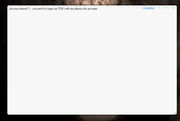
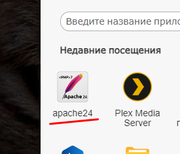
when launching Apache 24, this message appears, what could be wrong, start is the user root
Image

Image
F2-423 TOS 6.0.507 16GB System Partition on 2 x 8TB Traid; SSD m.2 128 Gb
User avatar
sharekhan
Posts: 2
Joined: 30 Aug 2023, 20:41

Re: TOS 6.0.507 (X86) is Released for Update

Post by sharekhan »

Hej,

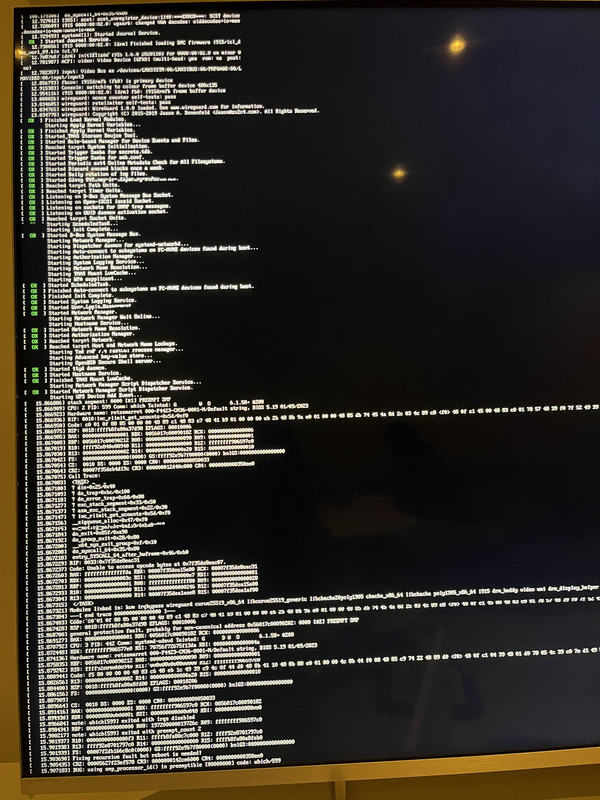
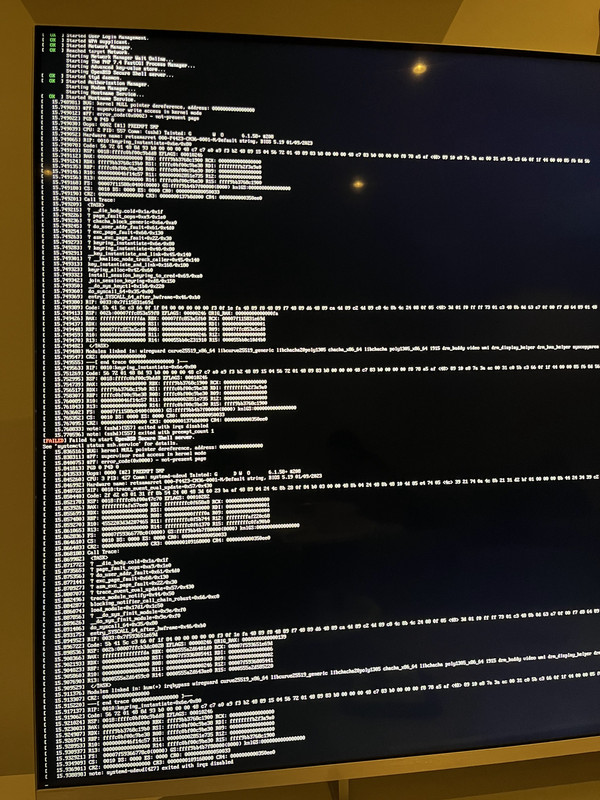
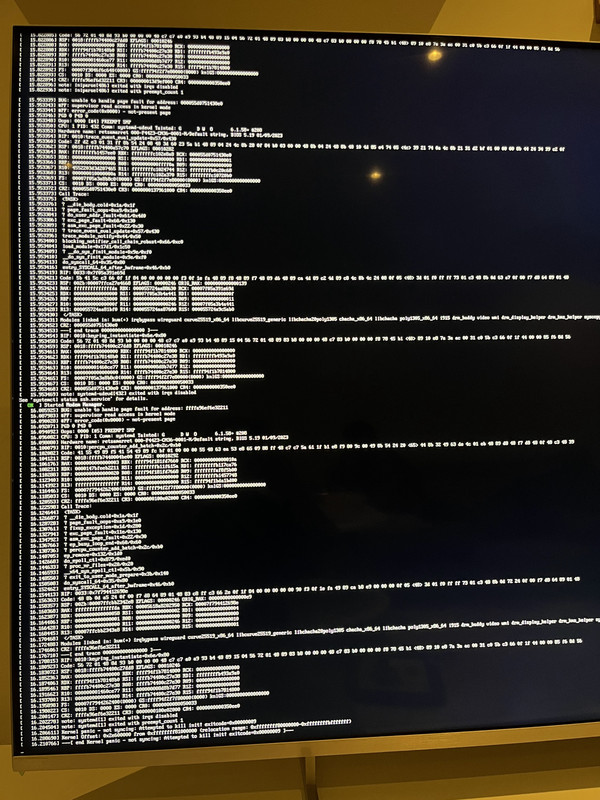
i was running 6.0.500 on my F4-423 box fine but after i upgraded to 6.0.507, my NAS does not boot up successfully. i attached the monitor and tried restarting it several times and here are the different logs as seen on the display without any success in boot up.

https://i.postimg.cc/59XjGv8m/IMG-1633.jpg
https://i.postimg.cc/YCzSgxwt/IMG-1637.jpg
https://i.postimg.cc/qB6MQrdb/IMG-1639.jpg

Please help !
User avatar
DanielB
Posts: 14
Joined: 21 Jul 2024, 02:02
Canada

Re: TOS 6.0.507 (X86) is Released for Update

Post by DanielB »

When I got my F2-424, I installed a brand new NVMe (Volume1), put TOS 5.x on it then immediately updated it to 6.x Beta. Once it was up and running, I shut down and inserted HDDs into the bays, with HDD1 (Volume2) as my main data storage drive. I've installed all the Beta versions since and wasn't aware of any configuration issue until this past weekend when I noticed system files (@apps, @cache, @system, etc) on Volume2 - and saw under Control Panel->Disk->Disk that HDD1 was marked as a System Drive, in addition to my NVMe.

As I was about to update to 6.0.507 today, I realized that there was a chance it might install to HDD1's Volume2 instead of my NVMe's Volume1. To ensure it would install to Volume1, I shut down the TNAS and removed my HDDs, rebooted, then from Control Panel->System, downloaded and installed the update that was found.

The system rebooted and I confirmed the version # in System was .507 and that there were no further updates available. I shut down the TNAS and reinserted my HDDs. After rebooting, I went to Control Panel->Shared Folders and checked permissions of some /Volume2 folders I'd been having permissions issues with since the .500 release, and reapplied them, thinking all was good.

But then I went to System and saw that it reported the TOS version number as 6.0.500! And there was an update (.507) available.
What happened?

I decided to contact TM live chat support.

The first thing he had me do was reboot. It came back up, still on 6.0.500.
He then asked me to install the update again but he didn't specify whether to remove the HDDs or not so I applied the update with them still inserted this time. The system shut down as it does when doing an update but after 5 minutes, the system had not come back online. I checked through the TNAS PC app and it did not detect any TNAS on my home network. The TNAS Mobile app on my Android phone showed the TNAS at its correct IP address but said that it was Uninitialized.

I remembered reading the posts by members tanktarta and TMRyan in this thread earlier today, also regarding an uninitialized TNAS after the .507 update.
I told the tech support rep about this and asked if I should run the same 3 commands. Here's what happened after the 1st command:

Code: Select all

[root@TNAS /]# /etc/tos/scripts/mntcore
/bin/sh: warning: setlocale: LC_ALL: cannot change locale (en_US.utf8)
script mntcore get lock
found RAID core disk: /dev/sdza2
mdadm: /dev/md9 has been started with 1 drive (out of 72).
[Error]: File /mnt/core/bin/appservice-init hash error!
mdadm: stopped /dev/md9
start RAID core with disk: /dev/sdza2
start RAID core failed
script mntcore put lock
TMRyan has originally said to see that /dev/md9 has started before proceeding. Mine did start, but as you can see, then stopped.
Like member tanktarta, I had the 'appservice-init has error'.

My tech support guy did not have any suggestions so I asked if I should proceed to the 2nd command. Here's what I got:

Code: Select all

[root@TNAS /]# /mnt/core/usr/sbin/CheckSystem
-bash: /mnt/core/usr/sbin/CheckSystem: No such file or directory
In fact /mnt/core/ directory was empty - no files or directories, so no /usr subfolder.

The tech said he needs to consult other engineers and would get back to me later this evening. So right now, I can't use the TNAS, except root login via SSH.


Possibly/probably(?) related:
Yesterday, I mentioned my multiple system file locations issue in another thread and a reply suggested it may be due to system file corruption on Volume1. So last night, I followed the thread link that was posted in the reply and ran the commands provided there in SSH to check for and correct corruption on Volume1. The post said that EXT4 file system errors may show up in the results in red text - but my check didn't report any. However when ran the command "e2fsck -p /dev/mapper/vg0-lv0", as posted, I got an error message saying "Bad magic number in super-block while trying to open /dev/mapper/vg0-lv0".
F2-424 w 1x 250GB WD SN580 Blue NVMe (TOS6.0.519) + 2x 4TB WD Red Plus 3.5"HDDs
User avatar
tanktarta
Posts: 18
Joined: 04 May 2024, 17:40
Great Britain

Re: TOS 6.0.507 (X86) is Released for Update

Post by tanktarta »

DanielB wrote: 01 Oct 2024, 06:31 TMRyan has originally said to see that /dev/md9 has started before proceeding. Mine did start, but as you can see, then stopped.
Like member tanktarta, I had the 'appservice-init has error'.
I believe you need to press Ctrl+C as soon as it says "/dev/md9 has started", i.e. before the command completes. If you do not do this, it appears that the command continues and unmounts everything again before exiting. I had similar result to you until I did this.

Hope this helps.
User avatar
jpeckinp
Posts: 39
Joined: 22 Mar 2024, 05:30
United States of America

Re: TOS 6.0.507 (X86) is Released for Update

Post by jpeckinp »

Well permissions are sticking for Plex now after about 10 tries it stayed read/write enabled. Now if I could just get Plex itself to enable and open. Tried uninstall and older versions no luck.
Current System:
F4-424 Pro
40TB storage.
TOS- 7.0.0746
User avatar
DanielB
Posts: 14
Joined: 21 Jul 2024, 02:02
Canada

Re: TOS 6.0.507 (X86) is Released for Update

Post by DanielB »

tanktarta wrote: 01 Oct 2024, 06:35I believe you need to press Ctrl+C as soon as it says "/dev/md9 has started", i.e. before the command completes. If you do not do this, it appears that the command continues and unmounts everything again before exiting. I had similar result to you until I did this.Hope this helps.
Aha - thank you. On my TNAS, when I ran that command, the result completed its output within 1 second of starting and returned me to the command prompt. So there really wasn't any "need" to press CTRL+C. But, having seen your post, I tried it again, and on my 4th attempt I was quick enough on the CTRL+C to interrupt it before it completed. And that did the trick! I checked the contents of /mnt/core and there was stuff there now!

After running 2nd & 3rd of TMRyan's commands and issuing the 'reboot' command, I was able to get back into TOS, and it now reports 6.0.507 when running with no HDDs installed and after shutdown and resinsertion of the HDDs, 6.0.507 with them.

Still got figure out how to make HDD1 not be seen as a system drive but that's for another thread.

Thank you TMRyan and tanktarta for the help! :thumbsup:
F2-424 w 1x 250GB WD SN580 Blue NVMe (TOS6.0.519) + 2x 4TB WD Red Plus 3.5"HDDs
Post Reply

Return to “Update Notice”