Quick question,
I've set up a Raid 1 with 2x 20tb IronWolf drives.
TOS only shows Volume 1. How do I know that the second HDD is actually mirroring the first? I guess I just want some assurance, but I cant seem to even check how much space is used on each individual HDD, only on the total volume (20tb as the second 20tb is obviously the mirror).
How do I know Raid 1 is actually working?


Re: How do I know Raid 1 is actually working?
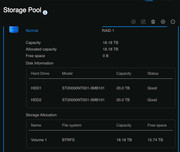
If you go to Control Panel > Storage Pool; Highlight the pool you are concerned with; click on the 'down chevron' in top right of highlighted area.
This will show the HDDs being used and the Volume(s) mounted on that array. Naturally, if you have set up Raid1 (or Traid on 2 Drives) using similar sized drives the amount of space used will be the same for each HDD. (Or, it will be the size of the smaller drive and the rest of the space on the larger drive(s) will be inaccessible - that's sort of how raid works.)
This will show the HDDs being used and the Volume(s) mounted on that array. Naturally, if you have set up Raid1 (or Traid on 2 Drives) using similar sized drives the amount of space used will be the same for each HDD. (Or, it will be the size of the smaller drive and the rest of the space on the larger drive(s) will be inaccessible - that's sort of how raid works.)
F5-221 TOS7.0.1278 - 4x4TB (Ironwolf) Traid
F2-424 TOS7.0.1278 - 2x500GB nvme (P3) Traid, 2x6TB HDD (HGST) Traid
F2-221 TOS7.0.1278 - 1x3TB Ext4, 1x4TB Btrfs
F2-425+ TOS7.0.1278 - 2x500GB nvme (P3) Traid, 2x6TB HDD (EXOS) Traid
F2-424 TOS7.0.1278 - 2x500GB nvme (P3) Traid, 2x6TB HDD (HGST) Traid
F2-221 TOS7.0.1278 - 1x3TB Ext4, 1x4TB Btrfs
F2-425+ TOS7.0.1278 - 2x500GB nvme (P3) Traid, 2x6TB HDD (EXOS) Traid
-
itsmikeski

- Posts: 6
- Joined: 30 Jul 2024, 06:45

Re: How do I know Raid 1 is actually working?
Thanks. I guess my point is there's nothing to actually show that the files on HDD2 have mirrored HDD1. It would help if we could see used space on both drives, just to confirm it's the same.Gremlin wrote: ↑22 Aug 2024, 16:55 If you go to Control Panel > Storage Pool; Highlight the pool you are concerned with; click on the 'down chevron' in top right of highlighted area.
This will show the HDDs being used and the Volume(s) mounted on that array. Naturally, if you have set up Raid1 (or Traid on 2 Drives) using similar sized drives the amount of space used will be the same for each HDD. (Or, it will be the size of the smaller drive and the rest of the space on the larger drive(s) will be inaccessible - that's sort of how raid works.)
This is what I see:
Re: How do I know Raid 1 is actually working?
If the used space were different you would get a "broken raid" warning.
{{I suppose (being raid 1) you could remove one disk at a time to prove that both would work on their own. I suppose that at some time or another most of us that are curious have done that, but why waste time and effort rebuilding the arrays [i]twice[/i] (and there is always a risk in doing that)}}
{{I suppose (being raid 1) you could remove one disk at a time to prove that both would work on their own. I suppose that at some time or another most of us that are curious have done that, but why waste time and effort rebuilding the arrays [i]twice[/i] (and there is always a risk in doing that)}}
F5-221 TOS7.0.1278 - 4x4TB (Ironwolf) Traid
F2-424 TOS7.0.1278 - 2x500GB nvme (P3) Traid, 2x6TB HDD (HGST) Traid
F2-221 TOS7.0.1278 - 1x3TB Ext4, 1x4TB Btrfs
F2-425+ TOS7.0.1278 - 2x500GB nvme (P3) Traid, 2x6TB HDD (EXOS) Traid
F2-424 TOS7.0.1278 - 2x500GB nvme (P3) Traid, 2x6TB HDD (HGST) Traid
F2-221 TOS7.0.1278 - 1x3TB Ext4, 1x4TB Btrfs
F2-425+ TOS7.0.1278 - 2x500GB nvme (P3) Traid, 2x6TB HDD (EXOS) Traid
-
DigitalAnalog

- Posts: 74
- Joined: 22 Mar 2024, 07:07
Re: How do I know Raid 1 is actually working?
Pull one drive out and check that all your files are still there and then put the drive back in. No need to worry, your data is in safe hands with the TerraMaster OS. 
F4-423
-
genoasvelte

- Posts: 1
- Joined: 01 Oct 2024, 10:20

Re: How do I know Raid 1 is actually working?
So how do you know for sure that your data source will be safe with the TerraMaster OS? Is there another way without having to remove the drive?DigitalAnalog wrote: ↑23 Aug 2024, 21:44 Pull one drive out and check that all your files are still there and then put the drive back in. No need to worry, your data is in safe hands with the TerraMaster OS.
Re: How do I know Raid 1 is actually working?
So how do you know for sure that your data source will be safe with the TerraMaster OS? Is there another way without having to remove the drive?
[/quote]
Make backups, just like with any other system. Then 'test restore' from the backup to another drive in order to make sure that backup works. No system is 100% "safe".
F5-221 TOS7.0.1278 - 4x4TB (Ironwolf) Traid
F2-424 TOS7.0.1278 - 2x500GB nvme (P3) Traid, 2x6TB HDD (HGST) Traid
F2-221 TOS7.0.1278 - 1x3TB Ext4, 1x4TB Btrfs
F2-425+ TOS7.0.1278 - 2x500GB nvme (P3) Traid, 2x6TB HDD (EXOS) Traid
F2-424 TOS7.0.1278 - 2x500GB nvme (P3) Traid, 2x6TB HDD (HGST) Traid
F2-221 TOS7.0.1278 - 1x3TB Ext4, 1x4TB Btrfs
F2-425+ TOS7.0.1278 - 2x500GB nvme (P3) Traid, 2x6TB HDD (EXOS) Traid