

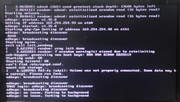
Each attempt to start this NAS ends with: "udhcpc: no lease, forking to background".
What should I do to solve the problem?
F2-423 start problem


Re: F2-423 start problem
Not exactly my field but I would suggest checking your network.
a) Are you requesting an IP address from dhcp?
b) Have you set an ip address in the nas?
c) Do you have a dhcp server on your network? (Like your router) and is it working?
d) Do you have any other devices on the LAN that can issue dhcp addresses:
{Devices such as TPLink powerline adapters can have an unseen bug that enables them as alternate dhcp servers in the event no other server can be found. Later firmware updates have been issued (in some cases) that makes this option visible and modifiable.}
'dnsmasq' is also involved.
a) Are you requesting an IP address from dhcp?
b) Have you set an ip address in the nas?
c) Do you have a dhcp server on your network? (Like your router) and is it working?
d) Do you have any other devices on the LAN that can issue dhcp addresses:
{Devices such as TPLink powerline adapters can have an unseen bug that enables them as alternate dhcp servers in the event no other server can be found. Later firmware updates have been issued (in some cases) that makes this option visible and modifiable.}
'dnsmasq' is also involved.
F5-221 TOS7.0.1278 - 4x4TB (Ironwolf) Traid
F2-424 TOS7.0.1278 - 2x500GB nvme (P3) Traid, 2x6TB HDD (HGST) Traid
F2-221 TOS7.0.1278 - 1x3TB Ext4, 1x4TB Btrfs
F2-425+ TOS7.0.1278 - 2x500GB nvme (P3) Traid, 2x6TB HDD (EXOS) Traid
F2-424 TOS7.0.1278 - 2x500GB nvme (P3) Traid, 2x6TB HDD (HGST) Traid
F2-221 TOS7.0.1278 - 1x3TB Ext4, 1x4TB Btrfs
F2-425+ TOS7.0.1278 - 2x500GB nvme (P3) Traid, 2x6TB HDD (EXOS) Traid
Re: F2-423 start problem
a) yes, from router
b) no, I can't do it, I haven't seen "desktop of TOS" yet...
c) only on router
d) no, only one router
Thanks you for trying to help.
b) no, I can't do it, I haven't seen "desktop of TOS" yet...
c) only on router
d) no, only one router
Thanks you for trying to help.

Re: F2-423 start problem
Maybe the router has not assigned an IP address. You can try restarting the router.
To contact our team, please send email to following addresses, remember to replace (at) with @
Technical team: support(at)terra-master.com (for technical support)
Service team: service(at)terra-master.com (for purchasing, return, replacement, RMA service)
Technical team: support(at)terra-master.com (for technical support)
Service team: service(at)terra-master.com (for purchasing, return, replacement, RMA service)
Re: F2-423 start problem
Based on the screenshot, the IP addresses being used are defaults assigned by the nas when it does not get an ip from the network. There is almost certainly an issue with the router/network. Do you have other devices attached and do they get ip addresses? Is the DHCP address pool set up correctly? Are the cable(s) between router/nas ok?
{By the way, when first installing TOS only have LAN1 connected.}
{By the way, when first installing TOS only have LAN1 connected.}
F5-221 TOS7.0.1278 - 4x4TB (Ironwolf) Traid
F2-424 TOS7.0.1278 - 2x500GB nvme (P3) Traid, 2x6TB HDD (HGST) Traid
F2-221 TOS7.0.1278 - 1x3TB Ext4, 1x4TB Btrfs
F2-425+ TOS7.0.1278 - 2x500GB nvme (P3) Traid, 2x6TB HDD (EXOS) Traid
F2-424 TOS7.0.1278 - 2x500GB nvme (P3) Traid, 2x6TB HDD (HGST) Traid
F2-221 TOS7.0.1278 - 1x3TB Ext4, 1x4TB Btrfs
F2-425+ TOS7.0.1278 - 2x500GB nvme (P3) Traid, 2x6TB HDD (EXOS) Traid
Re: F2-423 start problem
I have other devices, but they successfully connected by WiFi.Gremlin wrote: ↑27 Jul 2024, 16:57 Based on the screenshot, the IP addresses being used are defaults assigned by the nas when it does not get an ip from the network. There is almost certainly an issue with the router/network. Do you have other devices attached and do they get ip addresses? Is the DHCP address pool set up correctly? Are the cable(s) between router/nas ok?
{By the way, when first installing TOS only have LAN1 connected.}
At the same time tried to connect my laptops on this cable - all OK.
Unfortunately I can't tell if the address pool is configured correctly, I don't know much about network settings.
I tried both LAN ports

Re: F2-423 start problem
Probably DHCP is working correctly, here are the router logs after rebooting NAS:
2024-07-27 13:32:39 [Debug][Debug-Log] static:[dhcpd]receive Discover, xid[4aed5675], mac[6c:bf:b5:03:da:6b], option60[udhcp 1.35.0]
2024-07-27 13:32:39 [Critical][Debug-Log] static:[dhcpd]xid[4aed5675] choose [main] address pool
2024-07-27 13:32:40 [Debug][Debug-Log] static:[dhcpd]send Ack, xid[4aed5675], mac[6c:bf:b5:03:da:6b], request serverip[192.168.100.1], yourip[192.168.100.8], dns1[8.8.8.8], dns2[8.8.4.4]
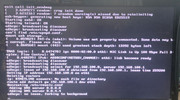
What's strange is that only one line "no lease" after that.
Re: F2-423 start problem
Dear friends, thanks for all your advices, the problem is solved. Most likely it was a few calls to the Internet provider and setting up the router that helped. And a DHCP tuning.
Now I'm moving on to the stage of system installation.
Learned a lot about the unit even before it was first run)
Have a nice day!
Now I'm moving on to the stage of system installation.
Learned a lot about the unit even before it was first run
) Have a nice day!
Re: F2-423 start problem
Glad to here it. Good Luck
F5-221 TOS7.0.1278 - 4x4TB (Ironwolf) Traid
F2-424 TOS7.0.1278 - 2x500GB nvme (P3) Traid, 2x6TB HDD (HGST) Traid
F2-221 TOS7.0.1278 - 1x3TB Ext4, 1x4TB Btrfs
F2-425+ TOS7.0.1278 - 2x500GB nvme (P3) Traid, 2x6TB HDD (EXOS) Traid
F2-424 TOS7.0.1278 - 2x500GB nvme (P3) Traid, 2x6TB HDD (HGST) Traid
F2-221 TOS7.0.1278 - 1x3TB Ext4, 1x4TB Btrfs
F2-425+ TOS7.0.1278 - 2x500GB nvme (P3) Traid, 2x6TB HDD (EXOS) Traid