

I am pulling my hair out. I've been trying for 2 weeks to get the firewall in place and as soon as I add the deny all rule at the end of the rule list, my F4-424 Pro cannot reach the internet and tailscale cannot connect. My local network still can access the TM. I cannot ping from the NAS unless I remove the deny all rule. I've never had any problems with the firewall on my Linux systems, but this is driving me insane? What is the proper rules for the firewall to give access to local network, tailscale and guarantee NAS and docker containers can reach the internet?
Thanks
[Help] I cannot get Firewall working on TOS 6 F4-424 pro


Re: [Help] I cannot get Firewall working on TOS 6 F4-424 pro
Please provide a screenshot of your current firewall configuration so we can verify it. If any part involves privacy, you can send it to our technical support email ([email protected]), and we will analyze it. Please include a link to this post in the email body.
To contact our team, please send email to following addresses, remember to replace (at) with @
Technical team: support(at)terra-master.com(for technical support)
Service team: service(at)terra-master.com(for purchasing, return, replacement, RMA service)
Technical team: support(at)terra-master.com(for technical support)
Service team: service(at)terra-master.com(for purchasing, return, replacement, RMA service)
Re: [Help] I cannot get Firewall working on TOS 6 F4-424 pro
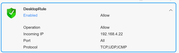
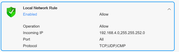
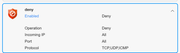
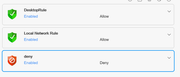
I've scaled way back to just keep access from my local network. Here is what I have now. With this I cannot ping anywhere outside my local network (like google.com) and tailscale cannot connect. If I delete the deny rule, I can ping the internet, my docker containers can reach the internet and tailscale connects fine.
Re: [Help] I cannot get Firewall working on TOS 6 F4-424 pro
If you want to ping websites outside of your local network, you need to enable the ICMP protocol. In fact, certain protocol interactions require not only the NAS to send packets but also for the other party to return packets. If everything is disabled, it will result in connection failures.
To contact our team, please send email to following addresses, remember to replace (at) with @
Technical team: support(at)terra-master.com(for technical support)
Service team: service(at)terra-master.com(for purchasing, return, replacement, RMA service)
Technical team: support(at)terra-master.com(for technical support)
Service team: service(at)terra-master.com(for purchasing, return, replacement, RMA service)
Re: [Help] I cannot get Firewall working on TOS 6 F4-424 pro
so what is the proper way in terramaster tos 6 to allow all access to local network, tailscale and allow the NAS to ping and download updates while locking everything else out?

Re: [Help] I cannot get Firewall working on TOS 6 F4-424 pro
https://toshelp.terra-master.com/web/#/en/security
In TOS 6, the firewall policy is configured so that all traffic is allowed by default. You can configure new policies according to your needs. You can refer to this link to learn how to create a firewall policy.
Re: [Help] I cannot get Firewall working on TOS 6 F4-424 pro
That article doesn't help at all. Really starting to regret purchasing a terramaster. How should the final deny statement be set up to allow all the allowed statements to connect? May need to install another OS on the device or use a mini computer to run it since even getting basic answers seems next to impossible. Your article says allow the local network range then create a rule that deny's everything else. when I do that the NAS cannot reach the internet and tailscale cannot connect.


Re: [Help] I cannot get Firewall working on TOS 6 F4-424 pro
Are you confusing inbound and outbound rules. Deny All (whatever direction) will deny all processes/services/ports unless they are specifically allowed. Sounds like you have allowed specific inbound without allowing specific outbound. However manipulating specific outbound rules can be extremely difficult as you might not know ahead of time which ports (for example) a service is going to use. From a simplistic point of view why deny any outbound services? Typically desktop and router rules limit inbound but allow all outbound. Perhaps you could show which rules you have set and someone may spot something relevant.
F5-221 TOS7.0.1278 - 4x4TB (Ironwolf) Traid
F2-424 TOS7.0.1278 - 2x500GB nvme (P3) Traid, 2x6TB HDD (HGST) Traid
F2-221 TOS7.0.1278 - 1x3TB Ext4, 1x4TB Btrfs
F2-425+ TOS7.0.1278 - 2x500GB nvme (P3) Traid, 2x6TB HDD (EXOS) Traid
F2-424 TOS7.0.1278 - 2x500GB nvme (P3) Traid, 2x6TB HDD (HGST) Traid
F2-221 TOS7.0.1278 - 1x3TB Ext4, 1x4TB Btrfs
F2-425+ TOS7.0.1278 - 2x500GB nvme (P3) Traid, 2x6TB HDD (EXOS) Traid
Re: [Help] I cannot get Firewall working on TOS 6 F4-424 pro
My question is on the TOS 6 Firewall GUI there is no separation of inbound or outbound. You can allow or deny incoming ip, but when you place a deny rule for incoming ips, the unit cannot connect to the internet. using iptables or ufw you can block incoming without affecting outgoing. when I place the deny all rule which denies incoming ip, I cannot ping, my containers cannot reach the internet for metadata, etc. I can only reach my local network. I showed the images of the rules a couple messages ago. I pared it down to only show allowing my desktop and local network and then denying all else. The deny incoming also blocks tailscale even if I allow the tailscale subnet and ports, and it blocks all outgoing internet connections.
Re: [Help] I cannot get Firewall working on TOS 6 F4-424 pro
I knew there was a reason I stopped trying the Firewall in TOS5. Seems TOS6 was not much better after all. I suspect that it is not really blocking outgoing but preventing the needed incoming responses from outgoing connections. Probably better to keep firewall rules on the 'edge' (eg router) interface if you are happy with your local LAN to have access to NAS.
F5-221 TOS7.0.1278 - 4x4TB (Ironwolf) Traid
F2-424 TOS7.0.1278 - 2x500GB nvme (P3) Traid, 2x6TB HDD (HGST) Traid
F2-221 TOS7.0.1278 - 1x3TB Ext4, 1x4TB Btrfs
F2-425+ TOS7.0.1278 - 2x500GB nvme (P3) Traid, 2x6TB HDD (EXOS) Traid
F2-424 TOS7.0.1278 - 2x500GB nvme (P3) Traid, 2x6TB HDD (HGST) Traid
F2-221 TOS7.0.1278 - 1x3TB Ext4, 1x4TB Btrfs
F2-425+ TOS7.0.1278 - 2x500GB nvme (P3) Traid, 2x6TB HDD (EXOS) Traid