Page 1 of 3
[Help] TOS7 cannot mount remote SMB folders.
Posted: 15 Apr 2026, 11:43
by Varlei
I connect to my server without problems using my Synology DSM 7.3.2 and Asustor ADM 5.1.2, but with Terramaster TOS7 I get the message "The source path is not available." They are on the same network and I'm using exactly the same credentials.
Any ideas?
Re: [Help] TOS7 cannot mount remote SMB folders.
Posted: 15 Apr 2026, 12:12
by FredMutter
I’m quite surprised that this feature hasn’t been improved in the new version. It was a bit of a mess with TOS 6 and it seems to still be a bit of a mess with TOS 7

In the meantime, I also use the Unix command ‘mount’ to do it myself.
Re: [Help] TOS7 cannot mount remote SMB folders.
Posted: 15 Apr 2026, 15:24
by Gremlin
Re: [Help] TOS7 cannot mount remote SMB folders.
Posted: 15 Apr 2026, 18:01
by CursaYang
We have internally tested multiple machines with different system versions, and all can mount normally. The issue you're encountering may be related to the network environment or SMB settings. If convenient, you can find online customer service through the entry in the lower right corner of the official website to schedule a remote session, where our engineers can conduct troubleshooting.
Re: [Help] TOS7 cannot mount remote SMB folders.
Posted: 15 Apr 2026, 18:44
by FredMutter
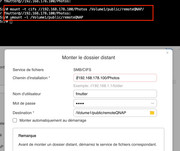
unix mount and umount works
but mount using the external volume dialog not
here is screenshot
Re: [Help] TOS7 cannot mount remote SMB folders.
Posted: 16 Apr 2026, 17:24
by CursaYang
FredMutter wrote: ↑15 Apr 2026, 18:44
unix mount and umount works
but mount using the external volume dialog not
here is screenshot
If the NAS can be mounted normally in the terminal, this indicates that the NAS connection is working properly, and there may be some issues on the front end. If it's convenient for you, you can schedule an engineer for remote troubleshooting.
Re: [Help] TOS7 cannot mount remote SMB folders.
Posted: 16 Apr 2026, 19:37
by FredMutter
CursaYang wrote: ↑16 Apr 2026, 17:24
FredMutter wrote: ↑15 Apr 2026, 18:44
unix mount and umount works
but mount using the external volume dialog not
here is screenshot
If the NAS can be mounted normally in the terminal, this indicates that the NAS connection is working properly, and there may be some issues on the front end. If it's convenient for you, you can schedule an engineer for remote troubleshooting.
yes I will do that (in order to have a better software with TOS 7)
Re: [Help] TOS7 cannot mount remote SMB folders.
Posted: 18 Apr 2026, 16:09
by Gremlin
Did you get this sorted?
I'm curious because the subject of the thread was "TOS7 ....." yet the screen shots posted show the TOS6 interface? Or, was that updated later in TOS7 Beta release?
Re: [Help] TOS7 cannot mount remote SMB folders.
Posted: 18 Apr 2026, 16:42
by FredMutter
Gremlin wrote: ↑18 Apr 2026, 16:09
Did you get this sorted?
I'm curious because the subject of the thread was "TOS7 ....." yet the screen shots posted show the TOS6 interface? Or, was that updated later in TOS7 Beta release?
I do have an appointment for Monday
Re: [Help] TOS7 cannot mount remote SMB folders.
Posted: 18 Apr 2026, 16:52
by FredMutter
Gremlin wrote: ↑18 Apr 2026, 16:09
Did you get this sorted?
I'm curious because the subject of the thread was "TOS7 ....." yet the screen shots posted show the TOS6 interface? Or, was that updated later in TOS7 Beta release?
And I do have TOS 6 indeed.
But I suppose the problem remains with TOS 7. This is why I want to contact the hotline