

I got it working once, I could create an Ubuntu VM, then all went south.
Virtual machine(Test-Ubuntu) failed to start (Error:virError(Code=38, Domain=7, Message='Failed to connect socket to '/run/libvirt/virtlogd-sock': No such file or directory'))
that socket file is there, so no idea what it's grumbling about.
Is this app still being developed for TSO 7 or are folks just using virtual box?
[Help] TOS 7 VMs app -- Not the VirtBox thing
[Help] TOS 7 VMs app -- Not the VirtBox thing
F6-424 & F4-425 Plus at 7.0.1298
F4-424 Pro (x2) at 7.0.1298
D4-320 (Offline until I can afford more HDDs)
F4-424 Pro (x2) at 7.0.1298
D4-320 (Offline until I can afford more HDDs)

Re: [Help] TOS 7 VMs app -- Not the VirtBox thing
Hi,
VMs is a newly launched app, and we will continue to optimize and maintain it.
Could you please send a screenshot of the screen where you encountered the error here? If possible, please also describe the specific steps you took. This will help us pinpoint the issue.
VMs is a newly launched app, and we will continue to optimize and maintain it.
Could you please send a screenshot of the screen where you encountered the error here? If possible, please also describe the specific steps you took. This will help us pinpoint the issue.
To contact our team, please send email to following addresses, remember to replace (at) with @:
Technical team: support(at)terra-master.com (for technical support)
Service team: service(at)terra-master.com (for purchasing, return, replacement, RMA service)
Technical team: support(at)terra-master.com (for technical support)
Service team: service(at)terra-master.com (for purchasing, return, replacement, RMA service)
Re: [Help] TOS 7 VMs app -- Not the VirtBox thing
Oh yeah sorry, I was just going to update the post, I do have the debug log. I'll copy it to my link and post any screen shots.
https://1drv.ms/f/s!AgP4K-RskQ9MjLwJvJG ... Q?e=2GWq4N
In all honesty I think I did it. (Somehow)
Recap: Storage Pool #1 is SSD (System disk/boot)
Storage Pool #2 is the 4x20TB array
I first installed it on #2 and that is where it worked at first, I couldn't build a RHEL 9 VM, it would start but the RHEL install itself wouldn't get very far. I did successfully build an Ubuntu VM.
But I noticed the disk array was very busy. So, I decided to uninstall and reinstall on the SSD Storage Pool. in hind sight only the app would be on the SSD, the storage pool is still on the disk array.
When starting the VM
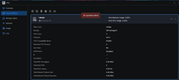
Log

config of the vm
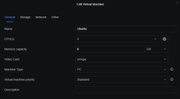


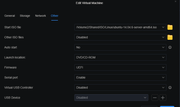
While we are discussing this app, is this supposed to let me upload ISO files, or just OV* images. I try the ISO and nothing happens, no message, no indication at all.
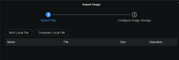
https://1drv.ms/f/s!AgP4K-RskQ9MjLwJvJG ... Q?e=2GWq4N
In all honesty I think I did it. (Somehow)
Recap: Storage Pool #1 is SSD (System disk/boot)
Storage Pool #2 is the 4x20TB array
I first installed it on #2 and that is where it worked at first, I couldn't build a RHEL 9 VM, it would start but the RHEL install itself wouldn't get very far. I did successfully build an Ubuntu VM.
But I noticed the disk array was very busy. So, I decided to uninstall and reinstall on the SSD Storage Pool. in hind sight only the app would be on the SSD, the storage pool is still on the disk array.
When starting the VM
Log
config of the vm
While we are discussing this app, is this supposed to let me upload ISO files, or just OV* images. I try the ISO and nothing happens, no message, no indication at all.
F6-424 & F4-425 Plus at 7.0.1298
F4-424 Pro (x2) at 7.0.1298
D4-320 (Offline until I can afford more HDDs)
F4-424 Pro (x2) at 7.0.1298
D4-320 (Offline until I can afford more HDDs)
Re: [Help] TOS 7 VMs app -- Not the VirtBox thing
We need some time to look into the situation you mentioned.
Is the app version the latest one, v1.0.042?
Is the app version the latest one, v1.0.042?
To contact our team, please send email to following addresses, remember to replace (at) with @:
Technical team: support(at)terra-master.com (for technical support)
Service team: service(at)terra-master.com (for purchasing, return, replacement, RMA service)
Technical team: support(at)terra-master.com (for technical support)
Service team: service(at)terra-master.com (for purchasing, return, replacement, RMA service)
Re: [Help] TOS 7 VMs app -- Not the VirtBox thing
Yes it is, just checked to be sure.
F6-424 & F4-425 Plus at 7.0.1298
F4-424 Pro (x2) at 7.0.1298
D4-320 (Offline until I can afford more HDDs)
F4-424 Pro (x2) at 7.0.1298
D4-320 (Offline until I can afford more HDDs)
Re: [Help] TOS 7 VMs app -- Not the VirtBox thing
The virtual machine cannot be started because the socket file does not exist.
Please check if the virtlogd service is running normally.
1. Check the current status
2. Stop the service
3. Start services in the correct order
4. Verify that the socket exists
5. Test the connection
If all goes well, you'll see screens like these.

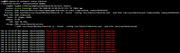
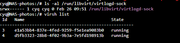
Please check if the virtlogd service is running normally.
1. Check the current status
Code: Select all
systemctl status virtlogdCode: Select all
systemctl stop virtlogd
systemctl stop libvirtdCode: Select all
systemctl start libvirtd
sleep 2  # Wait for libvirtd to fully start
systemctl start virtlogdCode: Select all
ls -la /run/libvirt/virtlogd-sockCode: Select all
virsh listTo contact our team, please send email to following addresses, remember to replace (at) with @:
Technical team: support(at)terra-master.com (for technical support)
Service team: service(at)terra-master.com (for purchasing, return, replacement, RMA service)
Technical team: support(at)terra-master.com (for technical support)
Service team: service(at)terra-master.com (for purchasing, return, replacement, RMA service)
Re: [Help] TOS 7 VMs app -- Not the VirtBox thing
Ok will do, although today I'm out for most of the day. Soon as can I will do as instructed. 
Thank you
Thank you
F6-424 & F4-425 Plus at 7.0.1298
F4-424 Pro (x2) at 7.0.1298
D4-320 (Offline until I can afford more HDDs)
F4-424 Pro (x2) at 7.0.1298
D4-320 (Offline until I can afford more HDDs)
Re: [Help] TOS 7 VMs app -- Not the VirtBox thing
was going to use the capture console, but test didn't take long
Seems the libv service is a system one and the virt is a user one, at least where the service file is located. (See below)
Molly@Forge:/# script
Script started, output log file is 'typescript'.
sh-5.1# systemctl status virtlogd
Unit virtlogd.service could not be found.
sh-5.1# systemctl status libvirtd
● libvirtd.service - Virtualization daemon
Loaded: loaded (/etc/systemd/system/libvirtd.service; linked; vendor preset: enabled)
Active: active (running) since Tue 2026-04-07 09:11:15 EDT; 36min ago
Process: 4465 ExecStartPre=/usr/share/qemu/qemu-kvm-init.sh start (code=exited, status=0/SUCCESS)
Process: 4479 ExecStart=/usr/local/VMs/bin/libvirtd -d --listen --config /etc/libvirt/libvirtd.conf --pid-file /var/run/libvirtd.pid (code=exited, status=0/SUCCESS)
Main PID: 4494 (libvirtd)
Tasks: 19 (limit: 37910)
Memory: 13.2M
CPU: 525ms
CGroup: /VMs.slice/libvirtd.service
└─4494 /usr/local/VMs/bin/libvirtd -d --listen --config /etc/libvirt/libvirtd.conf --pid-file /var/run/libvirtd.pid
Notice: journal has been rotated since unit was started, output may be incomplete.
sh-5.1# systemctl start virtlogd
Failed to start virtlogd.service: Unit virtlogd.service not found.
sh-5.1# ls -la /run/vibvirt/virtlogd-sock
ls: cannot access '/run/vibvirt/virtlogd-sock': No such file or directory
sh-5.1# ^C
sh-5.1# exit
exit
Script done.
Molly@Forge:/# find . -name libvirtd.service
./sys/fs/cgroup/VMs.slice/libvirtd.service
./var/subvols/8vEbTxkKvwa/@/@apps/VMs/init.d/libvirtd.service
./etc/systemd/system/libvirtd.service
./usr/lib/systemd/system/libvirtd.service
./Volume1/@apps/VMs/init.d/libvirtd.service
^C
Molly@Forge:/# find . -name virtlogd.service
./var/subvols/8vEbTxkKvwa/@/@apps/VMs/init.d/virtlogd.service
./usr/lib/systemd/system/virtlogd.service
./Volume1/@apps/VMs/init.d/virtlogd.service
Molly@Forge:/#
Did try full location
Molly@Forge:/# systemctl status /usr/lib/systemd/system/virtlogd.service
Unit usr-lib-systemd-system-virtlogd.service.mount could not be found.
Seems the libv service is a system one and the virt is a user one, at least where the service file is located. (See below)
Molly@Forge:/# script
Script started, output log file is 'typescript'.
sh-5.1# systemctl status virtlogd
Unit virtlogd.service could not be found.
sh-5.1# systemctl status libvirtd
● libvirtd.service - Virtualization daemon
Loaded: loaded (/etc/systemd/system/libvirtd.service; linked; vendor preset: enabled)
Active: active (running) since Tue 2026-04-07 09:11:15 EDT; 36min ago
Process: 4465 ExecStartPre=/usr/share/qemu/qemu-kvm-init.sh start (code=exited, status=0/SUCCESS)
Process: 4479 ExecStart=/usr/local/VMs/bin/libvirtd -d --listen --config /etc/libvirt/libvirtd.conf --pid-file /var/run/libvirtd.pid (code=exited, status=0/SUCCESS)
Main PID: 4494 (libvirtd)
Tasks: 19 (limit: 37910)
Memory: 13.2M
CPU: 525ms
CGroup: /VMs.slice/libvirtd.service
└─4494 /usr/local/VMs/bin/libvirtd -d --listen --config /etc/libvirt/libvirtd.conf --pid-file /var/run/libvirtd.pid
Notice: journal has been rotated since unit was started, output may be incomplete.
sh-5.1# systemctl start virtlogd
Failed to start virtlogd.service: Unit virtlogd.service not found.
sh-5.1# ls -la /run/vibvirt/virtlogd-sock
ls: cannot access '/run/vibvirt/virtlogd-sock': No such file or directory
sh-5.1# ^C
sh-5.1# exit
exit
Script done.
Molly@Forge:/# find . -name libvirtd.service
./sys/fs/cgroup/VMs.slice/libvirtd.service
./var/subvols/8vEbTxkKvwa/@/@apps/VMs/init.d/libvirtd.service
./etc/systemd/system/libvirtd.service
./usr/lib/systemd/system/libvirtd.service
./Volume1/@apps/VMs/init.d/libvirtd.service
^C
Molly@Forge:/# find . -name virtlogd.service
./var/subvols/8vEbTxkKvwa/@/@apps/VMs/init.d/virtlogd.service
./usr/lib/systemd/system/virtlogd.service
./Volume1/@apps/VMs/init.d/virtlogd.service
Molly@Forge:/#
Did try full location
Molly@Forge:/# systemctl status /usr/lib/systemd/system/virtlogd.service
Unit usr-lib-systemd-system-virtlogd.service.mount could not be found.
F6-424 & F4-425 Plus at 7.0.1298
F4-424 Pro (x2) at 7.0.1298
D4-320 (Offline until I can afford more HDDs)
F4-424 Pro (x2) at 7.0.1298
D4-320 (Offline until I can afford more HDDs)
Re: [Help] TOS 7 VMs app -- Not the VirtBox thing
Bad link
lrwxrwxrwx 1 Molly Molly 43 Apr 4 16:53 virtlockd.service -> '/Volume1/@apps/VMs/init.d/virtlockd.service'
lrwxrwxrwx 1 Molly Molly 42 Apr 2 10:02 virtlogd.service -> '/Volume2/@apps/VMs/init.d/virtlogd.service'
lrwxrwxrwx 1 Molly Molly 43 Apr 4 16:53 vms-redis.service -> '/Volume1/@apps/VMs/init.d/vms-redis.service'
-rw-r--r-- 1 Molly Molly 387 Apr 7 06:17 webdav.service
-rw-r--r-- 1 Molly Molly 461 Nov 24 06:00 winbind.service
-rw-r--r-- 1 Molly Molly 484 Nov 24 06:00 '[email protected]'
-rw-r--r-- 1 Molly Molly 478 Nov 24 06:00 '[email protected]'
-rw-r--r-- 1 Molly Molly 342 Nov 24 06:00 wpa_supplicant.service
-rw-r--r-- 1 Molly Molly 446 Nov 24 06:00 '[email protected]'
-rw-r--r-- 1 Molly Molly 616 Apr 7 06:17 wsdd.service
-rw-r--r-- 1 Molly Molly 541 Nov 24 06:00 '[email protected]'
-rw-r--r-- 1 Molly Molly 376 Nov 24 06:00 xfs_scrub_all.service
-rw-r--r-- 1 Molly Molly 250 Nov 24 06:00 xfs_scrub_all.timer
-rw-r--r-- 1 Molly Molly 272 Nov 24 06:00 '[email protected]'
-rw-r--r-- 1 Molly Molly 361 Nov 24 06:00 xl2tpd.service
Molly@Forge:/usr/lib/systemd/system# ls -la /Volume2/@apps/VMs/init.d/virtlogd.service
ls: cannot access '/Volume2/@apps/VMs/init.d/virtlogd.service': No such file or directory
Molly@Forge:/usr/lib/systemd/system# ls -la /Volume1/@apps/VMs/init.d/virtlogd.service
-rw-r--r-- 1 Molly Molly 372 Apr 4 16:53 /Volume1/@apps/VMs/init.d/virtlogd.service
Molly@Forge:/usr/lib/systemd/system#
I'll change the link to point to Volume1
lrwxrwxrwx 1 Molly Molly 43 Apr 4 16:53 virtlockd.service -> '/Volume1/@apps/VMs/init.d/virtlockd.service'
lrwxrwxrwx 1 Molly Molly 42 Apr 2 10:02 virtlogd.service -> '/Volume2/@apps/VMs/init.d/virtlogd.service'
lrwxrwxrwx 1 Molly Molly 43 Apr 4 16:53 vms-redis.service -> '/Volume1/@apps/VMs/init.d/vms-redis.service'
-rw-r--r-- 1 Molly Molly 387 Apr 7 06:17 webdav.service
-rw-r--r-- 1 Molly Molly 461 Nov 24 06:00 winbind.service
-rw-r--r-- 1 Molly Molly 484 Nov 24 06:00 '[email protected]'
-rw-r--r-- 1 Molly Molly 478 Nov 24 06:00 '[email protected]'
-rw-r--r-- 1 Molly Molly 342 Nov 24 06:00 wpa_supplicant.service
-rw-r--r-- 1 Molly Molly 446 Nov 24 06:00 '[email protected]'
-rw-r--r-- 1 Molly Molly 616 Apr 7 06:17 wsdd.service
-rw-r--r-- 1 Molly Molly 541 Nov 24 06:00 '[email protected]'
-rw-r--r-- 1 Molly Molly 376 Nov 24 06:00 xfs_scrub_all.service
-rw-r--r-- 1 Molly Molly 250 Nov 24 06:00 xfs_scrub_all.timer
-rw-r--r-- 1 Molly Molly 272 Nov 24 06:00 '[email protected]'
-rw-r--r-- 1 Molly Molly 361 Nov 24 06:00 xl2tpd.service
Molly@Forge:/usr/lib/systemd/system# ls -la /Volume2/@apps/VMs/init.d/virtlogd.service
ls: cannot access '/Volume2/@apps/VMs/init.d/virtlogd.service': No such file or directory
Molly@Forge:/usr/lib/systemd/system# ls -la /Volume1/@apps/VMs/init.d/virtlogd.service
-rw-r--r-- 1 Molly Molly 372 Apr 4 16:53 /Volume1/@apps/VMs/init.d/virtlogd.service
Molly@Forge:/usr/lib/systemd/system#
I'll change the link to point to Volume1
F6-424 & F4-425 Plus at 7.0.1298
F4-424 Pro (x2) at 7.0.1298
D4-320 (Offline until I can afford more HDDs)
F4-424 Pro (x2) at 7.0.1298
D4-320 (Offline until I can afford more HDDs)
Re: [Help] TOS 7 VMs app -- Not the VirtBox thing
Fixed it.
The initial issue (I believe) is the uninstall leaves one link behind.
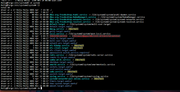
The screen shot is after I did an uninstall of the app.
I deleted that link, and did a successful install of the app.
and the virtlogd and libvirtd show running now.
Of course I need to build the VM and do a final test, but things look a lot better
The initial issue (I believe) is the uninstall leaves one link behind.
The screen shot is after I did an uninstall of the app.
I deleted that link, and did a successful install of the app.
and the virtlogd and libvirtd show running now.
Of course I need to build the VM and do a final test, but things look a lot better
F6-424 & F4-425 Plus at 7.0.1298
F4-424 Pro (x2) at 7.0.1298
D4-320 (Offline until I can afford more HDDs)
F4-424 Pro (x2) at 7.0.1298
D4-320 (Offline until I can afford more HDDs)