[Help] Copying snapshot to remote NAS
Posted: 25 Feb 2026, 00:35
Everyday I have this filesystem take a snapshot, keeping only 3 occurrences.
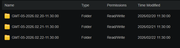
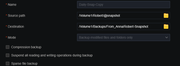
Later in the day I rsync the snapshot contents to another NAS (safekeeping if you call it)
Target folder (remote nas)
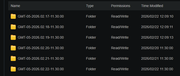
So my question or problem is, without manual intervention I want to the target folder to only contain what is in the source.
Is there an option on the RSYNC gui to do that?
What I am attempting now is to script what I thought was a simple rmdir of folders older than 3 days to be purged.
Here is what I'm using
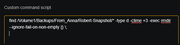
It doesn't work. No visible errors, even running manually in the terminal window. If you look at the folders in terminal window, there is external security on (SETACL). Do I need to remove that first then attempt whack the folders?
Later in the day I rsync the snapshot contents to another NAS (safekeeping if you call it)
Target folder (remote nas)
So my question or problem is, without manual intervention I want to the target folder to only contain what is in the source.
Is there an option on the RSYNC gui to do that?
What I am attempting now is to script what I thought was a simple rmdir of folders older than 3 days to be purged.
Here is what I'm using
It doesn't work. No visible errors, even running manually in the terminal window. If you look at the folders in terminal window, there is external security on (SETACL). Do I need to remove that first then attempt whack the folders?