[Help] Copying snapshot to remote NAS

SMB, NFS, FTP, web file manager and Rsync server.
Post Reply
User avatar
rfbjr
Silver Member
Posts: 504
Joined: 16 May 2024, 23:43
United States of America

[Help] Copying snapshot to remote NAS

Post by rfbjr »

Everyday I have this filesystem take a snapshot, keeping only 3 occurrences.

Image

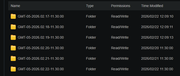
Later in the day I rsync the snapshot contents to another NAS (safekeeping if you call it)

Image

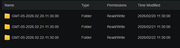
Target folder (remote nas)

Image
So my question or problem is, without manual intervention I want to the target folder to only contain what is in the source.
Is there an option on the RSYNC gui to do that?
What I am attempting now is to script what I thought was a simple rmdir of folders older than 3 days to be purged.
Here is what I'm using

Image
It doesn't work. No visible errors, even running manually in the terminal window. If you look at the folders in terminal window, there is external security on (SETACL). Do I need to remove that first then attempt whack the folders?
F4-424 Pro (x2) and F6-424 at 7.0.1536
F4-425 Plus at 7.0.1422
D4-320 & D4-SSD
User avatar
Gremlin
Gold Member
Posts: 1786
Joined: 02 Dec 2022, 22:31
Great Britain

Re: [Help] Copying snapshot to remote NAS

Post by Gremlin »

I don't know if this is relevant, but in many linux derivatives '-ctime' (creation time) is a nebulous concept and not always recognised. Take a look at '-mtime' (last modified).
British By Birth, Canadian By Choice, Residence By Circumstance :)
F5-221 TOS7.0.1422 - 4x4TB (Ironwolf) Traid
F2-424 TOS7.0.1422 - 2x500GB nvme (P3) Traid, 2x6TB HDD (HGST) Traid
Frustrated Beta Tester!!!
F2-221, F2-425+ == Tos7.1 in progress (broken)!
User avatar
rfbjr
Silver Member
Posts: 504
Joined: 16 May 2024, 23:43
United States of America

Re: [Help] Copying snapshot to remote NAS

Post by rfbjr »

I should have mentioned that I did try mtime as well.
drwxr-xr-x+ 1 Molly Molly 364 Feb 24 11:30 Robert-Snapshot/
drwxr-x---+ 1 Molly Molly 2794 Feb 22 12:09 GMT-05-2026.02.17-11.30.00/
drwxr-x---+ 1 Molly Molly 2794 Feb 22 12:09 GMT-05-2026.02.18-11.30.00/
drwxr-x---+ 1 Molly Molly 2794 Feb 22 12:09 GMT-05-2026.02.19-11.30.00/
drwxr-x---+ 1 Molly Molly 2806 Feb 20 11:30 GMT-05-2026.02.20-11.30.00/
drwxr-x---+ 1 Molly Molly 2806 Feb 21 11:30 GMT-05-2026.02.21-11.30.00/
drwxr-x---+ 1 Molly Molly 2806 Feb 22 11:30 GMT-05-2026.02.22-11.30.00/
drwxr-x---+ 1 Molly Molly 2806 Feb 24 11:30 GMT-05-2026.02.24-11.30.00/

Stat of
File: GMT-05-2026.02.17-11.30.00/
Size: 2794 Blocks: 0 IO Block: 4096 directory
Device: 38h/56d Inode: 816486 Links: 1
Access: (0750/drwxr-x---) Uid: ( 0/ Molly) Gid: ( 0/ Molly)
Access: 2026-02-17 13:15:06.708380728 -0500
Modify: 2026-02-22 12:09:10.885165661 -0500
Change: 2026-02-22 12:09:10.885165661 -0500
Birth: 2026-02-17 13:15:06.708380728 -0500


I think it's the external security or at least the next thing to try. I'm waiting for the resync to finish (another matter)

I also don't have a problem just scripting the rync manually with the mirror (I think) option to just make the target directory mirror the source.
F4-424 Pro (x2) and F6-424 at 7.0.1536
F4-425 Plus at 7.0.1422
D4-320 & D4-SSD
Post Reply

Return to “File Services”