

Hi there! F5-221 here with TOS 7.0.403.
I try to move from virtualbox to VM as virtualbox won't be supported anymore as I understand.
Import from OVA works but starting the VM fails with this log message:
Warning,2026-02-08 23:08:05,vm,username,"Virtual machine(name) failed to start (Error:virError(Code=67, Domain=10, Message='unsupported configuration: Emulator '/usr/local/sbin/qemu-system-x86_64' does not support virt type 'kvm''))"
I understand that this error have to do with disabled hardware support for virtualisation. Is there anything I can do to fix this?
[Help] fail to start VM imported from virtualbox

Re: [Help] fail to start VM imported from virtualbox
Please enter BIOS to check if VT-x is enabled。
(Connect the USB keyboard and HDMI monitor. After pressing the power button of the F5-221, frequently press ESC.)
(Connect the USB keyboard and HDMI monitor. After pressing the power button of the F5-221, frequently press ESC.)
To contact our team, please send email to following addresses, remember to replace (at) with @:
Technical team: support(at)terra-master.com (for technical support)
Service team: service(at)terra-master.com (for purchasing, return, replacement, RMA service)
Technical team: support(at)terra-master.com (for technical support)
Service team: service(at)terra-master.com (for purchasing, return, replacement, RMA service)
Re: [Help] fail to start VM imported from virtualbox
I checked BIOS settings. I found two that may deal with virtualisation: Intel virtualization technology (that seems to be VT-x) and VT-d, both were are are enabled, not working. I guess the fact that virtuabox works perfectly means the virtualisation is turned on.


Re: [Help] fail to start VM imported from virtualbox
KVM is a system-level resource that can only be used by one application at a time.
If you have both VirtualBox and VMs installed, when one (e.g., VirtualBox) starts and occupies the KVM module, the other (e.g., VMs) will report an error when trying to start a virtual machine.
You can try uninstalling VirtualBox first. If it still fails, you can try restarting or go to the Terminal on the TOS desktop and execute the following commands:
After running the command
Code: Select all
lsmod | grep kvmThen try loading it with the following command:
Code: Select all
insmod kvmTo contact our team, please send email to following addresses, remember to replace (at) with @
Technical team: support(at)terra-master.com (for technical support)
Service team: service(at)terra-master.com (for purchasing, return, replacement)
Technical team: support(at)terra-master.com (for technical support)
Service team: service(at)terra-master.com (for purchasing, return, replacement)
Re: [Help] fail to start VM imported from virtualbox
I can confirm disabling virtualbox let me boot in VM app. All my virtuabox fail to finish the boot process because of some other reasons but at least they start/try to boot. Thanks for the help with this one.

Re: [Help] fail to start VM imported from virtualbox
If the imported virtual machine displays a black screen or fails to load properly when connecting via noVNC, please try modifying the firmware options.
https://toshelp.terra-master.com/faq/vm ... Box-to-VMs
To contact our team, please send email to following addresses, remember to replace (at) with @
Technical team: support(at)terra-master.com (for technical support)
Service team: service(at)terra-master.com (for purchasing, return, replacement, RMA service)
Technical team: support(at)terra-master.com (for technical support)
Service team: service(at)terra-master.com (for purchasing, return, replacement, RMA service)
Re: [Help] fail to start VM imported from virtualbox
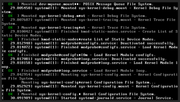
The VM is a wordpress Turnkey appliance that worked well in virtuabox. Tried various bios settings, nothing changes, it always hangs at this stage while booting. I am not a linux guy so a bit stucked, no ideea what to do to make it work, if it's a setting, a bug or what:
Re: [Help] fail to start VM imported from virtualbox
Regarding the issue you mentioned most recently, we are currently unable to speculate on the specific cause. We recommend that you visit the TerraMaster official website and schedule a remote inspection with an engineer via the Live Chat window.
(Please attach the URL of this forum post and your forum nickname.)
(Please attach the URL of this forum post and your forum nickname.)
To contact our team, please send email to following addresses, remember to replace (at) with @:
Technical team: support(at)terra-master.com (for technical support)
Service team: service(at)terra-master.com (for purchasing, return, replacement, RMA service)
Technical team: support(at)terra-master.com (for technical support)
Service team: service(at)terra-master.com (for purchasing, return, replacement, RMA service)