[Help] F4-210 NAS Will not add disk to volume

RAID, Volume, storage pool, hard drive, USB, SSD cache and iSCSI LUN
Post Reply
User avatar
seasonedgeek
Posts: 11
Joined: 05 Jun 2024, 02:17
United States of America

[Help] F4-210 NAS Will not add disk to volume

Post by seasonedgeek »

All,

Been quite a saga with this NAS. The WD RED 4TB drives had one failure and another one about to fail after only 3 years. Bit the bullet and took advantage of a sale Seagate official store had on 14TB drives. Bought four (4). First one installed had the high pitched whine of a stuck head. Configured RAID 5 with the three remaining disks.

Replacement drive from Seagate after waiting a few weeks also had high pitched whine of a stuck head. At least this time they didn't make me pay shipping, just wait another couple of weeks.

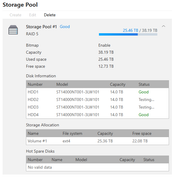
Stuck the finally good replacement drive in. Roughly three days later it was recognized and I added it to the storage pool

Image

Storage volume, however, refuses to let me change it.
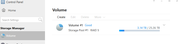

Image

I can edit, click MAX, and Confirm yet there is no indication the change took.
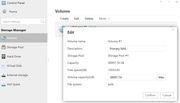
Image

I do hear the NAS doing a series of four bumps - pause four bumps but there is nothing indicating it is synchronizing, adding, whatever.

Am I going to have to, once again, unload this NAS and reconstruct from scratch?
User avatar
IrisLi
TM Support
Posts: 146
Joined: 07 Aug 2023, 18:10

Re: [Help] F4-210 NAS Will not add disk to volume

Post by IrisLi »

1. The possible cause is suspected to be that the current volume is occupied by certain services. Check the status of each hard drive in the storage pool and any background tasks. You can also try restarting the NAS before attempting the expansion again.

2. If the storage pool is fully functional, based on the symptoms you described, you can also refer to this post for a possible solution:
viewtopic.php?t=2342
To contact our team, please send email to following addresses, remember to replace (at) with @
Technical team: support(at)terra-master.com (for technical support)
Service team: service(at)terra-master.com (for purchasing, return, replacement, RMA service)
User avatar
seasonedgeek
Posts: 11
Joined: 05 Jun 2024, 02:17
United States of America

Re: [Help] F4-210 NAS Will not add disk to volume

Post by seasonedgeek »

IrisLi wrote: 11 Feb 2026, 12:15 1. The possible cause is suspected to be that the current volume is occupied by certain services. Check the status of each hard drive in the storage pool and any background tasks. You can also try restarting the NAS before attempting the expansion again.

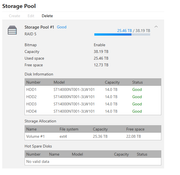
Keep in mind this drive was just stuck in.

Image

Image

Apparently that dialog tests all drives when you open it.

Image

I will try the Microsoft Solution to Everything; reboot; next.


2. If the storage pool is fully functional, based on the symptoms you described, you can also refer to this post for a possible solution:
viewtopic.php?t=2342
User avatar
seasonedgeek
Posts: 11
Joined: 05 Jun 2024, 02:17
United States of America

Re: [Help] F4-210 NAS Will not add disk to volume

Post by seasonedgeek »

Microsoft Solution to Everything did nothing. Trying next thing.
User avatar
seasonedgeek
Posts: 11
Joined: 05 Jun 2024, 02:17
United States of America

Re: [Help] F4-210 NAS Will not add disk to volume

Post by seasonedgeek »

So, the second "solution" caused me to nearly lose everything. I'm in the process of copying everything off that NAS yet again. Can someone post the link to the instructions where you SSH in and cd some place then download a compressed file you expand which resets the NAS to factory first boot?

RAID 5 does not appear to be a clean implementation. When I was one drive short the techs told me it would allow me to add the drive, expand the volume, and bring world peace. I think a new war started instead.

Need the clean reset instructions so I can bring this up "new" as RAID10. Just not willing to mess with the RAID5 implementation again.

Thanks in advance.
User avatar
TMnight
TM Support
Posts: 181
Joined: 30 Sep 2022, 16:40

Re: [Help] F4-210 NAS Will not add disk to volume

Post by TMnight »

From the screenshots you provided, the current array consists of four 14TB drives configured in RAID 5, and the storage pool status is normal. However, the volume has not been successfully expanded yet. We recommend that you first try restarting the NAS to check whether the volume capacity can be expanded properly. If the capacity still cannot be expanded after restarting, it may be due to an issue with the file system. In this case, please contact our official online support to schedule a remote inspection and repair with an engineer.
To contact our team, please send email to following addresses, remember to replace (at) with @:
Technical team: support(at)terra-master.com(for technical support)
Service team: service(at)terra-master.com(for purchasing, return, replacement, RMA service)
Post Reply

Return to “Storage”