Page 1 of 3

[Help] F8 SSD Plus - System freeze during initial setup, no 3 beeps on restart

Posted: 07 Feb 2026, 09:50
by T0f
Hello,

I need help with my new F8 SSD Plus that is experiencing critical issues during initial setup.

Hardware:
- Model: TerraMaster F8 SSD Plus
- SSDs: 2x Western Digital SN700 (brand new)

What happened:

1. ✅ First boot: OK
2. ✅ Followed browser assistant
3. ✅ System installation: OK
4. ✅ First restart: OK
5. ✅ Created super admin account and named the NAS
6. ⚠️ Warning appeared about needing to create a volume
7. ❌ System froze completely and stopped responding

Troubleshooting attempts:

After the freeze, I restarted the NAS:
- Only 1 beep at startup, never getting the normal 3 beeps
- Performed RESET procedure: got 3 beeps during reset, NAS restarted, but still no 3 beeps after
- Removed both SSDs: boots OK but displays "no SSD detected" message
- Tried with 1 SSD only: no 3 beeps
- Tried with 2 SSDs: no 3 beeps
- Attempted another RESET: no longer working

Current situation:

- NAS appears to boot without SSDs but cannot complete startup with SSDs installed
- Cannot access BIOS (no USB keyboard available)
- System seems stuck and unable to complete initialization
- I've already tried everything I could find online with no success

Questions:
1. Is this a hardware failure or a software issue?
2. How can I recover the system without BIOS access?
3. Should I try a different initialization method?

Any help would be greatly appreciated. Thank you!
Re: [Help] F8 SSD Plus - System freeze during initial setup, no 3 beeps on restart

Posted: 07 Feb 2026, 11:24
by OrionXie
T0f wrote: 07 Feb 2026, 09:50
Hello, Regarding your inquiry, here is the response:
1. There may be an issue with the built-in black bootable USB drive. You can verify this by following these steps:
After powering off the device and ensuring no NVMe drives are installed, observe the number of beep sounds within the first minute after a clean boot. If only a single beep is heard, it strongly indicates a problem with the built-in black USB drive. Please refer to this guide to reprogram the built-in black USB drive and attempt the process again.
viewtopic.php?t=6433

2. Resolving issue 1 should generally solve the problem.
3. If issue 1 is confirmed but the problem persists, we will explore alternative solutions.

Re: [Help] F8 SSD Plus - System freeze during initial setup, no 3 beeps on restart

Posted: 07 Feb 2026, 22:40
by crisisacting
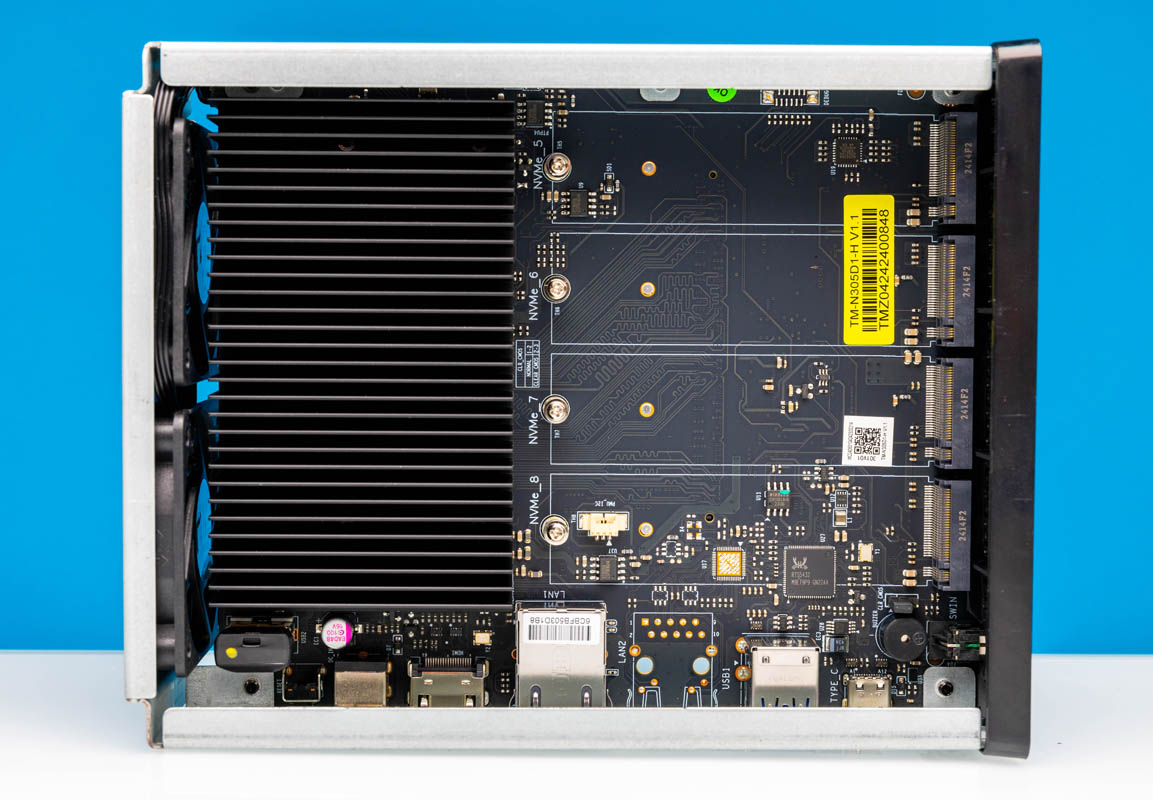
See if removing or reseating the USB drive in your unit (in the bottom left corner of this image with the yellow dot) & then starting up, helps at all, as that's the TerraMaster initboot drive:

Image

Re: [Help] F8 SSD Plus - System freeze during initial setup, no 3 beeps on restart

Posted: 08 Feb 2026, 05:31
by T0f
OrionXie wrote: 07 Feb 2026, 11:24
T0f wrote: 07 Feb 2026, 09:50
Hello, Regarding your inquiry, here is the response:
1. There may be an issue with the built-in black bootable USB drive. You can verify this by following these steps:
After powering off the device and ensuring no NVMe drives are installed, observe the number of beep sounds within the first minute after a clean boot. If only a single beep is heard, it strongly indicates a problem with the built-in black USB drive. Please refer to this guide to reprogram the built-in black USB drive and attempt the process again.
viewtopic.php?t=6433

2. Resolving issue 1 should generally solve the problem.
3. If issue 1 is confirmed but the problem persists, we will explore alternative solutions.
Thank you for your reply.
With no drives installed, I first hear a single beep, and shortly after, the three beeps. I can then access the web interface through my browser at http://tns.local, which confirms that no drives are detected. This indicates that the built-in USB drive is working properly, doesn't it?

Re: [Help] F8 SSD Plus - System freeze during initial setup, no 3 beeps on restart

Posted: 08 Feb 2026, 13:33
by Felix
Yes, the first beep indicates the hardware self-test has passed, and the following three beeps indicate that the USB boot system has been entered. This means the boot system is working correctly. You can try resetting it using the RESET button, or try completely formatting the hard drive before using it, or try initializing the system with a different hard drive.

Re: [Help] F8 SSD Plus - System freeze during initial setup, no 3 beeps on restart

Posted: 08 Feb 2026, 15:41
by T0f
Felix wrote: 08 Feb 2026, 13:33 Hello: Yes, the first beep indicates the hardware self-test has passed, and the following three beeps indicate that the USB boot system has been entered. This means the boot system is working correctly. You can try resetting it using the RESET button, or try completely formatting the hard drive before using it, or try initializing the system with a different hard drive.
Thank you for the suggestions.
Unfortunately, I only have these 2 SSDs and don't have access to a laptop or computer to reformat them beforehand.
During the first and only successful startup, I selected both SSDs to install the system on. The installation appeared to complete successfully, but the system froze when the warning about creating a volume appeared.
Since the RESET button is no longer responding and I cannot format the drives externally, what would you recommend as the next step? Is there a way to force a complete reinstallation or factory reset?

Re: [Help] F8 SSD Plus - System freeze during initial setup, no 3 beeps on restart

Posted: 08 Feb 2026, 15:53
by Felix
You can try following the instructions in this post to see if you can access the boot screen while the hard drive is still attached.
viewtopic.php?t=9523

Re: [Help] F8 SSD Plus - System freeze during initial setup, no 3 beeps on restart

Posted: 08 Feb 2026, 16:39
by T0f
First of all, thanks for your help.

I managed to find a screen and a USB keyboard, so I can now access the system directly.
Felix wrote: 08 Feb 2026, 15:53 You can try following the instructions in this post to see if you can access the boot screen while the hard drive is still attached.
viewtopic.php?t=9523
Additional important information:
When I follow the RESET procedure, I get stuck at the GRUB screen. If I press Enter to validate, I receive an "Invalid magic number" error.
However, in the BIOS, both SSDs are properly detected.

Since I cannot format the drives externally and the system seems stuck at GRUB with this error, what would be the best way to proceed?

Re: [Help] F8 SSD Plus - System freeze during initial setup, no 3 beeps on restart

Posted: 08 Feb 2026, 17:05
by Felix
The reason this stage is stuck is simply because the hard drive has bad sectors. I suggest you perform a hard drive status check. There is also a small possibility that it is a boot system problem. You can refer to the tutorial above to recreate a boot disk and try it. If the same thing happens, I suggest you buy an NVMe hard drive enclosure, connect the hard drive to the computer, and perform a health check. If there are any problems, replace it in time. If everything is normal, you can write some data to the disk header partition to destroy any superblocks that may exist at the beginning.

Re: [Help] F8 SSD Plus - System freeze during initial setup, no 3 beeps on restart

Posted: 08 Feb 2026, 18:05
by T0f
Is it possible that the F8 SSD Plus damaged both of my SSDs during that single startup? Both drives were brand new Western Digital SN700, which are officially supported by this NAS according to the compatibility list, and they both stopped working properly after the system froze during initial setup.
It seems unusual that two new, compatible SSDs would simultaneously develop bad sectors on their very first use. Could there be a hardware issue with the NAS itself?
Should I proceed with purchasing an NVMe enclosure to check the drives' health, or are there other steps you'd recommend first?