[Help] Lost IP address, cannot access
Posted: 05 Feb 2026, 22:27
I cannot access my F4-424 Pro after rebooting. This is a recurring problem. I want to avoid a system re-install this time.
PROBLEM:
My F4-424 Pro always loses its IP address allocation:
(1) when the F4-424 reboots (running TOS 5.X and TOS 6.X);
(2) and/or when my old router would reboot (Arris BGW210-700);
(3) and/or when my new router reboots (Arris BGW320-500);
For both the old router and the new router, I was/am connected directly to the router using two (2) LAN connections on a link aggregation. I was connected using one of the bond methods, likely "Self-adapting Load Balance" or "IEEE 802.3as Dynamic Link Aggregation" though I cannot remember for sure. Likely whichever was default?
On the new router, one of the connections is 2.5Gbs and one is 1Gbs (on the old router, both were 1Gbps). With both routers on multiple TOS versions, I could be connected successfully for months at a time before a reboot would cause this problem.
ATTEMPTS:
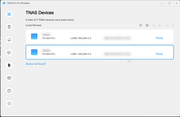
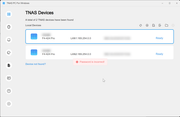
Regardless of TOS 5.X or 6.X, and regardless of "2 x 1Gbps" LAN or "1 x 2.5Gbps + 1 x 1Gbs" LAN configuration, the two LAN links to the F4-424 are visible as "169.254.0.0" in the TNAS PC application (5.2.506 and 5.2.510).
 .
.
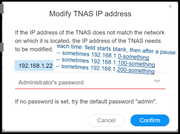
After clicking on either link, the TNAS PC application prompts me to "Modify TNAS IP address" by seemingly requesting a DHCP allocation from the router and then prompting for a password.
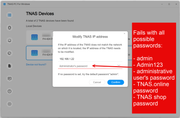
But I have tried every known possible password that is connected to this TNAS device: "admin", "Admin123", the administrative (and sole) user's password, the TerraMaster account that allows for TNAS.online remote access, even the password I used to purchase the device from the shop.terra-master.com site. None work; they all return "Password is incorrect!" in a red box.
I have tried every permutation of rebooting the TNAS device, rebooting the router, rebooting both in different sequences, disconnecting one of the LAN cables before rebooting, disconnecting both LAN cables before rebooting. I have tried different cables (but to reiterate, this link has been stable for months).
HELP:
(1) Is there another password to try modifying the IP address in the TNAS PC application?
(2) Why do my known passwords and the default password(s) fail when modifying IP address using the TNAS PC application?
(3) How can I access my TNAS directly — without networking — when this frustratingly frequent TNAS problem happens?
(4) How can I access my TNAS without doing a system re-install?
INFO:
(1) TNAS model = F4-424 Pro
(2)(a) TNAS OS = 5.X (can't remember exactly)
(2)(b) TNAS OS = 6.X (can't access; can't remember exactly)
(3)(a) Router model = Arris BGW210-700
(3)(b) Router model = Arris BGW320-500
(4)(a) Connection = "2 x 1Gbps" LAN
(4)(b) Connection = "1 x 2.5Gbps + 1 x 1Gbs" LAN
(5) Link aggregation = Likely either "Self-adapting Load Balance" or "IEEE 802.3as Dynamic Link Aggregation" (can't remember exactly; likely whichever was default)
(6)(a) TNAS PC version = 5.2.506
(6)(b) TNAS PC version = 5.2.510
(7) Yes, I've tried rebooting.
(8) Blood type = O-positive
Last time this happened, I ended up doing a system re-install. I really hope to avoid a system re-install again. Such an outcome would really sour my private and public opinion of Terra-Master.
PROBLEM:
My F4-424 Pro always loses its IP address allocation:
(1) when the F4-424 reboots (running TOS 5.X and TOS 6.X);
(2) and/or when my old router would reboot (Arris BGW210-700);
(3) and/or when my new router reboots (Arris BGW320-500);
For both the old router and the new router, I was/am connected directly to the router using two (2) LAN connections on a link aggregation. I was connected using one of the bond methods, likely "Self-adapting Load Balance" or "IEEE 802.3as Dynamic Link Aggregation" though I cannot remember for sure. Likely whichever was default?
On the new router, one of the connections is 2.5Gbs and one is 1Gbs (on the old router, both were 1Gbps). With both routers on multiple TOS versions, I could be connected successfully for months at a time before a reboot would cause this problem.
ATTEMPTS:
Regardless of TOS 5.X or 6.X, and regardless of "2 x 1Gbps" LAN or "1 x 2.5Gbps + 1 x 1Gbs" LAN configuration, the two LAN links to the F4-424 are visible as "169.254.0.0" in the TNAS PC application (5.2.506 and 5.2.510).
. After clicking on either link, the TNAS PC application prompts me to "Modify TNAS IP address" by seemingly requesting a DHCP allocation from the router and then prompting for a password.
But I have tried every known possible password that is connected to this TNAS device: "admin", "Admin123", the administrative (and sole) user's password, the TerraMaster account that allows for TNAS.online remote access, even the password I used to purchase the device from the shop.terra-master.com site. None work; they all return "Password is incorrect!" in a red box.
I have tried every permutation of rebooting the TNAS device, rebooting the router, rebooting both in different sequences, disconnecting one of the LAN cables before rebooting, disconnecting both LAN cables before rebooting. I have tried different cables (but to reiterate, this link has been stable for months).
HELP:
(1) Is there another password to try modifying the IP address in the TNAS PC application?
(2) Why do my known passwords and the default password(s) fail when modifying IP address using the TNAS PC application?
(3) How can I access my TNAS directly — without networking — when this frustratingly frequent TNAS problem happens?
(4) How can I access my TNAS without doing a system re-install?
INFO:
(1) TNAS model = F4-424 Pro
(2)(a) TNAS OS = 5.X (can't remember exactly)
(2)(b) TNAS OS = 6.X (can't access; can't remember exactly)
(3)(a) Router model = Arris BGW210-700
(3)(b) Router model = Arris BGW320-500
(4)(a) Connection = "2 x 1Gbps" LAN
(4)(b) Connection = "1 x 2.5Gbps + 1 x 1Gbs" LAN
(5) Link aggregation = Likely either "Self-adapting Load Balance" or "IEEE 802.3as Dynamic Link Aggregation" (can't remember exactly; likely whichever was default)
(6)(a) TNAS PC version = 5.2.506
(6)(b) TNAS PC version = 5.2.510
(7) Yes, I've tried rebooting.
(8) Blood type = O-positive
Last time this happened, I ended up doing a system re-install. I really hope to avoid a system re-install again. Such an outcome would really sour my private and public opinion of Terra-Master.